


5 Signs Your .NET Application Needs a Caching Layer
Technical articles and news about Memurai.
When Your .NET App Starts Showing Its Limits
Most .NET performance problems build up slowly, then suddenly become urgent. Response times that were fine with 100 users are no longer acceptable at 1,000. A SQL Server that managed the load last quarter is now slowing things down. An architecture that worked on one server starts to fail as soon as you add another.
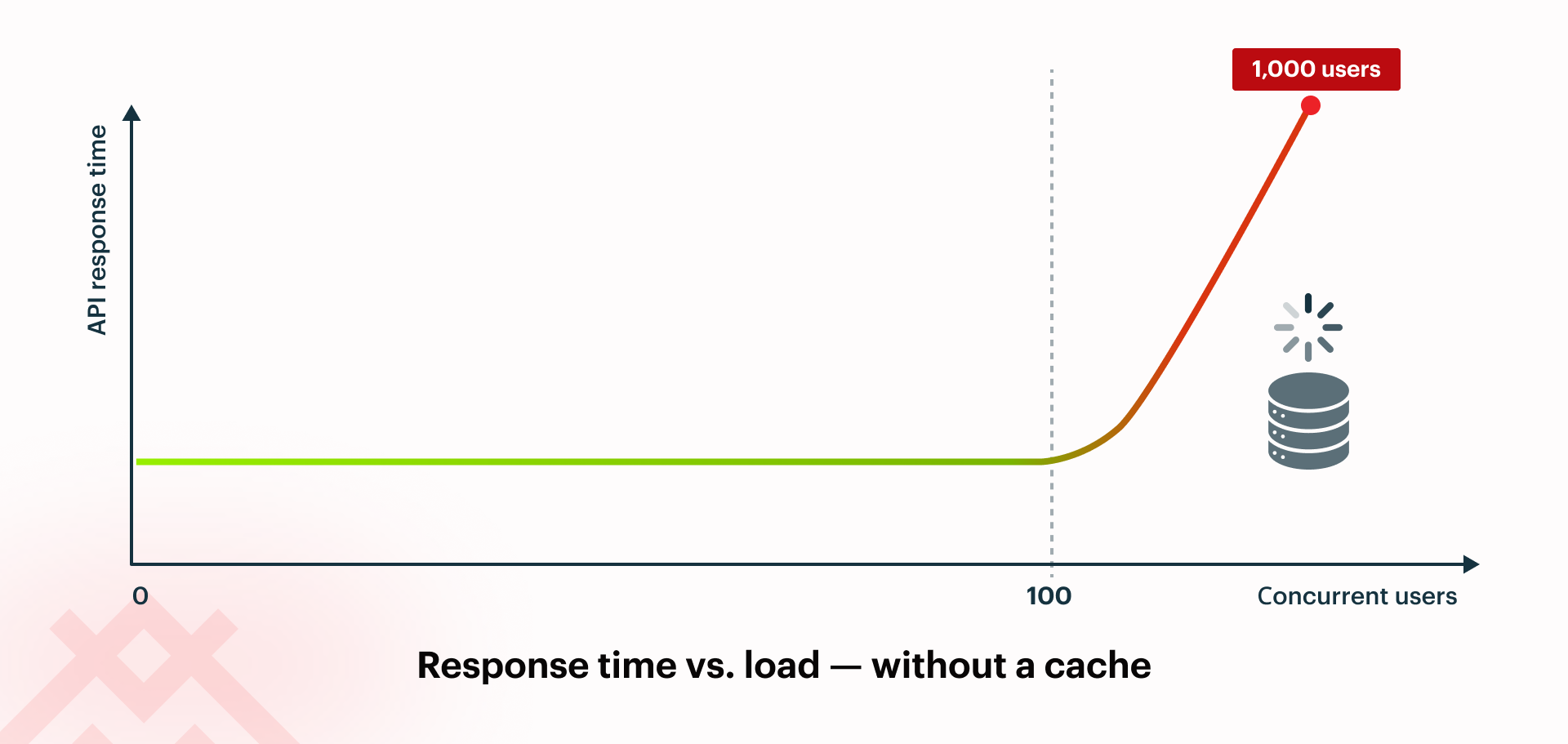
In many of these situations, adding a caching layer is the answer. A fast, shared cache handles repeated reads, letting your database focus on what really matters. Redis® is the standard choice for this, and .NET works well with it using IDistributedCache and the StackExchange.Redis client.
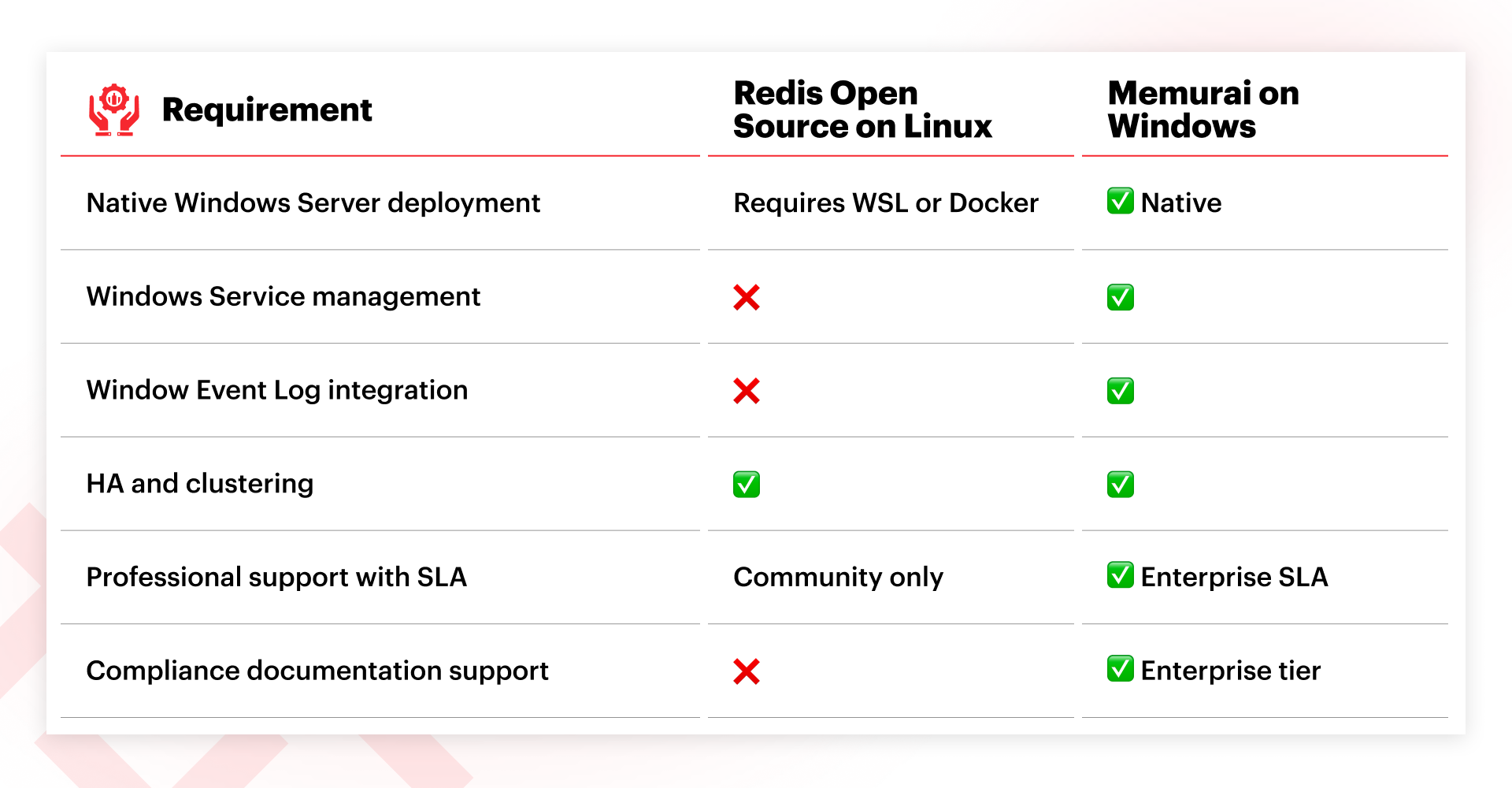
For teams using Windows Server, running Redis can be challenging because it is primarily developed and supported for Linux; on Windows you typically run it via WSL, Docker, or on a separate Linux VM. Some organizations are comfortable with this trade-off, while others, particularly those with Windows-only teams, strict governance, or on-premises setups subject to regulation, find the added complexity hard to justify for a basic infrastructure component. In these cases, Memurai offers a Windows-native, Redis-compatible option that fits into existing Windows operations without introducing a Linux layer.
Here are five signs that your .NET app could benefit from an improved caching setup.
Sign #1: API Response Times Degrade Under Load
This is a common problem: your app works well in testing and under low traffic, but response times degrade during busy periods. You might see HTTP timeouts, thread pool exhaustion, and simultaneous spikes in CPU and I/O on the database server. This often happens because the app keeps running the same expensive queries, such as product lookups, user profile reads, configuration data, and reference table queries. These results don't change between requests, but the database still fetches them every time.
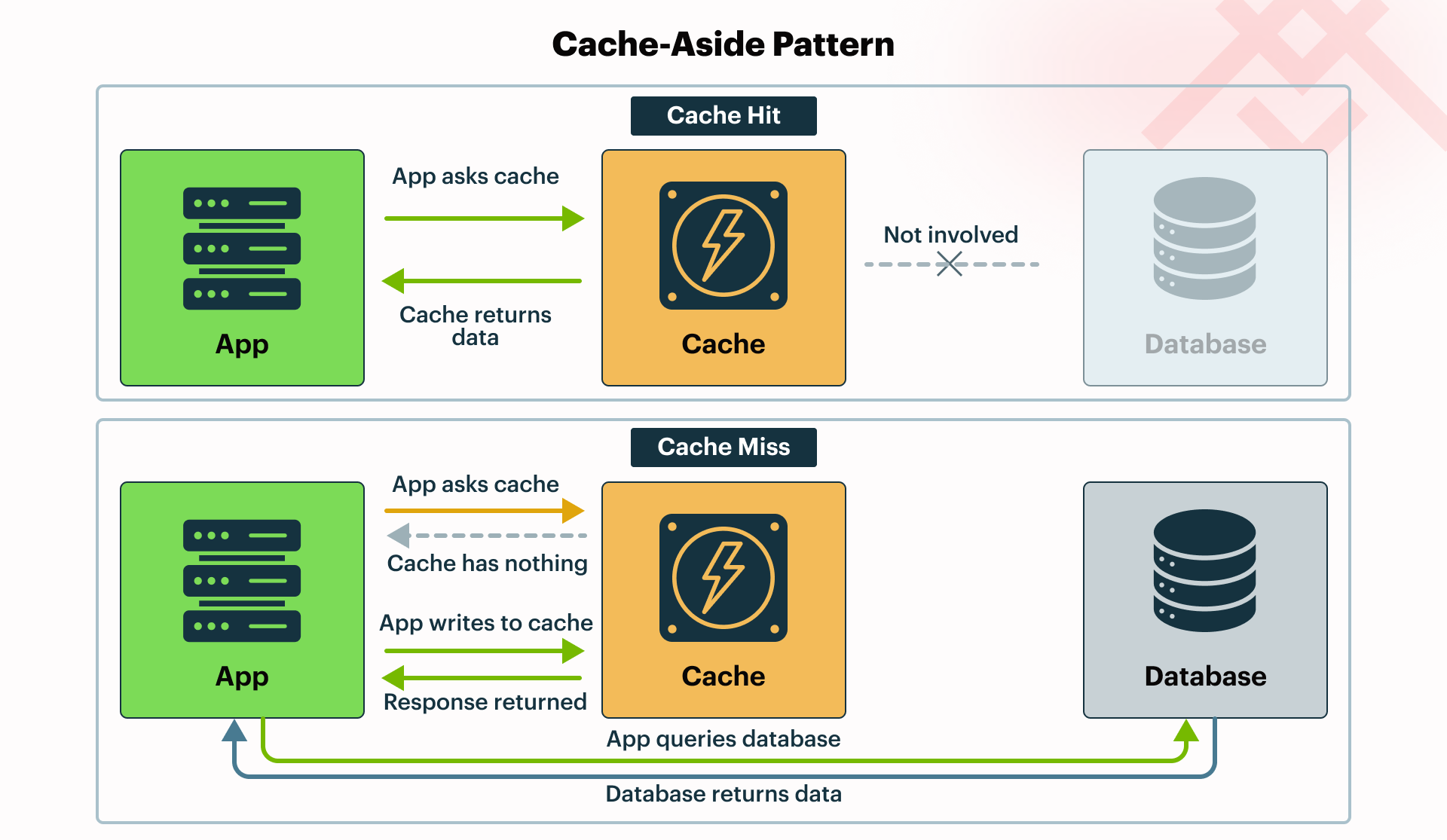
The answer is to use the cache-aside pattern: check a fast in-memory store first, only go to the database if the data isn't there, and then store the result in the cache for next time. In .NET, you can do this easily with IDistributedCache. You should set expirations (TTLs) and invalidation rules based on how often the underlying data changes to avoid serving stale results.
Sign #2: Your Database Costs Are Climbing Without a Matching Increase in Data
SQL Server license costs are rising, more cores are being added to handle read loads, and a DBA recommends a second instance for reporting queries. If these conversations are happening, but your actual data volume hasn't changed much, you're probably scaling hardware to make up for the lack of a cache.
Usually, a few hot queries cause most of the database load. By caching their results and setting TTLs based on how often the data changes, you can significantly reduce read load without changing your schema or application code.
Sign #3: Horizontal Scaling Is Broken by Shared State
IMemoryCache is an in-process cache that exists within a single application instance. When you add a second node behind a load balancer, each instance has its own separate cache. Session state or user data stored in memory on one instance can't be seen by the others.
Quick self-check: Does any of the following apply to your architecture?
- You rely on sticky sessions to maintain user sessions
- Each application instance maintains its own in-memory cache
- Cache state is lost after restarts or deployments
- Scaling out makes state management harder
If any of these sound familiar, your caching strategy may be holding your app back and could prevent you from achieving true horizontal scalability.
This causes users to be logged out when their requests are routed to a different instance. Load balancers are configured with sticky sessions to work around the issue, but you lose much of the resilience you wanted by running multiple instances.
Microsoft's documentation explains that IMemoryCache is an in-process cache and is not recommended for shared state in a multi-server setup; for that, it suggests using IDistributedCache with an external store. IMemoryCache still has its place for per-node, transient data that does not need to be shared across instances, such as small lookups or per-instance throttling. A shared cache addresses this: all instances use the same store, so session state, output caching, and user data stay consistent across your app.
Sign #4: You Are Still Running AppFabric or Home-Grown In-Memory Caching
Windows Server AppFabric Caching was a good solution when it first came out, but Microsoft stopped supporting it years ago. If your app still relies on it, you're taking on real risk: no security patches, no support for modern .NET, and it could block future upgrades.
The same goes for custom caching built on HttpRuntime.Cache or static dictionaries. These approaches tend to accumulate maintenance overhead over time, and that complexity only grows as your application evolves, especially when new scaling requirements emerge. Getting visibility into hit rates and evictions typically requires additional custom instrumentation, which is even more work to build and maintain as your app grows.
Migrating away from AppFabric does require code changes, since AppFabric predates IDistributedCache. However, your application logic stays the same. In modern ASP.NET Core applications, these legacy patterns can be replaced by plugging a Redis-backed implementation into IDistributedCache, such as Microsoft.Extensions.Caching.StackExchangeRedis, allowing you to move to a supported distributed cache without rewriting your application logic.
Sign #5: Most of Your Latency Comes From Read Queries
Many .NET applications spend most of their time reading data rather than modifying it. Endpoints often fetch product catalogs, configuration data, user profiles, or aggregated views that change infrequently but are requested constantly. Each request triggers the same database queries, joins, and transformations, even if the underlying data remains unchanged for minutes or hours.
A caching layer helps by storing these frequently requested results in memory. Instead of repeatedly executing the same queries, the application can retrieve the data directly from a cache such as Redis. The database continues to serve as the source of truth, while the cache handles most read traffic. In systems with a high read-to-write ratio, this can significantly reduce latency and also ease the pressure on the database.
What if cloud caching isn't an option for your team?
Redis Cloud® managed services work well for many organizations, but they aren't the best fit for everyone.
If your organization needs to keep data on-premises, works in a regulated industry, or has policies that require everything to run on Windows Server, cloud-managed services might not be an option. Running Redis Open Source® on a Linux VM solves the data residency issue but adds a Linux node to your Windows environment, bringing its own patching, monitoring, and support needs.
If this describes your situation, you need a caching solution that fits your infrastructure as-is, not one that forces a new operational model onto your team. Memurai addresses this directly: it runs natively on Windows Server, installs as a standard Windows Service, and integrates with the Windows Event Log. It also offers clustering, high availability, replication, and professional support with an SLA.
Getting Started with Memurai
If you notice any of these signs, start with a focused pilot instead of a full rollout. Choose two or three of your most expensive database queries, specifically the ones that show up often in your slow query log or Application Insights. Cache their results using the cache-aside pattern and measure the difference in API latency and database CPU before and after.
If you prefer a Linux-based deployment, you can use Redis with the standard IDistributedCache abstractions in .NET and the StackExchange.Redis client. If you are running Windows Server, Memurai provides a Redis‑compatible cache that integrates naturally with a Windows-based stack, so you can follow the same patterns without introducing a Linux layer.
Memurai is free for testing and development and connects via the standard StackExchange.Redis client. You can find documentation and migration guides for moving off AppFabric at memurai.com.
Get in touch with us today if you would like to speak to one of our experts. Have questions about caching options for your .NET stack? We've answered a few common questions below.
Redis® is a registered trademark of Redis Ltd. Any rights therein are reserved to Redis Ltd. Memurai is a separate product developed by Janea Systems and is compatible with the Redis® API, but is not a Redis Ltd. Product.