


Building a Real-Time Feature Store with Redis on Windows: Fraud Detection and Risk Scoring Without the Cloud
Technical articles and news about Memurai.
Introduction
In regulated industries, such as financial services and insurance, the data used for fraud detection and risk scoring must often remain on-premises inside existing Windows infrastructure. This constraint largely rules out cloud-based options for storing and serving features to a fraud or risk model, even though production systems still need those features quickly enough to support real-time decisions. SQL Server can remain the durable source of truth, but live fraud detection and risk scoring require a low-latency serving mechanism.
Redis® is the missing layer for serving the required features. Memurai makes that pattern practical on Windows by providing a Redis-compatible low-latency serving layer that runs natively alongside existing Windows infrastructure without requiring WSL, Docker, or cloud dependencies.
What a Feature Store Does and Why SQL Server Is Not Enough
A Redis-based feature store is not a replacement for SQL Server. In this pattern, SQL Server remains the source of truth, while Redis serves precomputed features quickly when the fraud/risk model needs them. That distinction matters.
For fraud detection, an inference service may need values such as recent transaction count, average transaction amount, account age, or prior claims activity. Those are not always raw columns from the operational database — they are often derived values produced by a feature-generation pipeline.
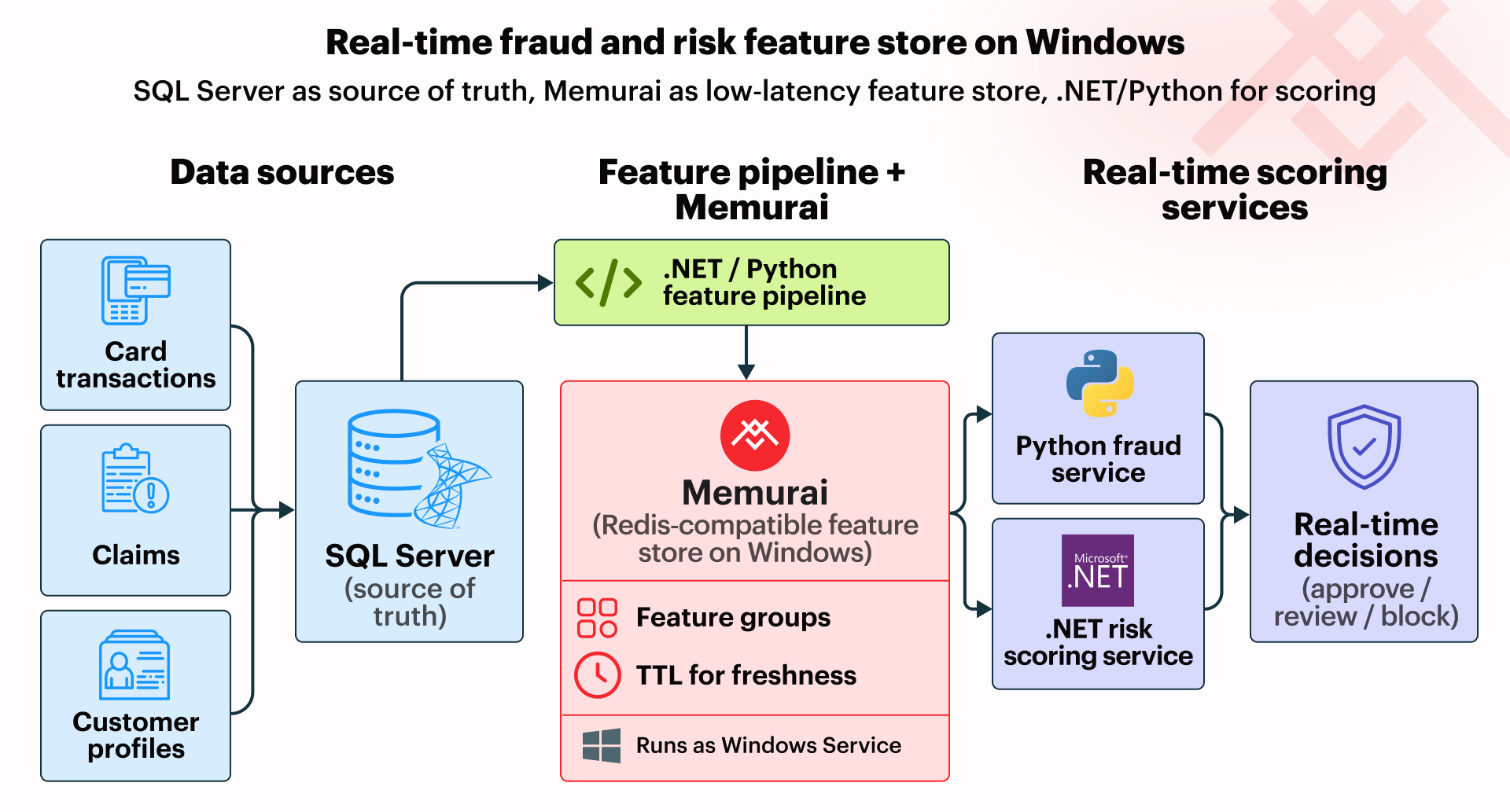
Querying SQL Server live for each scoring request can add unwanted latency, especially when multiple lookups or calculations are required. Redis Hashes are a natural fit for this low-latency feature serving layer because they let us store related feature values together and read them with low overhead.
Storing Features on Windows with Redis Hashes
A practical Windows pattern is to keep SQL Server as the durable system of record and use a batch pipeline to write model-ready feature groups to Redis. In this pattern, each customer can have more than one Hash key — such as one for transaction-history features and another for profile-related features. This keeps the design friendly to evolving freshness policies.
The following Python example shows the Redis side of a simplified batch process running locally against Memurai. In a production system, these values would typically come from a SQL Server pipeline or view, but here we use representative in-memory rows to keep the example self-contained.
import redis

# Connect to the local Memurai instance using the standard Redis client.
r = redis.Redis(host="127.0.0.1", port=6379, decode_responses=True)

# Representative input rows. In a production system, these values would
# typically come from a SQL Server pipeline or feature-generation process.
rows = [
    {
        "customer_id": 42,
        "txn_count_24h": 6,
        "avg_txn_amount_7d": 118.40,
        "chargebacks_30d": 1,
        "avg_claim_amount_365d": 0.0,
        "acct_tenure_months": 28
    },
    {
        "customer_id": 77,
        "txn_count_24h": 2,
        "avg_txn_amount_7d": 64.25,
        "chargebacks_30d": 0,
        "avg_claim_amount_365d": 245.50,
        "acct_tenure_months": 86
    }
]

# Write each customer's feature groups into separate Redis Hashes.
for row in rows:
    customer_id = row["customer_id"]
    transactions_key = f"features:{customer_id}:transactions"
    profile_key = f"features:{customer_id}:profile"

    # Store transaction-related features under one Hash key.
    r.hset(transactions_key, mapping={
        "txn_count_24h": row["txn_count_24h"],
        "avg_txn_amount_7d": row["avg_txn_amount_7d"],
        "chargebacks_30d": row["chargebacks_30d"]
    })

    # Store slower-changing profile features under a separate Hash key.
    r.hset(profile_key, mapping={
        "avg_claim_amount_365d": row["avg_claim_amount_365d"],
        "acct_tenure_months": row["acct_tenure_months"]
    })
This keeps the roles clear: SQL Server stores the durable source data, while Redis serves the precomputed features needed for low-latency fraud and risk decisions.
Feature Freshness with TTL
Not every feature group should expire on the same schedule. For example, transaction-history features may need aggressive refresh, while profile features may change far less often. This is where time to live (TTL) comes in.
Because expiration is applied at the key level, each feature group that needs its own freshness window should be stored under its own Redis key. With the grouped-key approach used earlier, transaction-history features can expire sooner than profile features without forcing everything for a customer to age out together.
transactions_key = "features:42:transactions"
profile_key = "features:42:profile"

# Shorter freshness window for recent transaction behavior
r.expire(transactions_key, 300)    # 5 minutes

# Longer freshness window for slower-changing profile data
r.expire(profile_key, 86400)       # 24 hours
In production, these TTL settings are typically applied as part of the same refresh workflow that repopulates the feature-group keys.
Connecting to a .NET or Python ML Pipeline
Once the required feature groups are available in Redis, real-time fraud detection and risk scoring become more straightforward. When a new transaction or claim needs to be evaluated, a Python service can read the relevant feature groups from Redis, combine them into the input expected by the fraud/risk model, and calculate a result without querying SQL Server for each request.
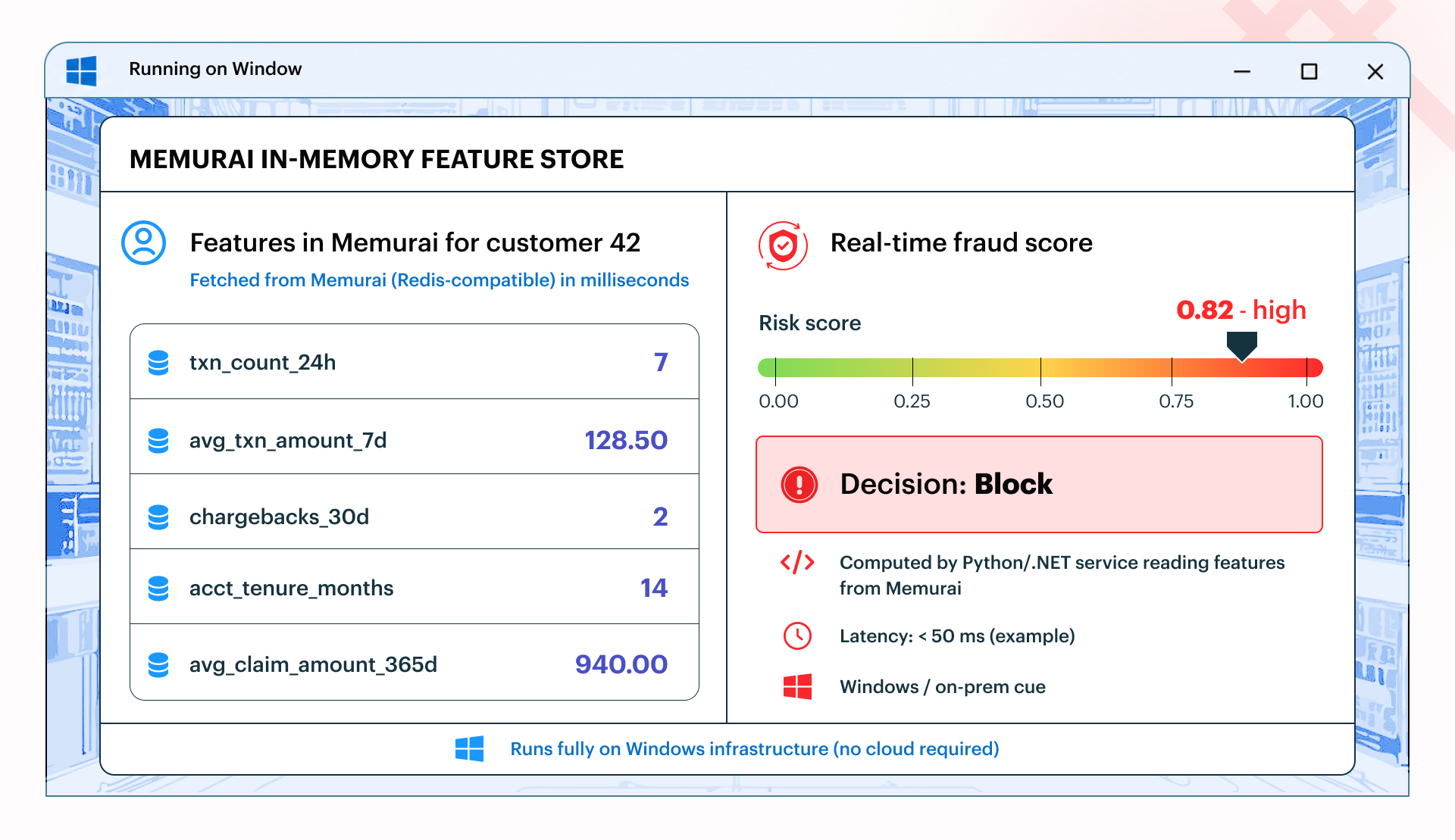
This is a conceptual example of a possible fraud-scoring dashboard built on Memurai, not an actual product UI.
For this example, we use a simplified scikit-learn-style inference flow. The goal is not to define the fraud/risk model itself, but to show how feature groups read from Redis can be assembled into the kind of input a Python pipeline could use at inference time.
Though the example below uses Python for clarity, the same pattern applies to .NET: read the required feature groups from Redis at inference time, shape them into the expected input, and hand them off to the fraud/risk code.
import redis

# Connect to the local Memurai instance using the standard Redis client.
r = redis.Redis(host="127.0.0.1", port=6379, decode_responses=True)

customer_id = 42    # for demo purposes

# Inference-time read: fetch the feature groups needed for this customer.
transactions = r.hgetall(f"features:{customer_id}:transactions")
profile = r.hgetall(f"features:{customer_id}:profile")

# Arrange the retrieved values into one row of fraud/risk model input.
# This is an example of the kind of feature-vector shape a fitted
# scikit-learn pipeline could consume at inference time.
feature_vector = [[
    float(transactions.get("txn_count_24h", 0)),
    float(transactions.get("avg_txn_amount_7d", 0.0)),
    float(transactions.get("chargebacks_30d", 0)),
    float(profile.get("acct_tenure_months", 0)),
    float(profile.get("avg_claim_amount_365d", 0.0)),
]]

# At this point, the feature_vector is ready to be passed to the
# fitted scikit-learn pipeline or model used for fraud or risk scoring.
print(feature_vector)
The key point is that Redis now sits directly in the inference pipeline, serving the features needed for low-latency fraud and risk decisions on Windows infrastructure.
In production, that inference path also depends on TTL settings and refresh cadence being aligned so the required feature groups are still available when scoring occurs.
Why This Works on Windows Without the Cloud
This pattern fits Windows environments well. Memurai runs as a native Windows Service alongside SQL Server, .NET applications, and the scheduled jobs or services that refresh features. This keeps the data inside the existing perimeter and aligns with the operational constraints many teams in regulated settings already navigate, including environments built around Active Directory and standard Windows administration.
Conclusion
A real-time feature store does not have to depend on the cloud. With SQL Server as the source of truth and Redis as the fast-serving layer, Windows teams can support low-latency fraud detection and risk scoring on infrastructure they already control.
Getting Started with Memurai
Memurai is free for development and testing, making it straightforward to build and validate the code and concepts in this article on a local or staging machine. The free developer version has three restrictions that are important to be aware of before you scale up: a maximum uptime of 10 days before an automatic shutdown, a maximum of 10 unique connected IP addresses, and a RAM cap of 50% of available system memory.
If you're ready to move beyond the free developer version, register on the Memurai portal for a free 90-day Enterprise trial and run everything in this article without the listed restrictions.
Redis® is a registered trademark of Redis Ltd. Any rights therein are reserved to Redis Ltd. Memurai is a separate product developed by Janea Systems and is compatible with the Redis® API, but is not a Redis Ltd. product.