


Building a Redis Pub/Sub Message Bus on Windows with Memurai
Technical articles and news about Memurai.
Building a Redis Pub/Sub Message Bus on Windows with Memurai
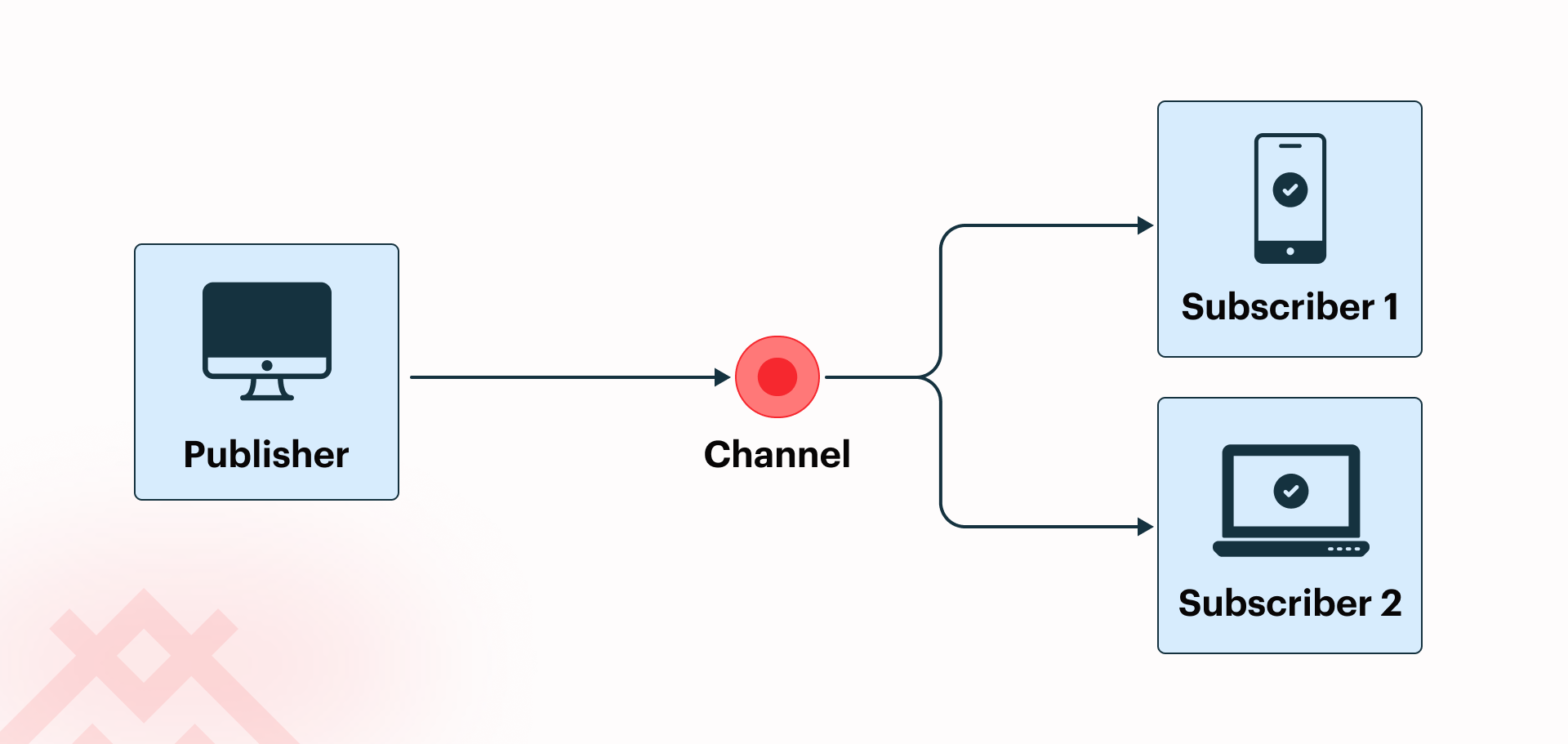
Redis Pub/Sub® is one of the simpler messaging primitives you can reach for: publishers write to a named channel, subscribers listen on it, and neither side knows anything about the other. It's fire-and-forget by design, with no persistence, no acknowledgment, and no routing configuration.
If a subscriber is offline when a message is published, that message is lost. That trade-off is what makes it fast and operationally simple, and it's the right tool when you need real-time fan-out without the overhead of a full broker.
This article walks through building a working pub/sub message bus in C# using Memurai, a Redis-compatible in-memory datastore that installs as a native Windows Service.
By the end, you'll have two microservice-style processes communicating through a clean, namespace-driven channel hierarchy, with production-ready configuration covering output buffers, ACLs, and network binding.
Why Pub/Sub Is a Natural Fit for a Message Bus
The pub/sub contract is deliberately simple: publishers send messages to a named channel, subscribers listen on that channel, and neither side needs to know anything about the other's business logic or identity. A publisher doesn't care what a subscriber does with a message. A subscriber doesn't care where a message came from. That decoupling is the feature, not a bug. It's what makes the pattern composable. You can add or remove subscribers without touching the publisher.
This decoupling is exactly what a message bus requires. When services communicate through a shared bus rather than direct calls, you can add a new consumer, such as an audit logger or a metrics collector, without touching the publisher at all. You can take a subscriber offline for a deploy without the publisher caring. The system grows at the edges, not the center.
Compare this to a point-to-point task queue, where a single producer sends work to a single consumer. Redis Pub/Sub flips the model: one event fans out to many consumers simultaneously. When an order is created, the event fires, and your notification service, your inventory service, and your analytics pipeline all receive it in a single publish call.
Memurai supports the Redis 7.4 pub/sub API, so StackExchange.Redis, the standard .NET client, works with it without modification. There's no adapter layer, no proprietary SDK to learn.
Prerequisites and Installation
Memurai requires a 64-bit version of Windows 10 or Windows Server 2012, at a minimum. Windows 10 and later versions of Windows Server are recommended for optimal performance.
Note for teams evaluating older environments: Memurai's download page lists Windows 7 64-bit as the minimum, while the FAQ states Windows 10. Confirm your specific runtime support requirements directly with Memurai before deploying to environments running older versions of Windows, such as Windows 10 or Windows Server 2012.
For the code examples, you'll also need the StackExchange.Redis NuGet package:
dotnet add package StackExchange.Redis
The GUI installer is the simplest path. Download it from memurai.com, run the wizard, and Memurai registers itself as a Windows Service on port 6379, optionally opens a firewall rule, and auto-starts with Windows.
Silent install via msiexec is the right choice for CI/CD pipelines and team provisioning. The basic silent install uses sensible defaults (port 6379, service registration enabled, and a firewall rule added):
msiexec /quiet /i Memurai.msi
The MSI supports additional properties for teams with more specific needs. The most useful combinations are listed below:
# Install to a custom path, on a non-default port, with a matching firewall exception `msiexec /quiet /i Memurai.msi INSTALLFOLDER= "C:\\Memurai" PORT=6380 ADD_FIREWALL_RULE=1`

<br/>\# Suppress service installation - useful on build agents where manual startup is preferred
*msiexec /quiet /i Memurai.msi INSTALL_SERVICE=0*
The full set of supported MSI properties is listed in the Memurai documentation.
CI/CD note: Starting with Memurai version 4.2, a valid license file is required at startup. The MSI installer includes a development and testing license. For production or automated provisioning, an Enterprise license needs to be applied. See the Memurai licensing documentation for instructions on deploying it alongside the binary.
winget works well for individual developer machines:
winget install Memurai.MemuraiDeveloper
Once installed, verify everything is working:
memurai-cli.exe PING
You should see PONG. No Docker daemon to start, no WSL distribution to mount, just a Windows Service responding on localhost.
Core Redis Pub/Sub Concepts with Memurai
Channels
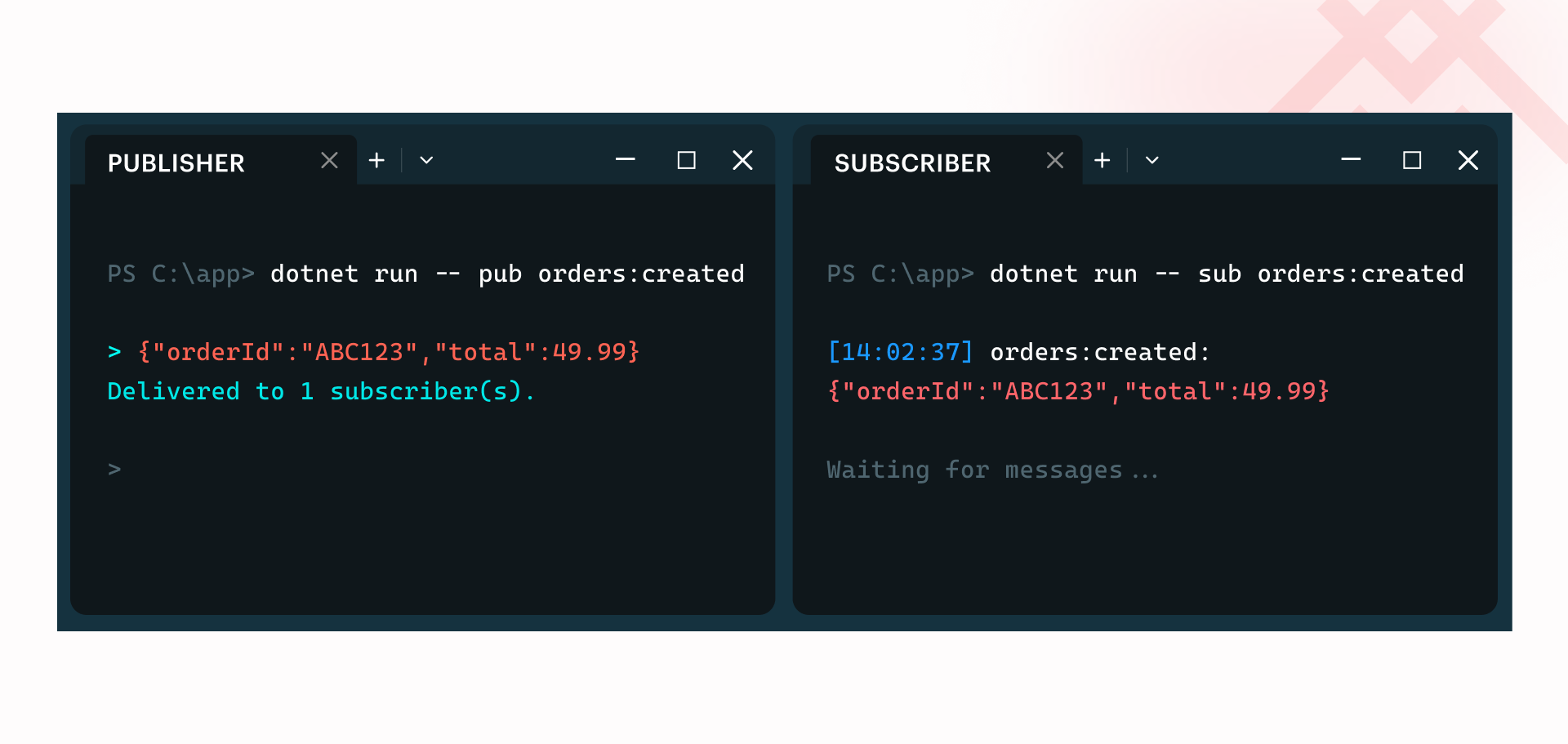
Channels are named routing keys, strings like orders:created or inventory:product:restocked. You don't pre-create or register them anywhere. A channel comes into existence the moment the first subscriber connects to it, and it disappears when the last subscriber disconnects.
SUBSCRIBE and PUBLISH
Open two memurai-cli.exe terminals side by side to see Redis Pub/Sub working in its raw form:
# Terminal 1 - subscriber
SUBSCRIBE orders:created
<br/>\# Terminal 2 - publisher
PUBLISH orders:created "{\\"orderId\\":\\"ABC123\\",\\"total\\":49.99}
The moment you run PUBLISH in Terminal 2, Terminal 1 prints the message. The subscriber receives a three-part reply: the message type (message), the channel name, and the payload.
Note: Once a client issues `SUBSCRIBE` in Terminal 1, that connection enters subscriber mode and can only issue `SUBSCRIBE`, `UNSUBSCRIBE`, `PSUBSCRIBE`, `PUNSUBSCRIBE`, `PING`, `RESET`, and `QUIT`. It cannot issue other commands, including `PUBLISH`. That's why you need a second terminal for publishing. StackExchange.Redis handles this transparently via its internal multiplexing, so application code isn't affected, but it's a common point of confusion when experimenting in the CLI.
PSUBSCRIBE: Pattern Subscriptions
PSUBSCRIBE is where Redis Pub/Sub graduates from a simple notification tool to a proper message bus primitive. It lets subscribers match channels using glob-style patterns:
PSUBSCRIBE orders:\
That single subscription receives messages for orders:created, orders:updated, orders:canceled, and any other channel that matches the pattern. This is invaluable for cross-cutting concerns such as audit logging, metrics collection, and alerting, where services need everything within a domain without being coupled to individual event types.
Designing Your Channel Namespace
Good channel naming is the structural backbone of a maintainable message bus. The recommended convention is domain:entity:event, or just entity:event for simple scenarios that don't work with multiple domains.
orders:createdorders:shippedinventory:product:restockedauth:user:loginauth:user:password_reset
This structure pays dividends in two directions. Services that care about a specific event use a precise SUBSCRIBE orders:created. Services that care about an entire domain use PSUBSCRIBE orders:\. A compliance service that needs everything uses PSUBSCRIBE \.
Anti-patterns to avoid:
- A single events or bus channel where all services publish, which recreates a monolith in message form
- Flat names like order or created, which collide the moment a second team starts using the bus
- Embedding dynamic IDs in channel names (e.g.,
orders:ABC123:created) uses the payload for entity identifiers, not the channel name
Trying It Out in C#
We'll prepare a .NET application to test it out.
The StackExchange.Redis API
StackExchange.Redis is the standard .NET client for Redis. For pub/sub, it exposes four relevant methods on the ISubscriber interface:
| Method | Purpose |
|---|---|
Publish / PublishAsync | Send a message to a channel |
Subscribe / SubscribeAsync | Subscribe to a channel or pattern |
Publish returns the number of subscribers that received the message. This is useful for diagnostics — for example, to warn when a message was sent to a channel nobody is listening to — but in most cases you won't act on it.
When subscribing, StackExchange.Redis distinguishes between exact channels and glob patterns through RedisChannel.Literal(...) and RedisChannel.Pattern(...). This matters because they map to different Redis commands under the hood: SUBSCRIBE and PSUBSCRIBE respectively. Using the wrong one will either not match what you expect, or silently behave differently than intended.
We'll use the async variants throughout.
Publishing Messages
RunPublisher connects to a single channel and enters an interactive loop. Each line typed is published, and Redis reports how many subscribers received it. An empty line exits.
static async Task RunPublisher(ISubscriber sub, string channel)
{
    Console.WriteLine($"Publishing to '{channel}'");
    Console.WriteLine("Type messages and press Enter (empty line to exit)");

    while (true)
    {
        Console.Write("> ");
        string? message = Console.ReadLine();

        if (string.IsNullOrEmpty(message))
            break;

        long receivers = await sub.PublishAsync(RedisChannel.Literal(channel), message);
        Console.WriteLine($"Delivered to {receivers} subscriber(s).");
    }
}
Subscribing to Channels
RunSubscriber subscribes to one or more exact channel names. The callback fires on a background thread whenever a message arrives, so we keep the program alive with Task.Delay(Timeout.Infinite).
static async Task RunSubscriber(ISubscriber sub, string[] channels)
{
    foreach (var channel in channels)
    {
        Console.WriteLine($"Subscribing to channel: '{channel}'");

        await sub.SubscribeAsync(RedisChannel.Literal(channel), (ch, msg) =>
        {
            Console.WriteLine($"[{DateTime.Now:HH:mm:ss}] {ch}: {msg}");
        });
    }

    await Task.Delay(Timeout.Infinite);
}
Subscribing by Pattern
RunPatternSubscriber works the same way, but uses RedisChannel.Pattern(...) to match channel names by glob — for example, shop:order:* will receive messages published to shop:order:created, shop:order:cancelled, and so on.
static async Task RunPatternSubscriber(ISubscriber sub, string[] patterns)
{
    foreach (var pattern in patterns)
    {
        Console.WriteLine($"Subscribing to pattern: '{pattern}'");

        await sub.SubscribeAsync(RedisChannel.Pattern(pattern), (ch, msg) =>
        {
            Console.WriteLine($"[{DateTime.Now:HH:mm:ss}] {ch}: {msg}");
        });
    }

    await Task.Delay(Timeout.Infinite);
}
Running It Yourself
Prerequisites: a running Redis instance or a Redis-compatible application such as Memurai.
Project setup:
dotnet new console -n PubSubDemo
cd PubSubDemo
dotnet add package StackExchange.Redis
Full Program.cs:
using StackExchange.Redis;

string connection = Environment.GetEnvironmentVariable("REDIS_URL") ?? "localhost:6379";

if (args.Length == 0)
{
    PrintUsage();
    return;
}

string mode = args[0];
var channels = args[1..];

using var redis = ConnectionMultiplexer.Connect(connection);
var sub = redis.GetSubscriber();

switch (mode)
{
    case "pub":
        if (channels.Length != 1)
        {
            Console.WriteLine("Publisher mode requires exactly one channel.");
            PrintUsage();
            return;
        }
        await RunPublisher(sub, channels[0]);
        break;

    case "sub":
        if (channels.Length == 0)
        {
            Console.WriteLine("Subscriber mode requires at least one channel.");
            PrintUsage();
            return;
        }
        await RunSubscriber(sub, channels);
        break;

    case "psub":
        if (channels.Length == 0)
        {
            Console.WriteLine("Pattern subscriber mode requires at least one pattern.");
            PrintUsage();
            return;
        }
        await RunPatternSubscriber(sub, channels);
        break;

    default:
        Console.WriteLine($"Unknown mode: {mode}");
        PrintUsage();
        break;
}

// paste RunPublisher here
// paste RunSubscriber here
// paste RunPatternSubscriber here

static void PrintUsage()
{
    Console.WriteLine("Usage:");
    Console.WriteLine("  pub <channel>");
    Console.WriteLine("  sub <channel> [channel...]");
    Console.WriteLine("  psub <pattern> [pattern...]");
    Console.WriteLine();
    Console.WriteLine("Set REDIS_URL env variable to override the default connection (localhost:6379).");
}
Try it out by opening two terminals. In the first, start a subscriber:
dotnet run -- sub shop:order:created
In the second, publish a message:
dotnet run -- pub shop:order:created
Type a message and press Enter — it will appear instantly in the subscriber terminal. To test pattern subscriptions, start a pattern subscriber instead:
dotnet run -- psub shop:*
This will receive messages from any channel matching shop:*, regardless of which specific channel they were published to.
To connect to a non-default Redis instance, set REDIS_URL before running:
# Bash
export REDIS_URL="myhost:6379"

# PowerShell
$env:REDIS_URL = "myhost:6379"
Handling Pub/Sub Limitations Gracefully
Redis Pub/Sub is intentionally not persistent. If a subscriber is offline when a message is published, that message is gone. This isn't a bug; it's a deliberate trade-off that keeps the system fast and memory-efficient.
For non-critical events such as UI refresh notifications, real-time metrics, and live dashboard updates, pure pub/sub is the appropriate tool. These events are only valuable in the moment.
For critical events where you cannot afford to lose a message, the right approach is to layer a durable log on top of Redis Streams alongside your pub/sub bus. Pub/sub handles real-time fan-out; Streams provides the persistent replay log.
Slow consumers are the most common operational headache. If a .NET subscriber's callback is slow, it may be waiting for an HTTP call or a database write; messages queue up in Memurai's output buffer. When the buffer limit is exceeded, Memurai disconnects the client. Tune this in memurai.conf:
\# Disconnect pub/sub clients whose output buffer exceeds 32MB,
\# or 8MB sustained over 60 seconds
client-output-buffer-limit pubsub 32mb 8mb 60
In .NET, the safest pattern for slow handlers is to hand off to the StackExchange.Redis callback immediately into a System.Threading.Channels.Channel<T>, then process in a separate BackgroundService. This keeps the subscription callback fast and non-blocking, and the processing pipeline fully decoupled.
There is no message acknowledgment in pub/sub. Error handling, retries, and idempotency are entirely the application's responsibility.
Running the Bus in Production on Windows
Because Memurai installs as a native Windows Service, it auto-starts on boot, recovers from crashes via the Service Recovery settings in services.msc, and runs without a logged-in user session.
Key memurai.conf Settings for Pub/Sub Workloads
The most important configuration for a pub/sub workload is the client output buffer limit. Memurai, like Redis, maintains a per-client output buffer for each connected subscriber. When a publisher produces messages faster than a subscriber can consume them, the buffer grows. If it reaches the configured limit, Memurai closes the connection.
There are two limits at play:
- The hard limit closes the connection immediately upon reaching it
- The soft limit closes the connection if the buffer remains above a threshold for a sustained periodPub/Sub clients have a default hard limit of 32MB and a soft limit of 8MB sustained over 60 seconds. These defaults are reasonable, but if your subscriber is doing slow work in its callback (database writes, HTTP calls, heavy deserialization), you may need to tune them or, better, address the slow consumer itself by offloading work to a background queue rather than raising the buffer ceiling.
\# Hard limit 32MB; soft limit 8MB sustained for 60 seconds

client-output-buffer-limit pubsub 32mb 8mb 60
\# Protect against slow subscribers
client-output-buffer-limit pubsub 32mb 8mb 60
To check the current output buffer usage of connected subscribers at runtime:
CLIENT LIST
Look for the omem field on any connection with the S flag (subscriber). A consistently growing om omem value is the earliest signal that a subscriber is falling behind. Catching it there is considerably easier than diagnosing a sudden disconnection under load.
If Memurai is serving double duty as both a message bus and a cache on the same instance, set maxmemory-policy to allkeys-lru rather than noeviction to avoid write errors when memory fills up. For a dedicated message bus with no key storage, noeviction is the safer default.
Network Binding
By default, Memurai binds to the loopback interface (127.0.0.1) and only accepts local connections. If your publishers and subscribers run on different hosts, update the bind directive in memurai.conf to include the host's network interface IP, for example:
bind 127.0.0.1 192.168.1.100
Also, add a Windows Firewall exception for whichever port Memurai is running on. The MSI installer can do this automatically if selected during setup, or you can add the rule manually through wf.msc.
One less obvious setting to check is protected-mode. When enabled, Memurai will refuse remote connections unless a password is configured. If you're seeing connection refusals from remote hosts even after updating bind, this is usually the cause. The fix is either to set a password via requirepass in memurai.conf (recommended for any networked instance), or to explicitly disable protected mode:
protected-mode no
In a microservices topology where services are distributed across machines, getting both bind and protected-mode right early saves a lot of time chasing connection errors that don't obviously point back to either setting.
Securing Channels with ACLs
Memurai supports Redis ACLs, letting you restrict which service accounts can publish or subscribe to specific channel patterns. For pure pub/sub service accounts that never read or write keys directly, use resetkeys rather than ~\* to enforce least privilege:
+ping and +hello are required by StackExchange.Redis for connection management
Order service: publish-only on orders:\* channels, no key access ACL SETUSER order-service on >strongpassword resetkeys &orders:\* +publish +ping +hello
Notification service: subscribe-only on orders:\* channels, no key access ACL SETUSER notification-service on >strongpassword resetkeys &orders:\* +subscribe +psubscribe +ping +hello
Without +ping and +hello, the internal connection health checks that StackExchange.Redis performs will be rejected. The resulting errors appear to be authentication failures, making them particularly difficult to diagnose without knowing the root cause.
In your StackExchange.Redis connection, pass per-service credentials at startup:
var config = new ConfigurationOptions
{
EndPoints = { "localhost:6379" },
User = "order-service",
Password = "strongpassword"
};
var connection = await ConnectionMultiplexer.ConnectAsync(config);
Monitoring Active Subscriptions
INFO clients # connected_clients count and buffer stats CLIENT LIST # each connection with flags (S = subscriber) PUBSUB CHANNELS # all active channels with at least one subscriber PUBSUB NUMSUB orders:created # subscriber count for a specific channel
In development, MONITOR is useful for verifying traffic, but treat it with caution even then: it can cut throughput by 50% or more under load, and it exposes every command passing through Memurai, including passwords and message payloads, to the monitoring client. Never use it in production or on any instance handling sensitive data.
When Pub/Sub Alone Isn't Enough
Redis Pub/Sub covers a wide range of real-time messaging needs. Still, if you find yourself needing message replay after a subscriber restart, strict ordering guarantees, or consumer groups where multiple workers share a subscription load, Redis Streams is the natural next step and a topic that deserves its own article. For now, it's worth knowing the escape hatch exists without needing to reach for it yet.
Taking Memurai to Production
Memurai is free for development and testing, making it easy to build and validate everything in this article on a local or staging machine. The free version has three restrictions worth knowing before you scale up: a maximum uptime of 10 days before an automatic shutdown, a limit of 10 unique connected IP addresses, and a RAM cap of 50% of the available system memory.
That last point is worth keeping in mind when tuning maxmemory in your config, since on a machine with 4GB of RAM, the memory cap and your configured limit may interact in ways that aren't immediately obvious. For production deployments, an enterprise license removes all these restrictions.
If you're ready to take the next step, register on the Memurai portal for a free 90-day Enterprise trial and run everything in this article without restrictions.
Further Reading
- Using Redis for Chat and Messaging for readers interested in user-facing real-time messaging
- Reactive Architecture on Windows with Memurai for the broader microservices picture
- Redis and Memurai ACLs: A Practical Security Guide for teams hardening their setup before going to production
Redis® is a registered trademark of Redis Ltd. Any rights therein are reserved to Redis Ltd. Memurai is a separate product developed by Janea Systems and is compatible with the Redis® API, but is not a Redis Ltd. product.