


Designing a Production-Ready Memurai Deployment: From Single Node to High Availability
Technical articles and news about Memurai.
In this article, we start with a single Memurai node and gradually scale up to a recommended production configuration that provides high availability and data security. We discuss all intermediate states and explain the trade-offs at each step.
As a reminder:
Memurai is a Redis®-compatible Windows-native in-memory data store.
- The 'primary node' is the central node in the deployment, responsible for handling write operations and replicating data to the replicas.
- 'Replica' is a separate instance that synchronizes its data set with the primary node. It doesn't handle write operations itself, but it can serve read operations. You can always promote the replica to primary.
- 'Sentinel' is an additional process that monitors the primary node and replicas and can perform automatic failover if the master becomes unavailable.
- The concepts and deployment patterns described in this article are not specific to Memurai and equally apply to Redis® and other in-memory databases.
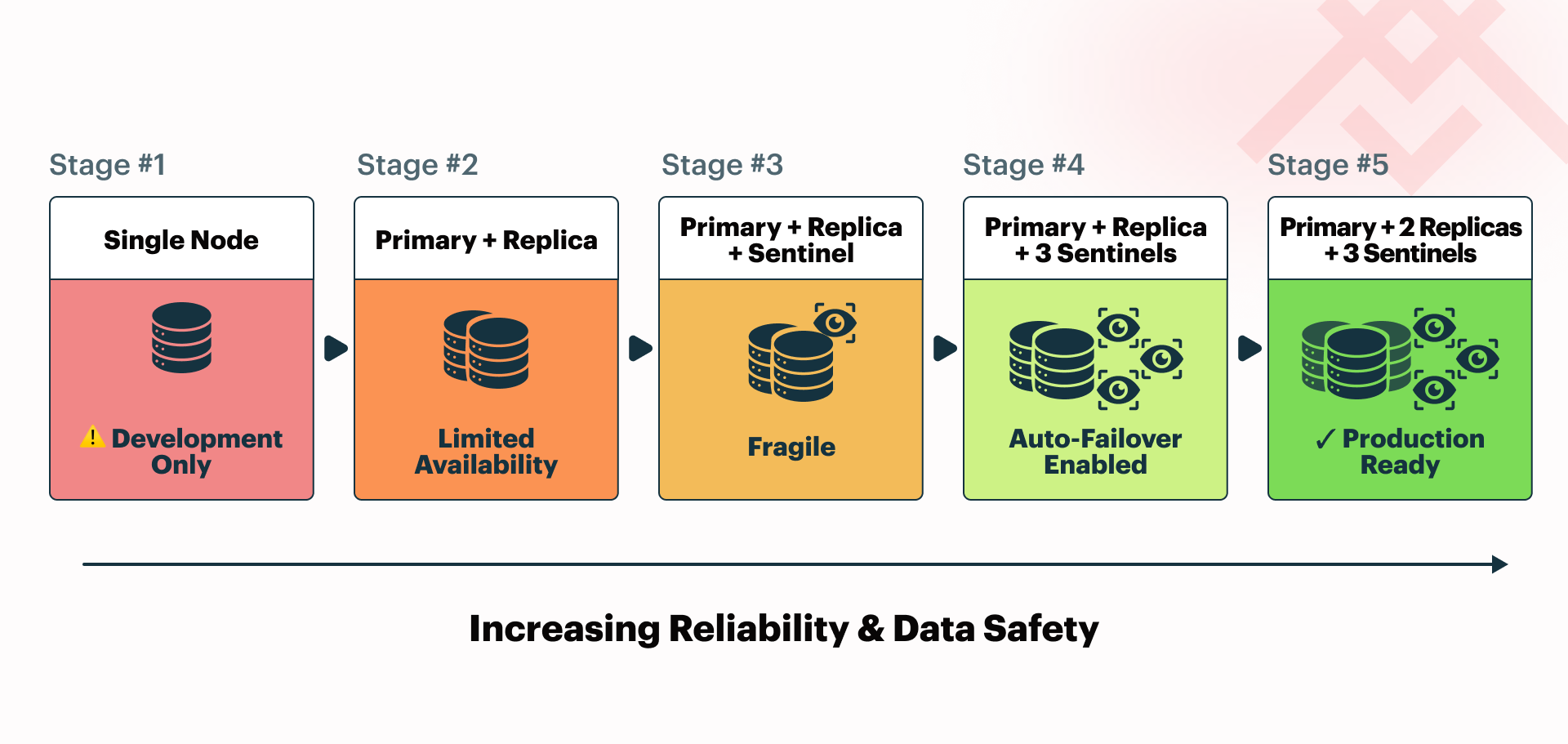
Single-node deployment
The most straightforward Memurai setup involves just one node, making it a good starting point for development and testing. However, it has limitations in data durability and high availability.
If the service process stops unexpectedly, for example, due to a crash or planned restart, the application will be unavailable until it is brought back online. In most cases, you can restore data from RDB snapshots for point-in-time recovery, or the AOF file captures changes more continuously with finer-grained durability. However, some recent updates may be lost depending on the actual persistence configuration.
A more serious risk arises from hardware failure, such as disk corruption or complete server loss. In that scenario, you may permanently lose all local data unless you have external backups. For this reason, a single-node setup is generally unsuitable for most production environments. It may still be acceptable in cases where you can rebuild the dataset from another source or where reliable off-site backups (such as exported RDB files enable rapid recovery.
Primary-replica deployment
The next step is to add a replica to the deployment. This additional Memurai process synchronizes its dataset with the primary node and can serve read operations. It improves both data security and high availability, but only to a limited extent.
Let's examine what occurs when the primary node fails. Properly configured client libraries may automatically switch to read from the replica. However, the application will still be unavailable for write operations because the replica cannot handle them and will not promote itself to primary. It is possible to promote it manually, but this requires constant system monitoring, which Sentinels are designed to handle. You would end up with a single running Memurai instance that can host only data from the last synchronization with the primary node, until you restore the primary node or manually promote the replica.
Note that a replica cannot promote itself to a primary node on its own. Allowing such behavior would be very risky, as even a network hiccup could cause replicas to promote themselves, resulting in multiple primaries and data inconsistency once the connection is restored. Such a split-brain scenario would cause conflicting writes and significant integrity issues. This illustrates why we need an additional mechanism to enable automatic failover.
Adding a Sentinel
The next step is to add a Sentinel to monitor the network and perform automatic failover if the primary node becomes unavailable. One Sentinel is a crucial step toward high availability, as the application can continue to operate even if the primary node fails. The Sentinel will promote the replica to primary, and the application will keep running with minimal downtime. Once you restore the original primary node, it will be added back as a replica.
To improve this process, you can configure client libraries to receive updates on the deployment topology from Sentinels. Enabling auto-discovery features in these libraries ensures smooth integration. Configuring client libraries to listen for changes in the deployment topology automates switching to the new primary node, reduces manual intervention, and enhances system resilience.
The remaining issue is that a single Sentinel instance is responsible for deciding whether to promote a replica to primary. Two problems come from this setup. First, if the Sentinel fails, automatic failover cannot happen. Second, any temporary disruption in the connection between the Sentinel and the primary might trigger a failover, which is often undesirable. Therefore, it is recommended to use at least three Sentinel instances in a production environment. Before proceeding, let's examine what occurs if we add just one more Sentinel.
Two Sentinels
Surprisingly, having only two Sentinels makes deployment less reliable. An important Sentinel-related setting is quorum, which determines how many Sentinels need to agree to trigger a failover. With two Sentinels, it only makes sense to set it to either 1 or 2.
It might seem that with a quorum of 1, the deployment can perform automatic failover even if one of the Sentinels fails. It would mean any Sentinel could promote a replica to primary independently of the others. Both Sentinels might select different replicas, or one might promote a replica while the other does not, resulting in a split-brain scenario. Having two concurrent primaries would be disastrous for data consistency.
Setting the quorum to 2 means both Sentinels must agree to perform a failover. If either Sentinel fails, the deployment cannot execute automatic failover, which is the same limitation as having only one Sentinel. However, with two Sentinels instead of one, there are now two possible points of failure, increasing the risk. In this setup, we do not gain reliability; we lose it, as the deployment becomes more complex and error-prone.
Therefore, having two Sentinels is not recommended. Running an even number of Sentinels is generally discouraged because having one fewer Sentinel can improve system reliability. It is best to use an odd number, with quorum set to where (𝑛+1)/2 is the number of Sentinels, so the smallest possible majority.
Three Sentinels
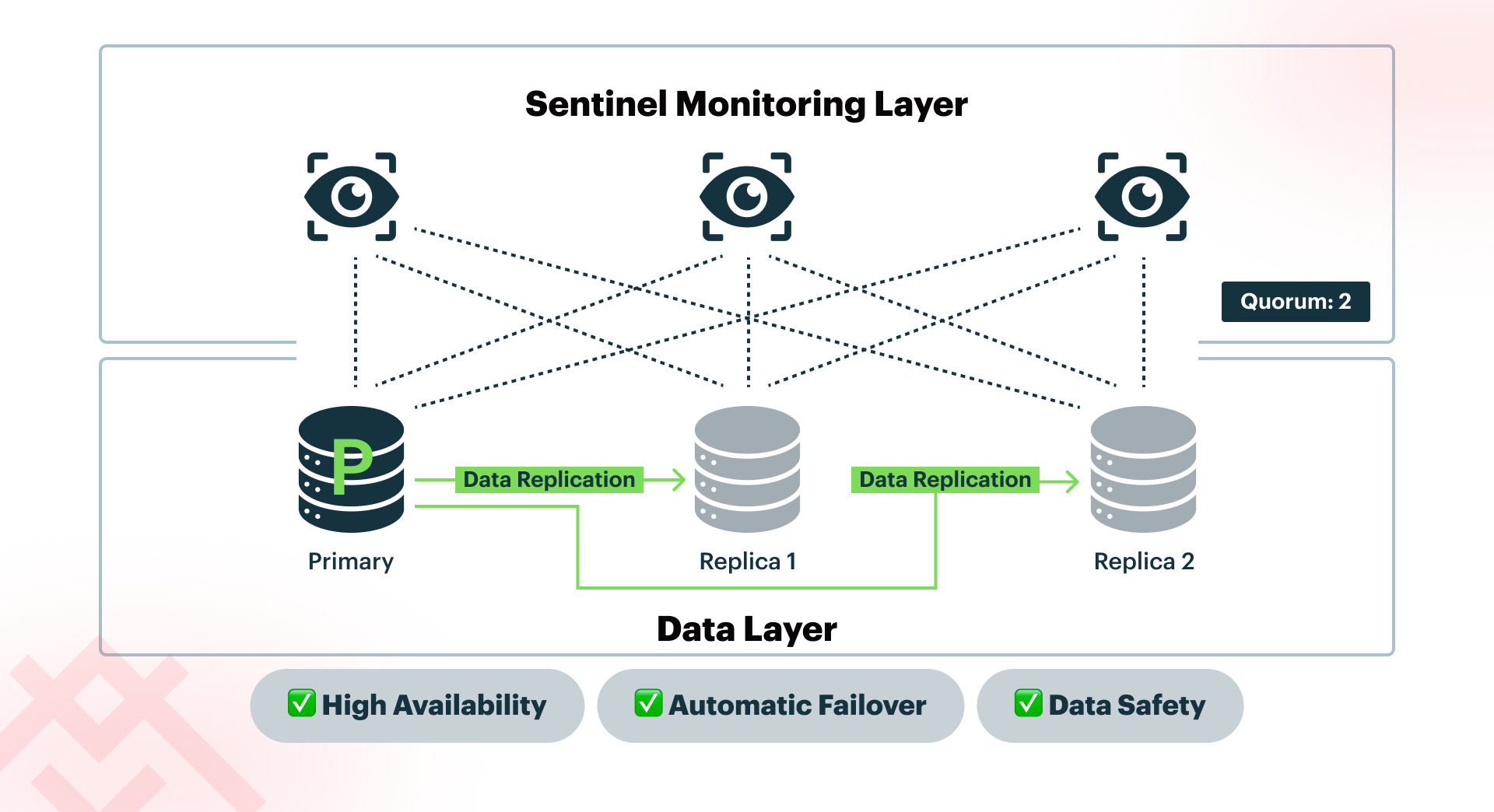
By adding just one Sentinel, we can set the quorum to 2, which strikes a good balance. No single Sentinel can promote a replica to primary, so deployment is safe from split-brain scenarios. If any Sentinel fails, the others can continue to perform automatic failover. Three Sentinels are the minimum recommended setup for a production environment. Sentinels are lightweight processes that can typically run alongside Memurai nodes on the same machine without sacrificing performance. This means you can run this configuration on just three servers: one hosting the primary and a Sentinel, one hosting the first replica and a Sentinel, and one hosting the second replica and a Sentinel. Since we're already using three servers, we might add a second replica to improve data safety further.
Adding a second replica
By adding a second replica, we arrive at the recommended production setup for high availability and improved data safety: one primary node, two replicas, and three Sentinel instances distributed across three separate machines.
In this setup, the system can withstand the failure of any single server without service disruption. If the primary fails, Sentinel manages the promotion of a replica. If a replica fails, the system continues to operate with redundancy still active. If a Sentinel node fails, quorum remains intact, and failover is still achievable. No individual machine becomes a single point of failure.
While this setup provides strong protection against individual server outages, it does not eliminate all risks. Catastrophic events such as a data center outage, a power failure affecting all machines, or widespread corruption can still result in data loss. For this reason, production deployments should also include regular off-site backups (for example, exported RDB snapshots) to ensure recovery even in the event of a complete environment failure.
Going further
The deployment we have arrived at is a good starting point for most production environments, but it is not the end of the road.
There are additional steps to improve it further, but they are more case-specific and depend on the application requirements and the bottlenecks it encounters. For example, read-heavy applications might benefit from adding more replicas and spreading the load between them. If write operations are the bottleneck, it might be worth considering sharding the data and running Memurai in a cluster configuration. Cluster mode enables linear scaling of both read and write operations across multiple nodes, offering enhanced performance and fault tolerance.
Architects should consider migrating to Memurai cluster mode when future scaling requires a more advanced method for distributing data and load. However, we can discuss this topic another time.
Checklist to Optimize Your Memurai Deployment
Here is a simple checklist to help decide the next steps in optimizing your Memurai deployment:
- Determine whether your application is read-heavy or write-heavy:
- If read-heavy, consider adding more replicas to distribute the load and enhance performance.
- If write-heavy, consider sharding data across multiple nodes to distribute writes and prevent bottlenecks.
- Consider the following factors before proceeding:
- How frequently does your data change?
- What is the acceptable latency for read and write operations in your environment?
Start Building in Windows with Memurai Today.
Ready to build a production-ready Memurai deployment? Download Memurai (free for development and testing) and follow our deployment guides to set up high availability with Sentinel monitoring.
Whether you're scaling read operations with replicas or planning cluster mode for write-intensive workloads, our documentation and support teams can help you design an exemplary architecture for your Windows environment.
Redis® is a registered trademark of Redis Ltd. Any rights therein are reserved to Redis Ltd. Memurai is a separate product developed by Janea Systems and is compatible with the Redis® API, but is not a Redis Ltd. product.