


RediSearch on Windows: What It Is and Why .NET Developers Should Care
Technical articles and news about Memurai.
Introduction
Redis-compatible cache is straightforward to use when an application already knows the keys it needs. An order service can fetch order:1001, a profile service can fetch customer:42, and an ASP.NET Core application can fetch session data by its session key. That access pattern is fast, direct, and simple.
Key-based access becomes limiting when the application needs to find records by field values: find open orders over $500, search product descriptions for a phrase, or list customers in a specific region. Without a search index, an application has to maintain its own lookup structures or move the search workload into another system. To that end, an earlier Memurai article explains how to model hash attributes with secondary indexes by maintaining supporting data structures manually.
RediSearch, on the other hand, provides a more direct path by adding secondary indexing and full-text search over data stored in Memurai. Memurai is a Redis-compatible in-memory data store built natively for Windows, from Janea Systems, the official Redis® partner for Windows.
For .NET teams using Windows or Windows Server, RediSearch in Memurai makes it possible to add indexed search without introducing a separate Linux virtual machine, WSL environment, Docker container, or separate search platform such as Elasticsearch.
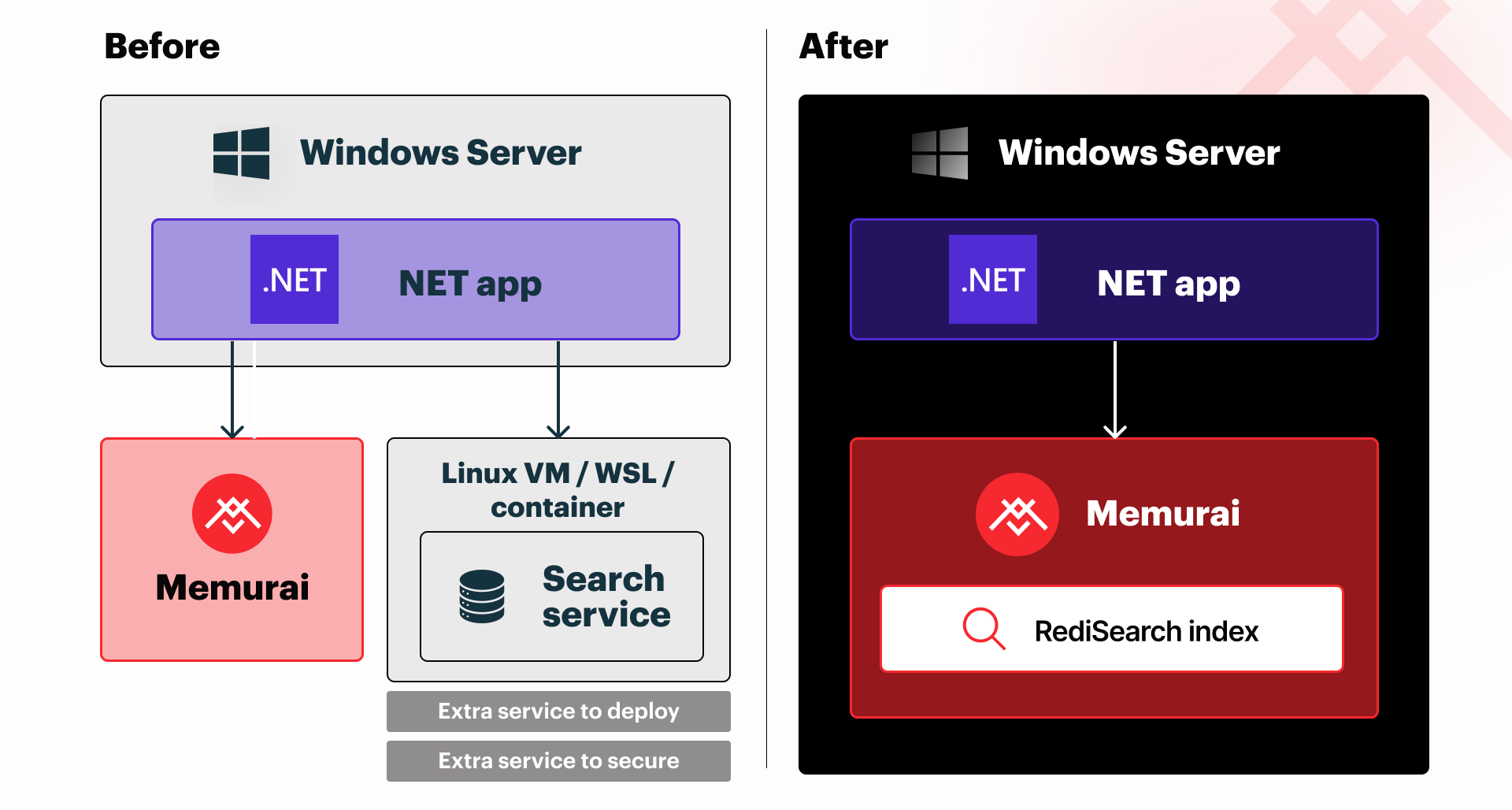
This article explains what RediSearch adds to a Redis-compatible data store, introduces three common field types, shows how to create and use queries and indexes, demonstrates RediSearch from .NET, and explains when a dedicated search engine may still be worth evaluating.
What does RediSearch actually do?
RediSearch adds a queryable index over data stored in Memurai, so an application can find records by field values instead of only retrieving records by key. It supports secondary indexing and full-text search over selected fields in Redis-compatible hashes or JSON documents.
A standard Redis lookup starts with a known key, such as order:1001, and returns the value stored at that key, but such a lookup does not answer questions about fields across many records. This is where RediSearch enters the picture.
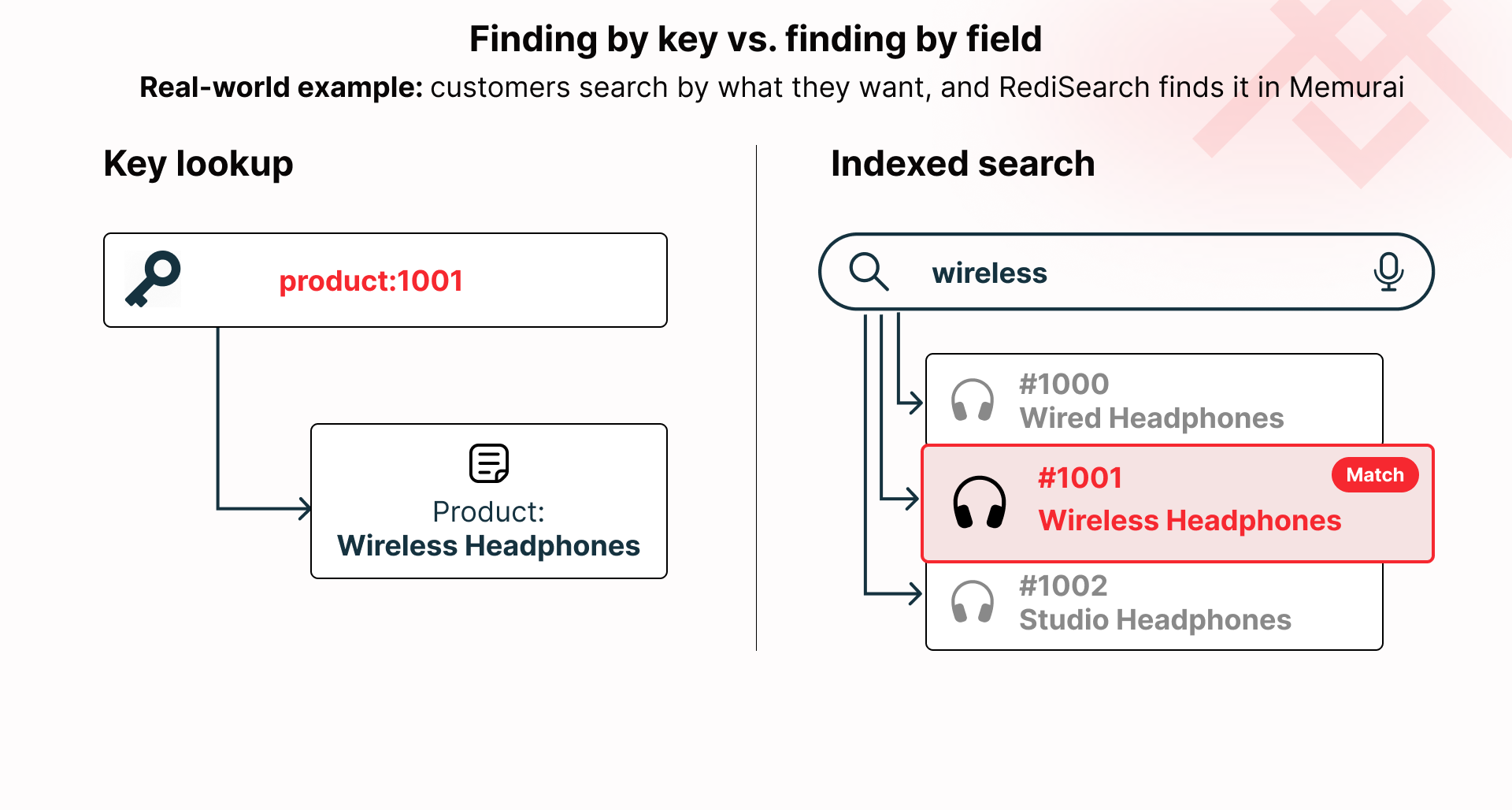
A RediSearch index starts with a schema. The schema identifies which fields should be searchable and how RediSearch should treat each field. For example, an order index might include a text description, an exact status value, and a numeric order total.
The indexed data still lives in Memurai as Redis-compatible data and RediSearch does not require a second search server for the basic pattern shown in this article. The index gives Memurai a secondary access path: not only “what value is stored at this key,” but also “which records match this query.”
Choosing TEXT, TAG, and NUMERIC fields
The first RediSearch field types to understand are TEXT, TAG, and NUMERIC. These field types cover many practical application queries: word-based search, exact category filtering, and numeric range filtering.
| Field type | Use it for | Example fields |
|---|---|---|
TEXT | Word-based search over natural-language or phrase-like content. A TEXT field is the right starting point when the value contains searchable language rather than a discrete category or exact filter value. | Product descriptions, support ticket text, order notes, and article titles are typical text fields. |
TAG | Exact matching over categories or identifiers. A TAG field is the right choice when the value represents a discrete category, label, or identifier that should be matched exactly. | Status values such as open or closed, regions such as west, and role names such as admin are typically well-suited as tags. |
NUMERIC | Range queries over numbers. A NUMERIC field is the right choice when the value is numeric and queries need to test values above, below, or between specific bounds. | Order totals, prices, quantities, timestamps, and scores are common numeric fields. |
Creating a RediSearch index
From Command Prompt, the following FT.CREATE command creates an index named idx:orders over order records stored as Redis-compatible hashes, where order: is the prefix of each key. The schema indexes description as TEXT, status as TAG, and total as NUMERIC. In Command Prompt, the ^ character is used for line continuation. Alternatively, the entire command can be entered as one line if preferred.
memurai-cli.exe FT.CREATE idx:orders ON HASH PREFIX 1 order: ^
SCHEMA description TEXT ^
status TAG ^
total NUMERIC
The expected response is:
OK
The index name idx:orders identifies the index used by subsequent searches. The ON HASH option tells RediSearch to index hash data. The PREFIX 1 order: option limits the index to matching keys, and the schema defines the searchable fields.
Existing matching records are indexed by the command, and new matching records are indexed as they are written.
Searching a RediSearch index by text
The HSET command writes the sample order hash, and the FT.SEARCH command searches the idx:orders index for matching text.
memurai-cli.exe HSET order:1001 ^
description "wireless mouse order for business customer" ^
status open ^
total 725
HSET also returns the number of fields added to the hash.
(integer) 3
Now that the sample order record has been added to Memurai, the FT.SEARCH command can locate it by searching for the term wireless.
memurai-cli.exe FT.SEARCH idx:orders "wireless"
The FT.SEARCH command then returns the total number of matches, followed by each matching key and its stored fields.
1) (integer) 1
2) "order:1001"
3) 1) "description"
   2) "wireless mouse order for business customer"
   3) "status"
   4) "open"
   5) "total"
   6) "725"
Without needing to know the order:1001 key beforehand, the text query finds order:1001 because the description field is part of the idx:orders schema.
In RediSearch terminology, each indexed record is returned as a document. In this hash-based example, the document ID is the Redis key, such as order:1001.
Filtering RediSearch results by tag and numeric range
A RediSearch query can combine a text term with structured filters. In the following example, the first query searches by text only. The second query keeps the text term and adds a TAG filter on status with the expression @status:{open}. The expression @total:[500 +inf] filters the NUMERIC field named total to values greater than or equal to 500.
memurai-cli.exe FT.SEARCH idx:orders "wireless"

memurai-cli.exe FT.SEARCH idx:orders "wireless @status:{open} @total:[500 +inf]"
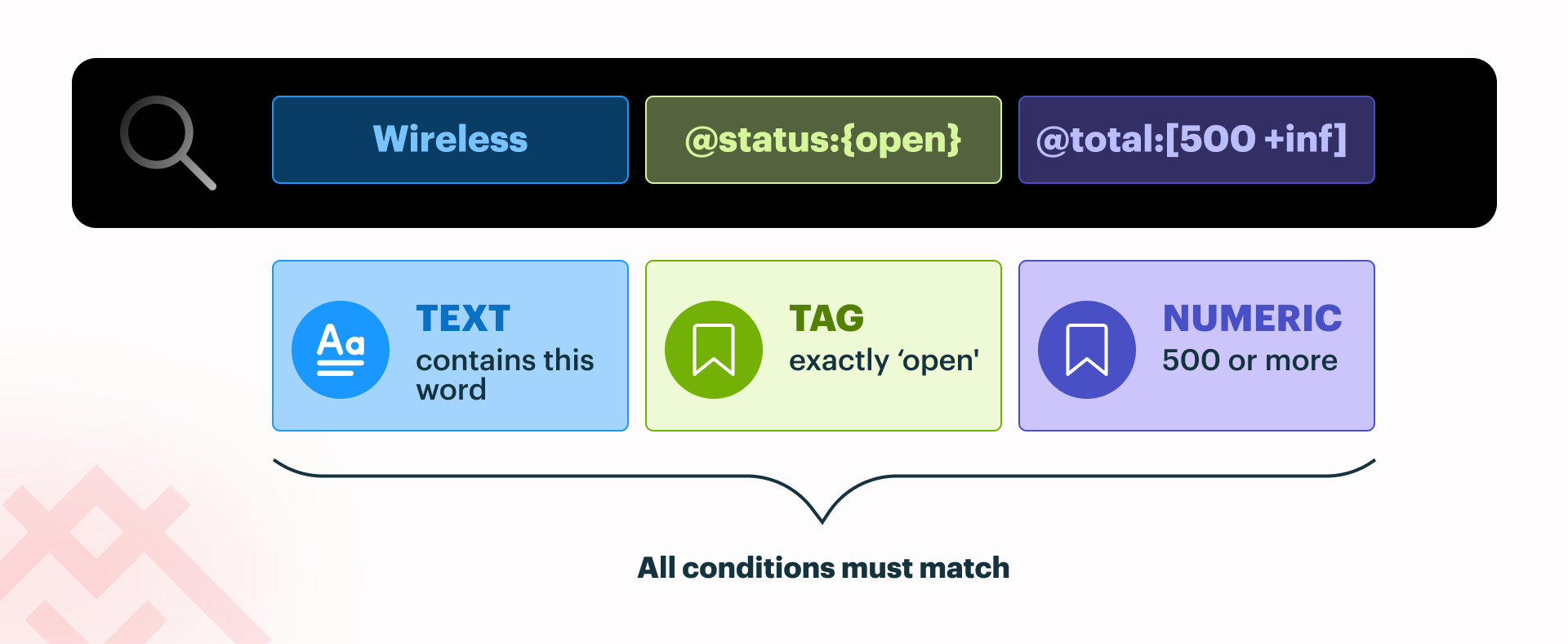
Filtered search is usually the more common pattern in application code. An internal dashboard, order workflow, or support tool rarely needs every text match. The application usually needs records that match a term and also satisfy structured conditions such as status, region, customer type, amount, or date range.
Using RediSearch from .NET
.NET applications that use RediSearch should add the NRedisStack NuGet package. NRedisStack builds on StackExchange.Redis and adds C# APIs for RediSearch and other extended Redis features.
dotnet add package NRedisStack
The following .NET console application example connects to Memurai, creates an order index named idx:orders, writes a couple of order hashes, and runs a filtered search by passing a RediSearch query expression to NRedisStack. The query contains the TEXT term wireless, the TAG filter @status:{open}, and the NUMERIC range filter @total:[500 +inf].
Finally, it displays the search results: each returned document’s ID, which is the Redis key in this hash-based example, along with the description field.
using NRedisStack.RedisStackCommands;
using NRedisStack.Search;
using NRedisStack.Search.Literals.Enums;
using StackExchange.Redis;

using ConnectionMultiplexer redis =
    await ConnectionMultiplexer.ConnectAsync("127.0.0.1:6379");

IDatabase db = redis.GetDatabase();

// Define the fields RediSearch should index.
var schema = new Schema()
    .AddTextField("description")
    .AddTagField("status")
    .AddNumericField("total");

// Create an index over order records stored as Redis-compatible hashes.
await db.FT().CreateAsync(
    "idx:orders",
    new FTCreateParams()
        .On(IndexDataType.HASH)
        .Prefix("order:"),
    schema);

// Write a sample order record.
await db.HashSetAsync("order:1001", new HashEntry[]
{
    new("description", "wireless mouse order for business customer"),
    new("status", "open"),
    new("total", "725")
});

// Write another sample order record.
await db.HashSetAsync("order:1002", new HashEntry[]
{
    new("description", "curved widescreen monitor for business customer"),
    new("status", "open"),
    new("total", "425")
});

// The query string uses standard RediSearch syntax:
// TEXT search, a TAG filter, and a NUMERIC range filter.
SearchResult result = await db.FT().SearchAsync(
    "idx:orders",
    new Query("wireless @status:{open} @total:[500 +inf]"));

foreach (var document in result.Documents)
{
    Console.WriteLine($"{document.Id}: {document["description"]}");
}
The expected output is:
order:1001: wireless mouse order for business customer
Checking a RediSearch index with FT.INFO
The FT.INFO command shows the definition and current state of a RediSearch index. It is a practical first check when a query does not return the expected documents.
memurai-cli.exe FT.INFO idx:orders
The output can be detailed and includes information such as the index name, indexed fields, and document count. For a basic troubleshooting pass, confirm that the index exists, the schema contains the expected fields, and the document count reflects the hashes that should match the index prefix.
If FT.INFO idx:orders returns an unknown-index error, the index was not created under that name or was removed. If the index exists but the document count is lower than expected, check whether the hash keys use the order: prefix declared in the FT.CREATE command.
Do you still need a dedicated search engine?
A dedicated search platform such as Elasticsearch may still make sense when search requirements go beyond that pattern. Examples include search across multiple systems, specialized text analysis or ranking behavior, detailed search analytics, or requirements important enough to justify another service to deploy, monitor, secure, and maintain.
RediSearch itself may be sufficient when a .NET application needs to find records by indexed fields, combine full-text search with filters, and search data already stored in Memurai without introducing a separate search platform.
| Search need | RediSearch in Memurai is usually enough when... | A dedicated search platform is still the better fit when... |
|---|---|---|
| Finding records by field values | The application needs to find records already stored in Memurai by text, tag, or numeric fields. | Search needs to combine data from several systems or repositories outside Memurai. |
| Full-text search with filters | The application needs practical text search combined with field filters, such as status, category, region, or numeric ranges. | Search quality depends on specialized text analysis, highly customized relevance behavior, or complex ranking rules. |
| Search across multiple systems | The searchable data is already written to Memurai or can be represented there cleanly. | Search needs to span databases, file stores, external services, documents, logs, or other sources outside the application’s Memurai data. |
| Customized result ranking | Basic relevance ordering and filtered matching are sufficient for the feature. | The application needs carefully tuned ranking rules, boosting, personalization, or search behavior that product teams expect to refine over time. |
| Search analytics | The application mainly needs to find and return matching records. | The team needs detailed reporting on searches, clicks, failed queries, popular terms, or other search behavior. |
| Minimal system footprint | The team wants indexed search without adding another service to deploy, monitor, secure, and maintain. | The search requirements are important enough to justify deploying and maintaining a separate search platform. |
Getting Started with Memurai
In this article, we used StackExchange.Redis for the Memurai connection, NRedisStack for RediSearch commands, memurai-cli.exe to verify the index from the command line, and Memurai as a Redis-compatible native Windows Service. By using Memurai, we eliminate the need for additional layers such as Linux, containers, or WSL.
Memurai is free for development and testing, making it straightforward to continue learning about RediSearch and other concepts from this article on a local or staging machine. Memurai Developer has three restrictions that are important to be aware of before you scale up: a maximum uptime of 10 days before an automatic shutdown, a maximum of 10 unique connected IP addresses, and a RAM cap of 50% of available system memory.
If you're ready to move beyond Memurai Developer, register on the Memurai portal for a free 90-day Memurai Enterprise trial and run everything in this article without the listed restrictions.
Redis® is a registered trademark of Redis Ltd. Any rights therein are reserved to Redis Ltd. Any use by Memurai is for referential purposes only and does not indicate any sponsorship, endorsement, or affiliation between Redis and Memurai.