


Vector Search on Windows: Core Concepts with .NET and Python Examples
Technical articles and news about Memurai.
Introduction
Vector search is often introduced from the top down: generate an embedding, create an index, and ask for the nearest matches. This approach skips prerequisites that many developers need first, such as what a vector is, what an embedding represents, how the closeness of two vectors is measured, and what a vector index does.
This article starts by explaining those core concepts, then demonstrates how Memurai performs vector search on Windows.
Memurai is a Redis-compatible in-memory data store built natively for Windows, from Janea Systems, the official Redis® partner for Windows. Memurai for Redis 8 supports both Vector Sets and RediSearch vector fields, giving Windows developers two distinct ways to perform vector similarity search.
Vector search terminology and concepts
A few related concepts and terms form the foundation of vector search.
What is a vector?
A vector is an ordered list of numbers. Each position in the list represents one dimension, so a vector containing three numbers has three dimensions.
In vector search, vectors provide a numerical representation that software can compare. A vector does not inherently represent text, an image, or any other particular kind of data. What the numbers represent depends on how the vector was created.
What is an embedding?
An embedding is a vector generated by a model to represent something such as text or an image. For text embeddings, the model converts the input into a fixed-length list of numbers designed so that semantically similar inputs tend to produce similar vectors.
For example, an embedding model might produce similar vectors for “The dog is sleeping on the sofa” and “A puppy is resting in the chair,” while producing a less similar vector for “The database server is running.” Vector search compares these numerical representations and ranks stored items according to their similarity or distance from a query vector.
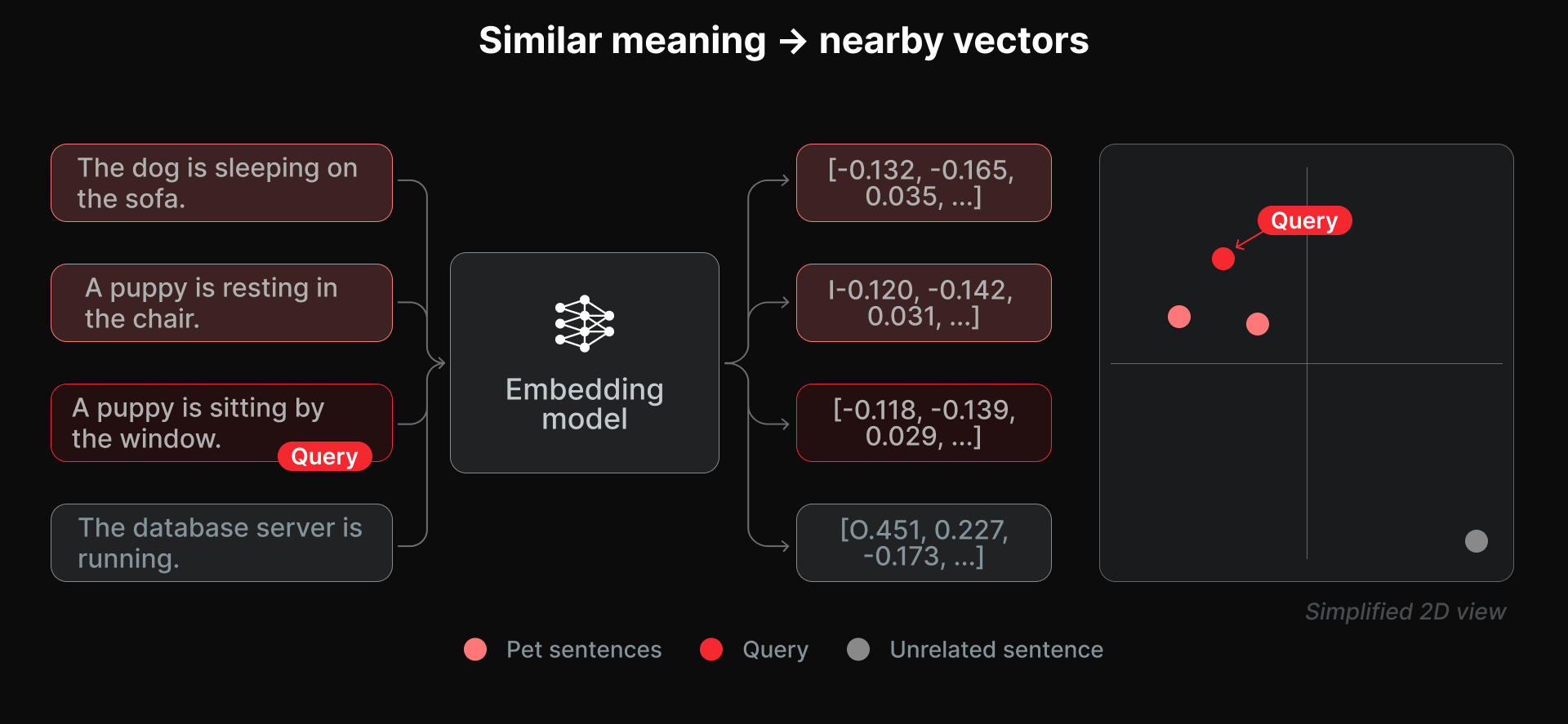
Every embedding is a vector, but not every vector is an embedding. A vector can simply be any ordered list of numbers, such as coordinates, measurements, or manually assigned values. The term embedding describes both the numerical representation and the fact that it was generated to capture characteristics of the original input.
What are similarity measures and distance metrics?
Vector search needs a consistent way to compare two vectors and determine how close, or how similar, they are. A similarity measure or distance metric assigns a value to that relationship. Similarity measures generally assign higher values to stronger matches, while distance metrics generally assign lower values to stronger matches.
What is vector search?
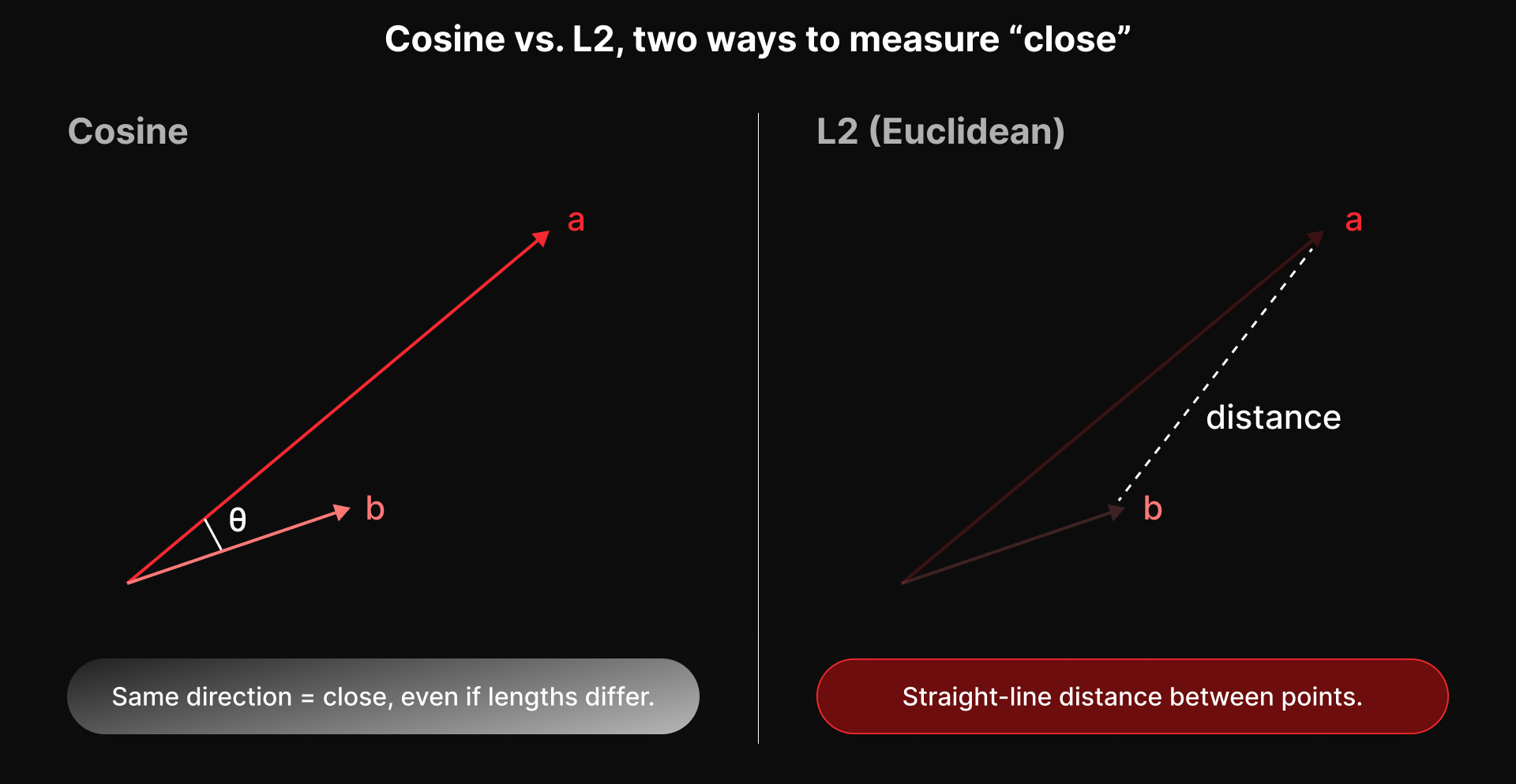
Vector search compares a query vector with stored vectors and ranks the matches according to a distance or similarity measure such as cosine and L2. Cosine distance compares the direction of two vectors, so vectors pointing in similar directions can be considered close even if their lengths differ. L2 distance, also called Euclidean distance, treats vectors more like points on a map and measures the straight-line distance between them.
In this article, vector search is used as shorthand for vector similarity search. Both terms describe the same basic operation of finding stored vectors that are most similar to, or closest to, a query vector according to a chosen similarity or distance measure.
The distinction between vector search and other search methods is primarily in what they compare. A key lookup retrieves a known item by identifier, while full-text search works primarily with indexed words and text-query rules. A vector search engine compares numerical representations, allowing related content to match even when values or wording differ.
What is a vector index?
A vector index organizes stored vectors so an application can efficiently find the best matches for a query vector. The application supplies a query vector, and the index helps locate stored vectors that are closest or most similar according to the configured similarity measure or distance metric.
Choosing how vectors are indexed is a separate decision from choosing how they are compared. A FLAT index compares a query vector with every indexed vector, which provides exact nearest-neighbor results but requires more work as the collection grows.
HNSW organizes vectors into a graph so a query can explore promising neighbors instead of checking every vector. Because HNSW uses an approximate search, it can be much faster, but it may not always return the exact closest matches. For small data sets, a FLAT index is often the easiest choice to inspect and understand.
The fundamental terminology used throughout this article can be summarized as follows:
| Vector search concept | Meaning |
|---|---|
| Vector | An ordered list of numbers. |
| Embedding | A vector generated by a model to represent something such as text or an image. |
| Similarity measure / distance metric | A rule for determining how similar or close two vectors are. |
| Vector search | Finding stored vectors most similar to or closest to a query vector; also called vector similarity search. |
| Vector index | A structure that organizes vectors so similar or nearby vectors can be found efficiently. |
How does vector search compare vectors?
Vector search compares a query vector with stored vectors and ranks the matches according to a distance or similarity measure such as cosine and L2. Cosine distance compares the direction of two vectors, so vectors pointing in similar directions can be considered close even if their lengths differ. L2 distance, also called Euclidean distance, treats vectors more like points on a map and measures the straight-line distance between them.
The vector index, such as FLAT or HNSW, then determines how the system finds nearby vectors efficiently.
How do I create an embedding in Python?
The following Python example uses Model2Vec with the potion-base-8M pretrained embedding model that is lightweight, customizable, local, and straightforward to implement. potion-base-8M produces 256-dimensional embeddings. To keep this article readable and the data manageable, the code loads it with dimensionality=32, a Model2Vec option that keeps the first 32 of the model’s PCA-ordered dimensions, which carry the most information.
The model files are downloaded from HF Hub the first time they are needed, but the embedding itself is generated locally. No API key, hosted embedding service, or vector index is required for this example. The code simply converts the input text into embeddings.
Install Model2Vec as follows:
python -m pip install model2vec
Once Model2Vec is installed, go ahead and run the Python code to generate embeddings for a group of sentences:
import numpy as np
from model2vec import StaticModel

np.set_printoptions(floatmode="unique")

# Load a local embedding model for this tutorial.
model = StaticModel.from_pretrained(
    "minishlab/potion-base-8M",
     dimensionality=32)

sentences = [
    "The dog is sleeping on the sofa.",
    "A puppy is resting in the chair.",
    "The database server is running.",
    "A puppy is sitting by the window."
]

# Generate embeddings for sentences to be used in vector search.
embeddings = model.encode(sentences)

# For simplicity, display only the first 5 dimensions of each embedding.
for sentence, embedding in zip(sentences, embeddings):
    print("Sentence: ", sentence)
    print("Dimensions: ", len(embedding), " (5 Displayed)")
    print("Embedding: ", embedding[:5])
    print()
The example prints the first five dimensions of each embedding along with a confirmation of the dimensionality. The dimensionality affects how vectors are stored, indexed, and compared. For example, vectors used together must have the same dimensionality.
With the model and settings used in this example, the output is:
Sentence:  The dog is sleeping on the sofa.
Dimensions:  32  (5 Displayed)
Embedding:  [-0.13248782 -0.16504729  0.0351916  -0.04726252 -0.26350546]

Sentence:  A puppy is resting in the chair.
Dimensions:  32  (5 Displayed)
Embedding:  [ 0.015311372  0.047063    -0.11618693  -0.028521596 -0.37492827 ]

Sentence:  The database server is running.
Dimensions:  32  (5 Displayed)
Embedding:  [ 0.50935215  0.2781109   0.1466363  -0.23520589  0.23612157]

Sentence:  A puppy is sitting by the window.
Dimensions:  32  (5 Displayed)
Embedding:  [-0.10504006 -0.08911519 -0.0676957  -0.14943235 -0.48756096]
Memurai supports two distinct approaches to vector search
Memurai for Redis 8 supports two distinct approaches to vector search: Vector Sets and RediSearch vector fields. A Vector Set is a dedicated data type designed around storing vectors and finding best-matching vectors directly. RediSearch instead stores a vector as one field within an indexed document, which makes it possible to search by vector similarity while also working with text, numeric, or other indexed fields. Our article Vector Sets or RediSearch Vector Fields: Choosing the Right Index on Windows, compares the two approaches in more detail.
Your first similarity query
For our stored vectors, we will use the first three sentences in the group, and for the query vector, we will use the fourth which is “A puppy is sitting by the window.”
| Identifier | Sentence |
|---|---|
sentence:dog-sofa | The dog is sleeping on the sofa. |
sentence:puppy-chair | A puppy is resting in the chair. |
sentence:database | The database server is running. |
| query vector | A puppy is sitting by the window. |
The search examples in this article use cosine comparison rather than L2. This is for consistency along with the fact that Vector Sets only use cosine similarity. RediSearch vector fields, on the other hand, can be configured to use cosine or L2.
The Vector Sets path
Start memurai-cli.exe and enter the following commands at its interactive prompt:
VADD sentences:vs VALUES 32 -0.13248782 -0.16504729 0.0351916 -0.04726252 -0.26350546 0.20199145 0.05658658 -0.1462703 0.041870274 -0.15016259 0.33046868 0.22456917 -0.012819006 -0.11952691 0.14153361 -0.027231531 -0.0028383092 0.054883935 0.030972637 0.14534193 0.04992027 0.021031294 0.2002432 -0.38282898 0.30177048 0.027300587 0.12049993 0.13874131 -0.15745887 0.02114479 -0.2269166 -0.4251224 sentence:dog-sofa

VADD sentences:vs VALUES 32 0.015311372 0.047063 -0.11618693 -0.028521596 -0.37492827 0.122928455 0.02951057 0.3233033 0.1020421 -0.39781564 0.24216065 0.2514539 0.1469217 -0.13350622 -0.18072614 -0.10260374 0.14482185 -0.04555064 -0.14453346 0.1458328 0.16995254 0.08090818 0.24133264 -0.22330208 0.07368582 0.073294014 0.0072419094 -0.00965138 0.19879584 -0.06849234 -0.08469363 -0.2791906 sentence:puppy-chair

VADD sentences:vs VALUES 32 0.50935215 0.2781109 0.1466363 -0.23520589 0.23612157 0.24353154 0.12441261 -0.29826766 -0.01437991 -0.14656729 0.008611689 0.2726453 -0.305591 0.051058907 0.0045215283 -0.07457982 0.12204965 0.054536287 0.004706216 -0.18635367 0.071155325 -0.07459256 -0.019699447 -0.10261294 -0.20298302 -0.076408215 -0.01981209 -0.10751588 0.15871789 -0.051445127 -0.035000097 0.083627515 sentence:database

VSIM sentences:vs VALUES 32 -0.10504006 -0.08911519 -0.0676957 -0.14943235 -0.48756096 0.12329686 0.38990572 0.29869607 0.06308754 0.014680786 0.20373903 -0.071659856 0.06764175 0.10560075 -0.06784997 -0.1380752 0.013464322 0.036409523 -0.13359801 0.1468899 0.06491545 0.10001085 0.1160619 -0.216604 -0.17215984 0.06469755 -0.2829147 0.034436285 0.108664304 0.24318416 -0.12081507 -0.23148045 WITHSCORES COUNT 3
VADD creates or updates elements in the Vector Set. Each of the VADD commands should return (integer) 1 if the specified vector is successfully added and (integer) 0 if the element exists and was updated instead.
VSIM queries the Vector Set and returns the elements in similarity order along with a score for each result. Vector Set scores range from 1 for an identical vector toward 0 for an opposite vector, so higher scores indicate greater similarity.
The two pet-related sentences receive the highest similarity scores, while the unrelated database sentence ranks last. This illustrates how vector search ranks semantically related content highly even when the wording differs. See the following output:
1) "sentence:puppy-chair"
2) "0.7852931022644043"
3) "sentence:dog-sofa"
4) "0.6792644262313843"
5) "sentence:database"
6) "0.40555405616760254"
The RediSearch path
The RediSearch path stores each vector as a field within a hash document. Because the vector field is defined as FLOAT32, the vector values are supplied as binary 32-bit floating-point data rather than as the readable numeric lists used with Vector Sets.
The FT.CREATE command creates a RediSearch index over the sentence: hashes and defines the embedding field as a 32-dimensional FLOAT32 vector field. RediSearch indexes the vectors in that field using the FLAT algorithm and compares them using cosine distance. The HSET commands then create the individual hashes that RediSearch indexes, storing each sentence together with its embedding.
FT.CREATE sentences:idx ON HASH PREFIX 1 sentence: SCHEMA text TEXT embedding VECTOR FLAT 6 TYPE FLOAT32 DIM 32 DISTANCE_METRIC COSINE

HSET sentence:dog-sofa text "The dog is sleeping on the sofa." embedding "\xe3\xaa\x07\xbe\x28\x02\x29\xbe\x11\x25\x10\x3d\x58\x96\x41\xbd\x30\xea\x86\xbe\xd9\xd6\x4e\x3e\x54\xc7\x67\x3d\xe2\xc7\x15\xbe\x2a\x80\x2b\x3d\x39\xc4\x19\xbe\x31\x33\xa9\x3e\x76\xf5\x65\x3e\xcf\x06\x52\xbc\x86\xca\xf4\xbd\x30\xee\x10\x3e\xa9\x14\xdf\xbc\xed\x02\x3a\xbb\xfa\xcd\x60\x3d\x54\xba\xfd\x3c\x84\xd4\x14\x3e\x32\x79\x4c\x3d\xd2\x49\xac\x3c\x8e\x0c\x4d\x3e\x29\x02\xc4\xbe\xa9\x81\x9a\x3e\x7b\xa5\xdf\x3c\xab\xc8\xf6\x3d\x34\x12\x0e\x3e\xe6\x3c\x21\xbe\xd7\x37\xad\x3c\xd3\x5c\x68\xbe\xa5\xa9\xd9\xbe"

HSET sentence:puppy-chair text "A puppy is resting in the chair." embedding "\x8c\xdc\x7a\x3c\x22\xc5\x40\x3d\x6a\xf3\xed\xbd\x1f\xa6\xe9\xbc\x99\xf6\xbf\xbe\xea\xc1\xfb\x3d\x27\xc0\xf1\x3c\x03\x88\xa5\x3e\x73\xfb\xd0\x3d\x7e\xae\xcb\xbe\xf6\xf8\x77\x3e\x91\xbe\x80\x3e\xa4\x72\x16\x3e\xdb\xb5\x08\xbe\x46\x10\x39\xbe\xe9\x21\xd2\xbd\x2e\x4c\x14\x3e\x4f\x93\x3a\xbd\x94\x00\x14\xbe\x32\x55\x15\x3e\x0a\x08\x2e\x3e\x30\xb3\xa5\x3d\xe7\x1f\x77\x3e\x4d\xa9\x64\xbe\x97\xe8\x96\x3d\x2c\x1b\x96\x3d\x8a\x4d\xed\x3b\xd2\x20\x1e\xbc\x23\x91\x4b\x3e\xb6\x45\x8c\xbd\xdb\x73\xad\xbd\x12\xf2\x8e\xbe"

HSET sentence:database text "The database server is running." embedding "\xe7\x64\x02\x3f\x8d\x64\x8e\x3e\xd4\x27\x16\x3e\xd0\xd9\x70\xbe\xda\xc9\x71\x3e\x55\x60\x79\x3e\x0a\xcc\xfe\x3d\x8a\xb6\x98\xbe\xb7\x99\x6b\xbc\xbc\x15\x16\xbe\x0b\x18\x0d\x3c\x2a\x98\x8b\x3e\x6c\x76\x9c\xbe\x25\x23\x51\x3d\x54\x29\x94\x3b\x4e\xbd\x98\xbd\x2b\xf5\xf9\x3d\x71\x61\x5f\x3d\x9a\x36\x9a\x3b\x7f\xd3\x3e\xbe\xe2\xb9\x91\x3d\xfc\xc3\x98\xbd\xbc\x60\xa1\xbc\xbc\x26\xd2\xbd\xc8\xda\x4f\xbe\xe9\x7b\x9c\xbd\xf7\x4c\xa2\xbc\x49\x31\xdc\xbd\xf1\x86\x22\x3e\x20\xb8\x52\xbd\x43\x5c\x0f\xbd\xe7\x44\xab\x3d"

FT.SEARCH sentences:idx "*=>[KNN 3 @embedding $queryVector AS distance]" PARAMS 2 queryVector "\x3e\x1f\xd7\xbd\x06\x82\xb6\xbd\x0b\xa4\x8a\xbd\xcb\x04\x19\xbe\x97\xa1\xf9\xbe\x10\x83\xfc\x3d\xb9\xa1\xc7\x3e\xb1\xee\x98\x3e\x0a\x34\x81\x3d\xae\x87\x70\x3c\xf7\xa0\x50\x3e\x67\xc2\x92\xbd\xc2\x87\x8a\x3d\x35\x45\xd8\x3d\xed\xf4\x8a\xbd\x96\x63\x0d\xbe\x76\x99\x5c\x3c\x27\x22\x15\x3d\xeb\xcd\x08\xbe\x4e\x6a\x16\x3e\x64\xf2\x84\x3d\x7d\xd2\xcc\x3d\xdd\xb1\xed\x3d\x70\xcd\x5d\xbe\xab\x4a\x30\xbe\x26\x80\x84\x3d\x32\xda\x90\xbe\x10\x0d\x0d\x3d\x64\x8b\xde\x3d\x45\x05\x79\x3e\xe4\x6d\xf7\xbd\x36\x09\x6d\xbe" SORTBY distance RETURN 2 text distance DIALECT 2
Because RediSearch expects hash-based vector fields and query vectors as binary data, the 32 embedding values are encoded here as little-endian FLOAT32 bytes. The \xHH sequences are simply the byte representation of the same vector values.
A k-NN (referred to as KNN for simplicity) query is a k-nearest neighbors query. Given a query vector, it asks the vector index to return the k stored vectors that are closest to it according to the configured distance metric. The KNN 3 portion of the FT.SEARCH query requests the three nearest neighbors, which are the three stored vectors closest to the query vector according to cosine distance.
The output for the FT.SEARCH command should look like the following:
1) (integer) 3
2) "sentence:puppy-chair"
3) 1) "distance"
   2) "0.427453041077"
   3) "text"
   4) "A puppy is resting in the chair."
4) "sentence:dog-sofa"
5) 1) "distance"
   2) "0.637567877769"
   3) "text"
   4) "The dog is sleeping on the sofa."
6) "sentence:database"
7) 1) "distance"
   2) "1.1906375885"
   3) "text"
   4) "The database server is running."
RediSearch reports cosine distance, so lower values represent closer vectors. That is the opposite direction from the similarity score returned by VSIM, where higher values indicate a closer match. Despite reporting different kinds of scores, both approaches produce the same ranking of the three sentences being compared with the query vector sentence.
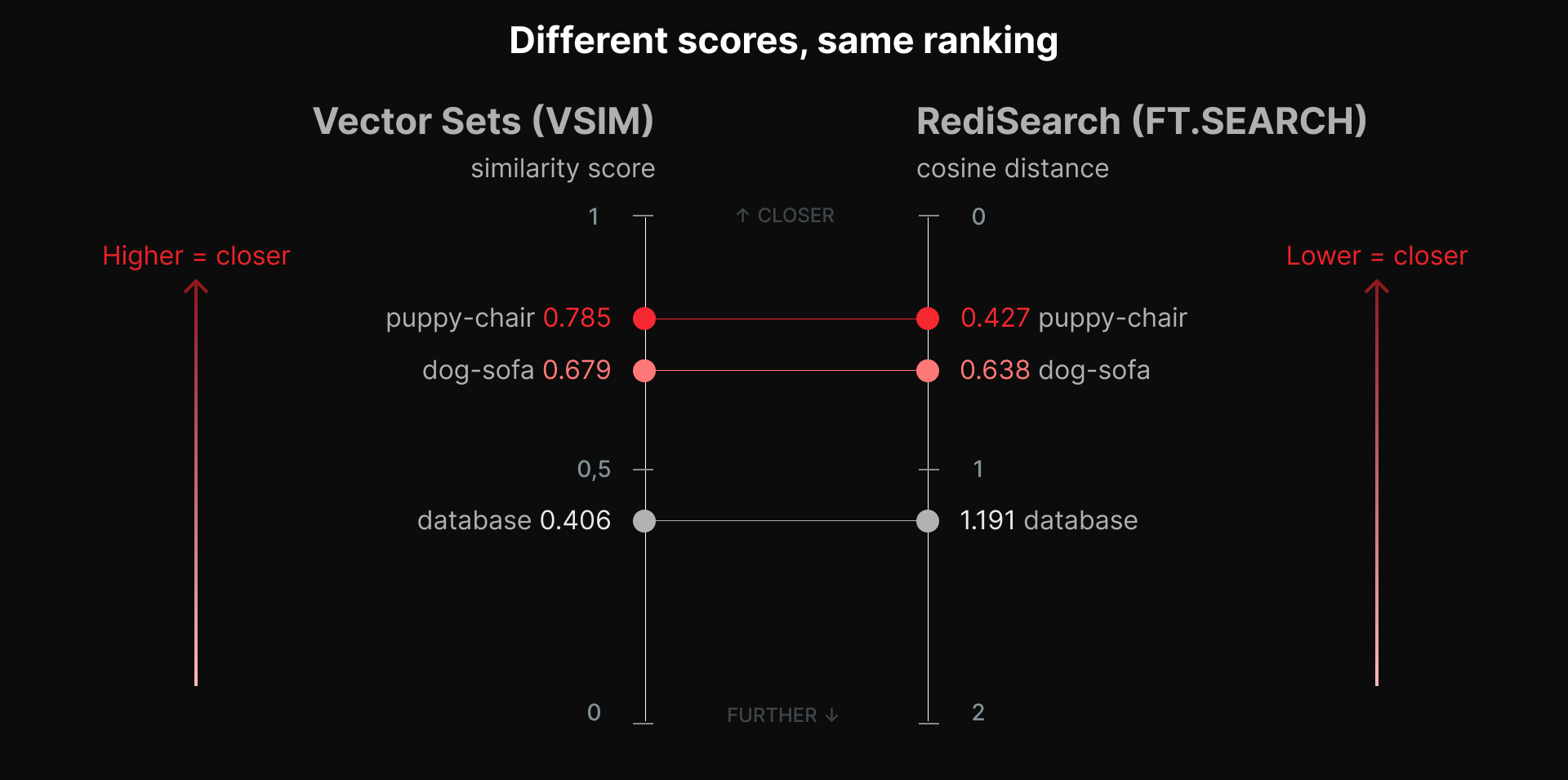
Cosine distance ranges from 0 to 2, so the database sentence’s distance of about 1.19 is not unexpected, as values above 1 mean the two vectors point in partly opposite directions.
The KNN query syntax and PARAMS substitution require query dialect 2 or later. Specifying DIALECT 2 makes that requirement explicit instead of depending on the server's configured default dialect. If the server’s default query dialect is lower than 2, omitting DIALECT 2 can cause the vector query to fail.
Running a KNN query from .NET
Because RediSearch commands are not part of the core StackExchange.Redis API, we need to install NRedisStack, which builds on StackExchange.Redis and provides APIs for RediSearch:
dotnet add package NRedisStack
This .NET console application example performs the same RediSearch vector-field workflow shown in the corresponding CLI example. It creates a RediSearch index over hash documents, stores the same embeddings generated by the model, and runs a KNN query using cosine distance. The ToBytes helper converts the C# float values into the same little-endian FLOAT32 binary representation written explicitly as escaped byte sequences in the CLI example.
using NRedisStack.RedisStackCommands;
using NRedisStack.Search;
using NRedisStack.Search.Literals.Enums;
using StackExchange.Redis;
using static NRedisStack.Search.Schema;

// RediSearch FLOAT32 vector fields store the vector as binary data.
static byte[] ToBytes(params float[] values)
{
    var bytes = new byte[values.Length * sizeof(float)];
    Buffer.BlockCopy(values, 0, bytes, 0, bytes.Length);
    return bytes;
}

using var redis =
    await ConnectionMultiplexer.ConnectAsync("127.0.0.1:6379");

var db = redis.GetDatabase();

var ft = db.FT();

const string indexName = "cs:sentences:idx";

try
{
    // dd: true drops the index AND deletes every document it indexes.
    // Omit dd to drop only the index.
    await ft.DropIndexAsync(indexName, dd: true);
}
catch (RedisServerException ex)
{
    // Handle server-side errors as appropriate for the application.
    // A common cause here is that the index does not exist on the first run.
    Console.WriteLine($"Index cleanup skipped: {ex.Message}");
}

var schema = new Schema()
    .AddTextField(new FieldName("text", "text"))
    .AddVectorField(
        "embedding",
        VectorField.VectorAlgo.FLAT,
        new Dictionary<string, object>
        {
            ["TYPE"] = "FLOAT32",
            ["DIM"] = "32",
            ["DISTANCE_METRIC"] = "COSINE"
        });

await ft.CreateAsync(
    indexName,
    new FTCreateParams()
        .On(IndexDataType.HASH)
        .Prefix("sentence:"),
    schema);

await db.HashSetAsync(
    "sentence:dog-sofa",
    new HashEntry[]
    {
        new("text", "The dog is sleeping on the sofa."),
        new("embedding", ToBytes(-0.13248782f, -0.16504729f, 0.0351916f, -0.04726252f, -0.26350546f,
    0.20199145f, 0.05658658f, -0.1462703f, 0.041870274f, -0.15016259f,
    0.33046868f, 0.22456917f, -0.012819006f, -0.11952691f, 0.14153361f,
    -0.027231531f, -0.0028383092f, 0.054883935f, 0.030972637f, 0.14534193f,
    0.04992027f, 0.021031294f, 0.2002432f, -0.38282898f, 0.30177048f,
    0.027300587f, 0.12049993f, 0.13874131f, -0.15745887f, 0.02114479f,
    -0.2269166f, -0.4251224f))
     });

await db.HashSetAsync(
    "sentence:puppy-chair",
    new HashEntry[]
    {
        new("text", "A puppy is resting in the chair."),
        new("embedding", ToBytes(0.015311372f, 0.047063f, -0.11618693f, -0.028521596f, -0.37492827f,
    0.122928455f, 0.02951057f, 0.3233033f, 0.1020421f, -0.39781564f,
    0.24216065f, 0.2514539f, 0.1469217f, -0.13350622f, -0.18072614f,
    -0.10260374f, 0.14482185f, -0.04555064f, -0.14453346f, 0.1458328f,
    0.16995254f, 0.08090818f, 0.24133264f, -0.22330208f, 0.07368582f,
    0.073294014f, 0.0072419094f, -0.00965138f, 0.19879584f, -0.06849234f,
    -0.08469363f, -0.2791906f))
    });

await db.HashSetAsync(
    "sentence:database",
    new HashEntry[]
    {
        new("text", "The database server is running."),
        new("embedding", ToBytes(0.50935215f, 0.2781109f, 0.1466363f, -0.23520589f, 0.23612157f,
    0.24353154f, 0.12441261f, -0.29826766f, -0.01437991f, -0.14656729f,
    0.008611689f, 0.2726453f, -0.305591f, 0.051058907f, 0.0045215283f,
    -0.07457982f, 0.12204965f, 0.054536287f, 0.004706216f, -0.18635367f,
    0.071155325f, -0.07459256f, -0.019699447f, -0.10261294f, -0.20298302f,
    -0.076408215f, -0.01981209f, -0.10751588f, 0.15871789f, -0.051445127f,
    -0.035000097f, 0.083627515f))
    });

// Find the three stored vectors nearest to the query vector.
// Sentence: A puppy is sitting by the window
var query = new Query("*=>[KNN 3 @embedding $queryVector AS distance]")
    .AddParam("queryVector", ToBytes(-0.10504006f, -0.08911519f, -0.0676957f, -0.14943235f, -0.48756096f,
    0.12329686f, 0.38990572f, 0.29869607f, 0.06308754f, 0.014680786f,
    0.20373903f, -0.071659856f, 0.06764175f, 0.10560075f, -0.06784997f,
    -0.1380752f, 0.013464322f, 0.036409523f, -0.13359801f, 0.1468899f,
    0.06491545f, 0.10001085f, 0.1160619f, -0.216604f, -0.17215984f,
    0.06469755f, -0.2829147f, 0.034436285f, 0.108664304f, 0.24318416f,
    -0.12081507f, -0.23148045f))
    .ReturnFields(
        new FieldName("text", "text"),
        new FieldName("distance", "distance"))
    .SetSortBy("distance") // Lower cosine distance means a closer match.
    .Dialect(2); // KNN queries require query dialect 2 or later.

var result = await ft.SearchAsync(indexName, query);

foreach (var document in result.Documents)
{
    Console.WriteLine(document.Id);

    foreach (var property in document.GetProperties())
    {
        Console.WriteLine($"  {property.Key}: {property.Value}");
    }
}
The NRedisStack query represents the same operation as the CLI example. We provide a query vector, compare it with the indexed vector field, and return the nearest documents with their distance values. The results should list sentence:puppy-chair, sentence:dog-sofa, and sentence:database in ascending cosine-distance order, which is the same outcome we saw from the RediSearch CLI commands.
Getting Started with Memurai
In this article, we delved into the core concepts behind vector search, generated a local text embedding in Python, compared Vector Sets with RediSearch vector fields, and used Memurai as a Redis-compatible native Windows Service to run both command-line and .NET vector similarity searches. By using Memurai, we eliminate the need for additional layers such as Linux, containers, or WSL.
Memurai is free for development and testing, making it straightforward to continue learning about vector search and other concepts from this article on a local or staging machine. Memurai Developer has three restrictions that are important to be aware of before you scale up: a maximum uptime of 10 days before an automatic shutdown, a maximum of 10 unique connected IP addresses, and a RAM cap of 50% of available system memory.
If you're ready to move beyond Memurai Developer, register on the Memurai portal for a free 90-day Memurai Enterprise trial and run everything in this article without the listed restrictions.
Redis® is a registered trademark of Redis Ltd. Any rights therein are reserved to Redis Ltd. Any use by Memurai is for referential purposes only and does not indicate any sponsorship, endorsement, or affiliation between Redis and Memurai.