


Distributed Caching in ASP.NET Core with Redis on Windows
Technical articles and news about Memurai.
Introduction
Many ASP.NET Core applications start with in-process caching because a single running instance can serve repeated reads from its own memory. In that model, IMemoryCache is simple, fast, and often sufficient.
That straightforward behavior changes when the application runs across multiple processes or servers, typically behind a load balancer. At that point, each instance has its own private cache. One instance may have a fresh copy of a user profile while another instance misses the cache entirely. Values cached by one instance are unavailable to the others, so the application repeats database reads that a shared cache could have avoided.
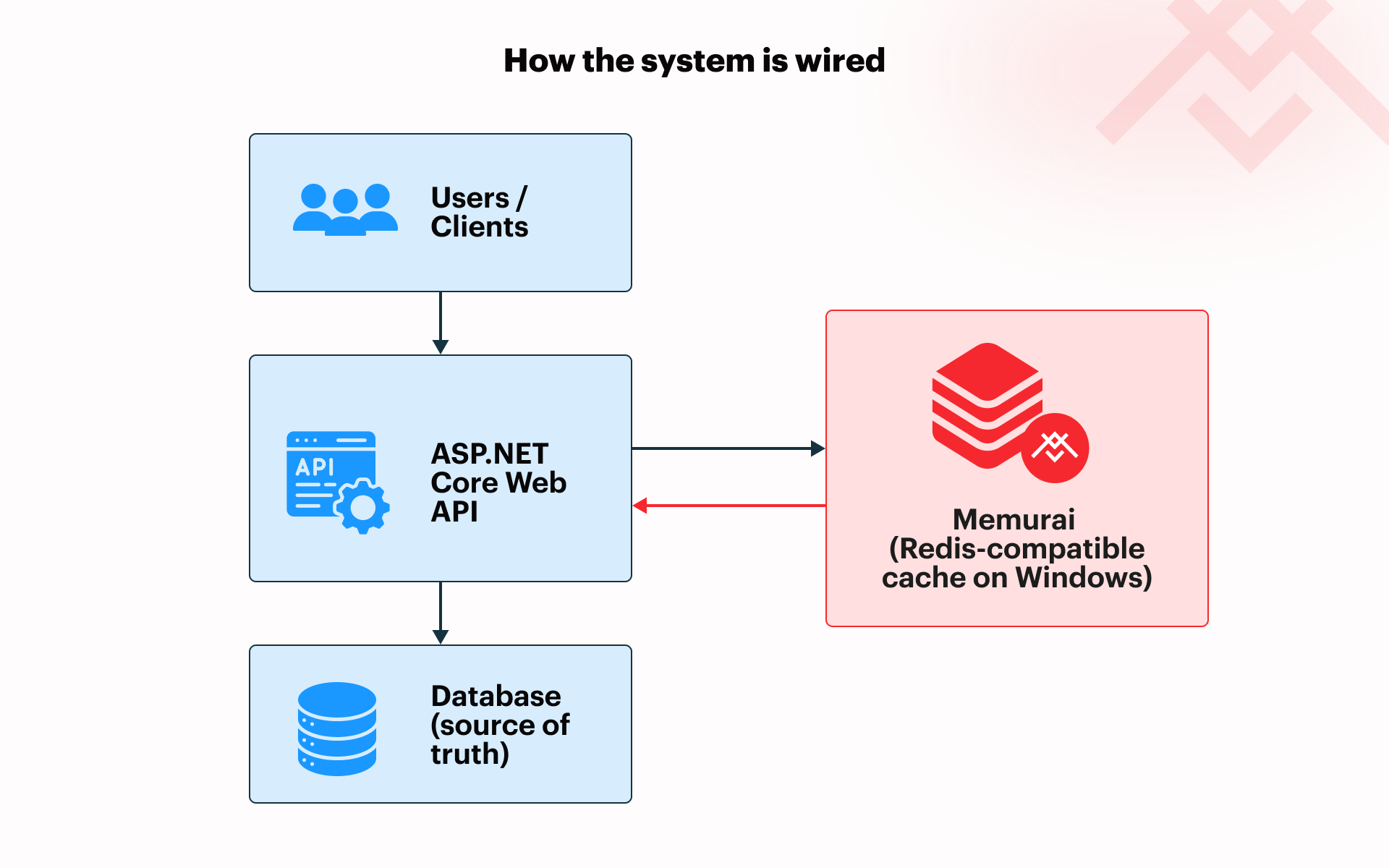
When multiple instances are involved, ASP.NET Core provides the IDistributedCache abstraction. Instead of storing cached values in the local process, the application writes them to a shared backing store.
When developers consider Redis® for this distributed caching problem, they often find tutorials that assume Linux, containers, or WSL in their implementations. On the other hand, Memurai gives Windows developers a Redis-compatible server that runs natively as a Windows Service, allowing ASP.NET Core applications to use Redis-backed distributed caching without additional architectural requirements.
This article shows how to wire up IDistributedCache with Redis on Windows, serialize cached values with System.Text.Json, implement the cache-aside pattern, verify cache entries with the memurai-cli.exe command-line utility, and remove stale entries when source data changes.
Why Redis Fits This Pattern
Redis is especially well suited for this role because it provides sub-millisecond reads, native time-to-live (TTL) support, and fast key-based access without requiring a relational schema for temporary cache values. The application can store a serialized value under a predictable key, let Redis expire it automatically, and fall back to the source of truth — database or other — when the key is missing.
The result is a more effective approach to time-sensitive cached data than pushing cache traffic back into a relational schema. SQL Server can be used as a distributed cache provider, but it still places read and write pressure on a relational database. Redis keeps cached values in memory and supports native TTL behavior, so that temporary values can expire automatically without a cleanup job.
In a Windows environment, Memurai fills the Redis server role while fitting into a familiar operational model. As mentioned, it installs as a Windows Service and works with Redis-compatible clients, including the StackExchange.Redis-based provider used by ASP.NET Core.
Understanding IDistributedCache
IDistributedCache is the standard ASP.NET Core abstraction for working with a shared cache. Application code depends on the interface, while the configured provider decides where the cached values are stored.
With IDistributedCache, the cache lives outside the application process. Each instance reads from and writes to the same backing store, so a value cached by one application instance can be reused by another instance.
The interface exposes four core operations:
GetAsyncreads a value from the cache.SetAsyncwrites a value to the cache.RemoveAsyncdeletes a value from the cache.RefreshAsyncrefreshes sliding expiration for an existing cached value.
Another important detail is that IDistributedCache stores values as byte arrays. It does not understand business objects (such as PurchaseOrder or ProductSummary), application settings, etc. If we want to cache objects, our application needs to serialize them before writing and deserialize them after reading.
For a broader discussion of when a .NET application needs caching, see 5 Signs Your .NET Application Needs a Caching Layer.
Setting Up Memurai and the ASP.NET Core Project
Once you have downloaded and installed Memurai Developer, use the memurai-cli.exe utility to verify that the local Memurai service is running.
memurai-cli.exe PING
Expected output:
PONG
We now have Memurai running as a functioning native Windows service without the need for additional requirements such as Linux, containers, or WSL.
Next, let’s use the .NET CLI to create a new controller-based ASP.NET Core Web API project:
dotnet new webapi -n DistributedCacheDemo --use-controllers
cd DistributedCacheDemo
dotnet new sln
dotnet sln add DistributedCacheDemo.csproj
Now let’s add the required Redis cache NuGet packages:
dotnet add package Microsoft.Extensions.Caching.StackExchangeRedis
dotnet add package StackExchange.Redis
The application registers Redis as the IDistributedCache provider in the Program.cs snippet below. The connection string 127.0.0.1:6379 points the application to a Redis-compatible server running on the local machine, using the default Redis port.
using StackExchange.Redis;

var builder = WebApplication.CreateBuilder(args);

builder.Services.AddControllers();

builder.Services.AddStackExchangeRedisCache(options =>
{
    options.Configuration = "127.0.0.1:6379";
    options.InstanceName = "myapp:";
});

var app = builder.Build();

app.MapControllers();

app.Run();
The InstanceName value is used as a prefix for keys written by this application. If application code uses the logical key user:42, the provider stores it in Redis as myapp:user:42. Prefixing keys this way keeps cache entries easier to identify and avoids accidental collisions when several applications share the same Redis-compatible server.
Implementing Cache-Aside with JSON Serialization
The cache-aside pattern gives the application explicit control over when data is read from the cache, loaded from the database, and stored for reuse. The application checks the cache first. If the value is present, it returns the cached value. If the value is missing, it loads the value from the database or other source of truth, writes it to the cache with an expiration, and returns it to the caller.
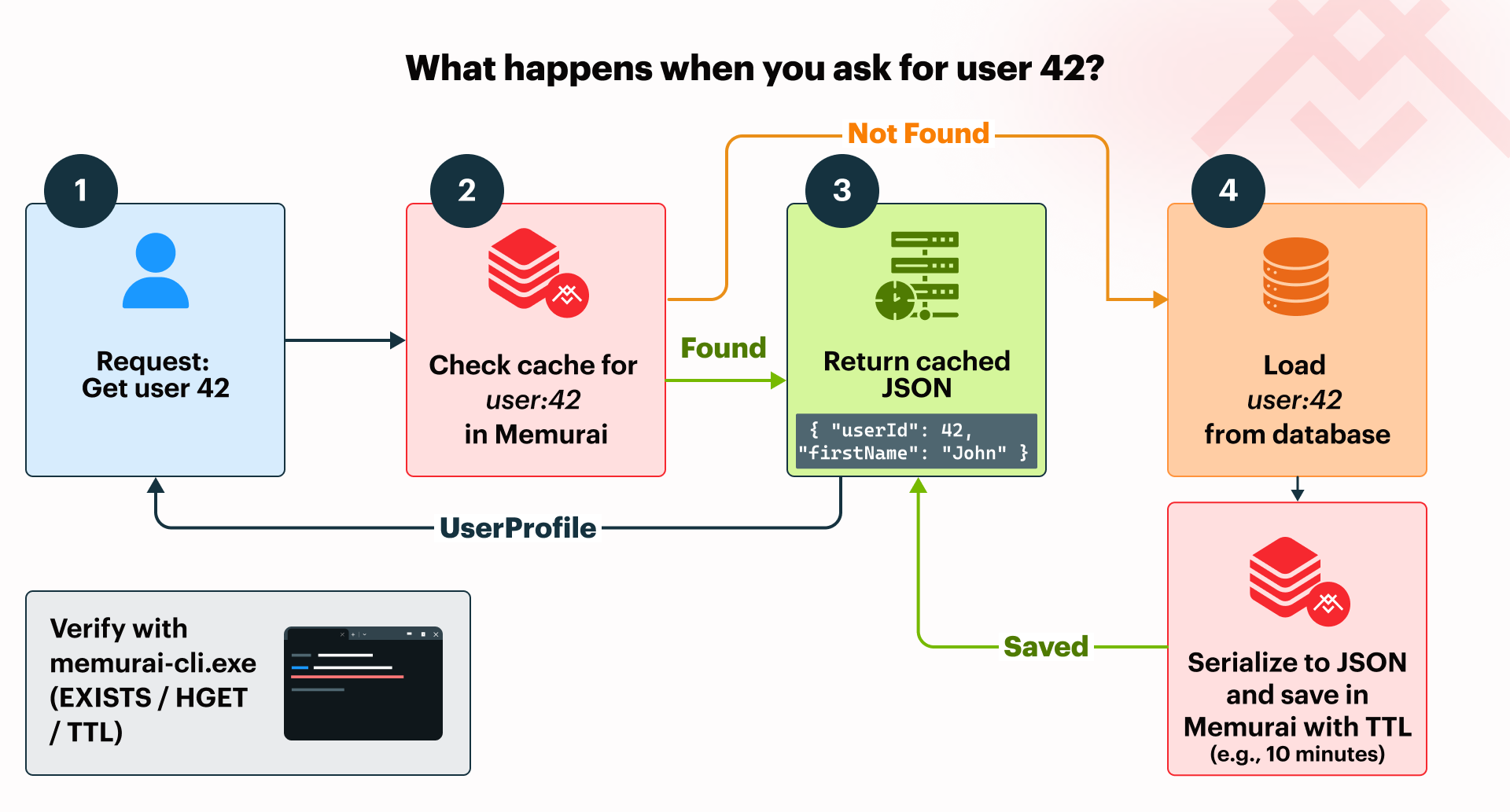
The following C# extension method on IDistributedCache implements that pattern for any JSON-serializable type:
using System.Text.Json;
using Microsoft.Extensions.Caching.Distributed;

public static class DistributedCacheExtensions
{
    private static readonly JsonSerializerOptions JsonOptions = new(JsonSerializerDefaults.Web);

    public static async Task<T?> GetOrSetAsync<T>(
        this IDistributedCache cache,
        string key,
        Func<Task<T?>> fetchFromSource,
        TimeSpan ttl)
    {
        byte[]? cachedBytes = await cache.GetAsync(key);

        if (cachedBytes is not null)
        {
            return JsonSerializer.Deserialize<T>(cachedBytes, JsonOptions);
        }

        T? value = await fetchFromSource();

        if (value is null)
        {
            return default;
        }

        byte[] serializedValue = JsonSerializer.SerializeToUtf8Bytes(value, JsonOptions);

        var cacheOptions = new DistributedCacheEntryOptions
        {
            AbsoluteExpirationRelativeToNow = ttl
        };

        await cache.SetAsync(key, serializedValue, cacheOptions);

        return value;
    }
}
A service, controller, or other caller can conveniently use this extension without depending directly on Redis APIs:
// Add the following line if calling the extension method from Program.cs
// rather than from an injected controller or service.
var cache = app.Services.GetRequiredService<IDistributedCache>();

var user = await cache.GetOrSetAsync(
    "user:42",
    async () =>
    {
        // Add an arbitrary delay to mimic retrieval from a database
        // or other persistent store. For demo purposes only.
        await Task.Delay(200);

        // Generate hardcoded user profile data for demo purposes.
        // This data will normally be read from a database or other persistent store.
        return new UserProfile(
            UserId: 42,
            FirstName: "John",
            LastName: "Smith");
    },
    TimeSpan.FromMinutes(10));
Finally, go ahead and also add the demo UserProfile record definition.
// Define our demo user profile record type
public sealed record UserProfile(
    int UserId,
    string FirstName,
    string LastName);
The first time the code requests user:42, the cache does not contain a value, so the delegate runs and returns a UserProfile instance. The extension method serializes that value and stores it in Redis using the supplied expiration options. Later requests for the same key can return the cached value without repeating the source lookup, until the entry expires or is explicitly removed.
The database remains the source of truth. Redis is the fast serving layer for values that are safe to reuse for a controlled period.
Verifying Cache Entries with memurai-cli.exe
After the cache-aside pattern writes an entry, we can verify it from the command line. Because the application configured InstanceName = "myapp:", the logical key user:42 appears in Redis as myapp:user:42.
To check whether the key exists, use the EXISTS command:
memurai-cli.exe EXISTS "myapp:user:42"
Expected output:
(integer) 1
A result of 1 means the key exists. A result of 0 means the key is not currently present.
The ASP.NET Core Redis cache provider stores the cached payload with expiration metadata. To inspect the serialized value itself, read the provider's data field:
memurai-cli.exe HGET "myapp:user:42" data
For a JSON-serialized user profile, the output will look similar to this:
"{\"userId\":42,\"firstName\":\"John\",\"lastName\":\"Smith\"}"
We can also check the remaining lifetime of the key:
memurai-cli.exe TTL "myapp:user:42"
That command returns the number of seconds before the key expires. Redis returns -1 if the key exists but has no expiration, and -2 if the key does not exist.
Cache Invalidation
TTL-based expiration is the simplest form of cache invalidation: the cached value is allowed to expire after a defined period. Use shorter TTLs for data that changes often or may be updated by users, such as profile details. Use longer TTLs for stable reference data, such as country lists, product categories, or ZIP-code mappings.
DistributedCacheEntryOptions supports absolute expiration (used earlier), sliding expiration, or both. Absolute expiration removes the entry after a fixed period, while sliding expiration extends the lifetime when the entry is accessed.
Some changes should invalidate the cache immediately. For example, if a user profile is updated, the application should save the change to the source of truth and then remove the cached entry. To explicitly remove a cached item, using our cache variable from earlier, we can use a statement such as:
await cache.RemoveAsync("user:42");
Getting Started with Memurai
In this article, we learned how to use Memurai as a Redis-compatible Windows service for ASP.NET Core distributed caching, providing a fast key-based caching mechanism that reduces the pressure on our underlying database. As a native Windows service, we eliminate the need for additional layers such as Linux, containers, or WSL.
Memurai is free for development and testing, making it straightforward to continue learning about IDistributedCache and other concepts from this article on a local or staging machine. Memurai Developer, our free developer version, has three restrictions that are important to be aware of before you scale up: a maximum uptime of 10 days before an automatic shutdown, a maximum of 10 unique connected IP addresses, and a RAM cap of 50% of available system memory.
If you're ready to move beyond Memurai Developer, register on the Memurai portal for a free 90-day Memurai Enterprise trial and run everything in this article without the listed restrictions.
Redis® is a registered trademark of Redis Ltd. Any rights therein are reserved to Redis Ltd. Any use by Memurai is for referential purposes only and does not indicate any sponsorship, endorsement, or affiliation between Redis and Memurai.