


Redis Queues and Streams: Decoupling Windows Microservices Without a Message Broker
Technical articles and news about Memurai.
Introduction
RabbitMQ and Kafka are powerful messaging platforms, but they are not always the required starting point for Windows microservices. Many teams simply need a lightweight messaging toolset.
Redis® is often an excellent fit for that level of messaging need. Using Lists, Streams, and publish/subscribe (Pub/Sub), it can cover a large share of day-to-day messaging tasks without introducing a dedicated broker. For Windows teams, Memurai makes that model easier to run natively as a Windows Service, without adding Linux or container overhead.
Simple Queues with Redis Lists
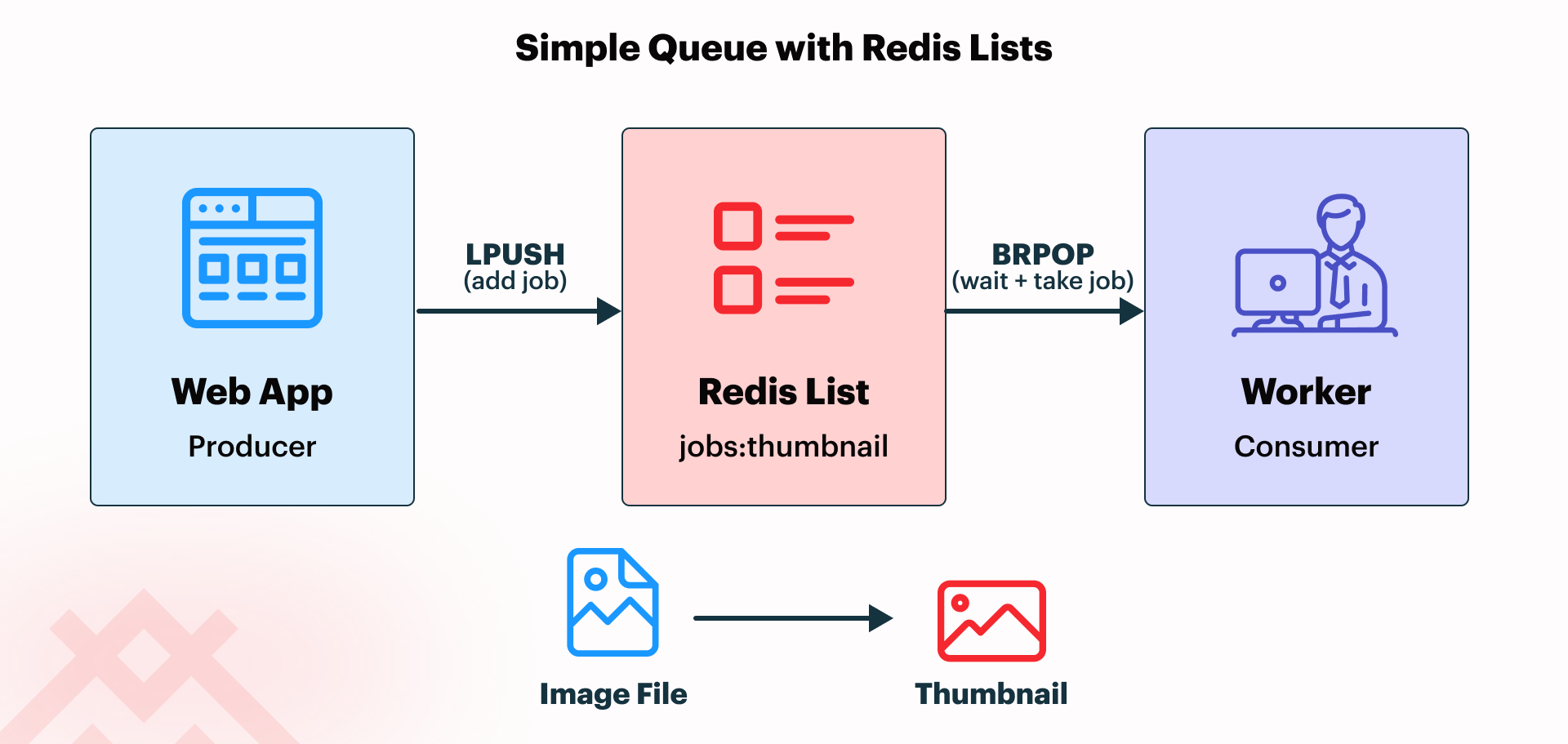
Redis Lists are the simplest message-queueing pattern discussed in this article. One common implementation is where a producer pushes work into a list using LPUSH, followed by a consumer blocking until work is available, then popping it out with the BRPOP command.
Lists are often adequate for background jobs such as sending confirmation emails, generating thumbnails after image uploads, or handing simple work items from one service to another, especially when each queued item should be processed by one worker.
The following .NET example shows a basic producer and blocking consumer in C#:
using StackExchange.Redis;

var mux = await ConnectionMultiplexer.ConnectAsync("127.0.0.1:6379");
var db = mux.GetDatabase();

// Producer: push a job payload into the queue with LPUSH.
await db.ListLeftPushAsync("jobs:thumbnail", "image-123");

// Consumer: use BRPOP to block until a job is available, then pop it.
var result = await db.ExecuteAsync("BRPOP", "jobs:thumbnail", "0");

// BRPOP returns the queue name and the value that was popped.
if (!result.IsNull)
{
    var values = (RedisResult[])result!;
    var queueName = (string)values[0]!;
    var payload = (string)values[1]!;
    Console.WriteLine($"Received {payload} from {queueName}");
}
In this example, a web application might accept an image upload and push a small thumbnail-generation job into the List-based queue, while a background worker blocks until work is available and then generates a thumbnail asynchronously.
This keeps the original image-upload response fast by handing thumbnail generation off to a background worker instead of doing it synchronously before the response is returned.
Note: In .NET, a BRPOP consumer should use a dedicated ConnectionMultiplexer, since blocking commands can stall a shared one. In production, some teams instead use a different notification or polling design.
Durable Messaging with Redis Streams
Lists are a strong fit when the messaging requirements are simple: queue work, let one worker take it, and process it in the background. This works well for straightforward job handoff where simplicity matters more than acknowledgment, recovery, or more advanced coordination between workers.
Redis Streams, on the other hand, are a better fit when messages need more reliable tracking, acknowledgment, and recovery than a simple queue allows. Unlike a List-based queue, a Stream keeps a durable record of messages after they are added, meaning they remain available for later processing and acknowledgment instead of disappearing as soon as one consumer reads them.
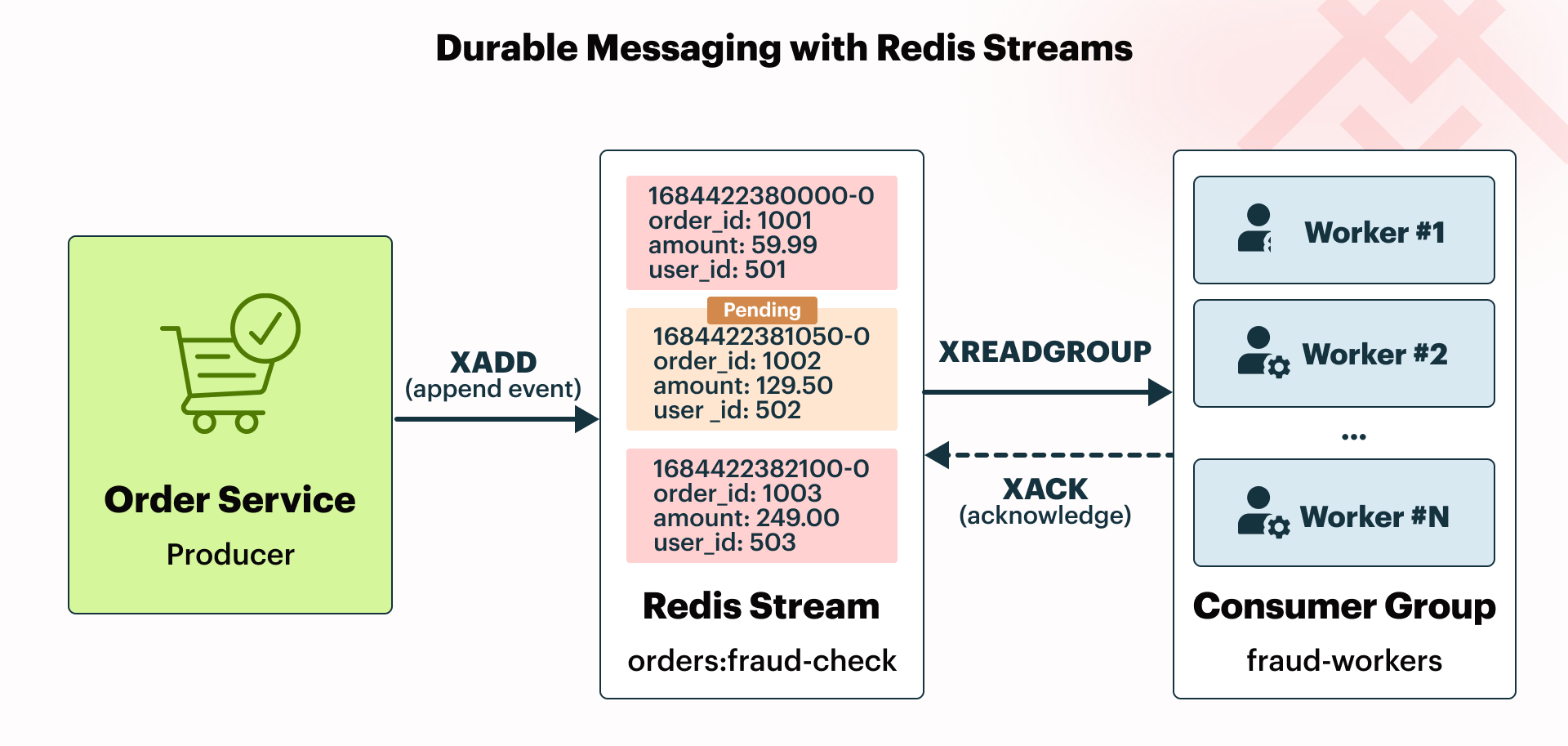
One common way to implement Redis Streams is for producers to add entries with XADD, with consumers reading them through a consumer group using the XREADGROUP command. After processing succeeds, the worker confirms completion with XACK. Note that the consumer group must be explicitly created before it is accessed.
That separation between reading and acknowledging is what makes Streams more reliable than List-based queues, because a message can remain pending until processing is confirmed.
The following .NET example shows a minimal producer plus consumer-group worker:
using StackExchange.Redis;

var mux = await ConnectionMultiplexer.ConnectAsync("127.0.0.1:6379");
var db = mux.GetDatabase();

// Producer: append an event to the stream with the XADD command.
await db.StreamAddAsync("orders:fraud-check", new NameValueEntry[]
{
    new("orderId", "A1001"),
    new("riskScore", "72")
});

// Create consumer group or verify it already exists before trying to read from it.
try
{
    await db.StreamCreateConsumerGroupAsync(
        "orders:fraud-check",
        "fraud-workers",
        StreamPosition.NewMessages);
}
catch (RedisServerException ex) when (ex.Message.StartsWith("BUSYGROUP"))
{
    // The consumer group already exists, which is fine.
}

// Consumer group worker: use XREADGROUP to read one new message for this group/consumer.
var entries = await db.StreamReadGroupAsync(
    "orders:fraud-check",
    "fraud-workers",
    "worker-1",
    ">",
    count: 1);

foreach (var entry in entries)
{
    // Read the message fields.
    foreach (var field in entry.Values)
    {
        Console.WriteLine($"{field.Name} = {field.Value}");
    }

    // Acknowledge successful processing with XACK.
    await db.StreamAcknowledgeAsync("orders:fraud-check", "fraud-workers", entry.Id);
}
In this example, an order service might write a fraud-check event into a Redis Stream, while one worker in a fraud-processing group reads it, evaluates it, and acknowledges it only after the work succeeds. As a result, this workflow is more resilient than a simple List-based queue, because messages do not disappear upon being read.
With both Lists and Streams, producers and consumers are typically run as separate services or worker processes, rather than in the same application.
When to Use Which
The examples thus far focus on Redis Lists and Streams, since those are the two primary messaging patterns explored in this article. The table below adds Pub/Sub as a third option and summarizes when each Redis-based approach is the better fit.
| Approach | Best Fit | Recommendation |
|---|---|---|
| Lists | Simple background jobs and lightweight queues | Start here when one producer hands work to one consumer and simplicity matters most. |
| Streams | Durable processing, worker groups, and acknowledgment | Use this when reliability, replay, and consumer coordination matter. |
| Pub/Sub | Live notifications and fan-out events | Use this for transient signals, not for work that must be reliably processed later. |
Why Skip the Broker?
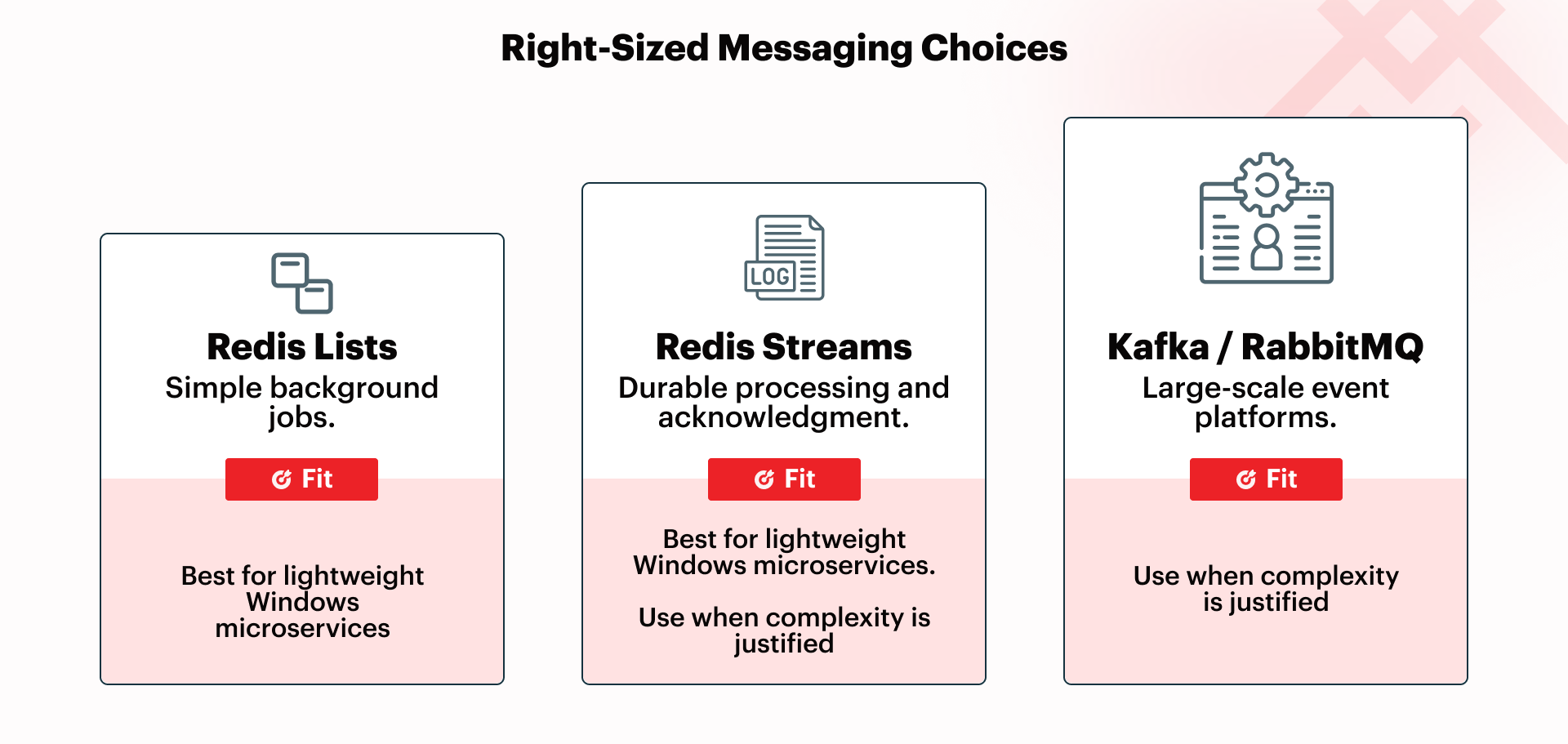
For many teams, the question is not whether Kafka and RabbitMQ are useful tools, but whether a system actually requires that much messaging machinery. Lists and Streams can cover a large portion of async messaging needs, reducing the case for a dedicated broker platform.
Kafka still wins where high-throughput event streaming, long retention, or broader event-platform patterns are central to the design. But many Windows microservices never reach that threshold.
Windows Deployment Note
For Windows teams, Memurai runs this messaging model as a native Windows Service, fits naturally with .NET IHostedService workers, and avoids Linux or container layers. If durability matters, AOF persistence can strengthen recovery characteristics without changing the application-facing Redis API. This keeps the operational side straightforward while still supporting more than simple caching.
Conclusion
For many Windows microservices, Redis is a practical middle ground between direct service calls and a full broker. Lists cover simple queueing, Streams cover more durable processing, and Memurai lets Windows teams run both natively without the need for Linux or containers.
Getting Started with Memurai
Memurai is free for development and testing, making it straightforward to build and validate the code and concepts in this article on a local or staging machine. The free developer version has three restrictions worth knowing before you scale up: a maximum uptime of 10 days before an automatic shutdown, a limit of 10 unique connected IP addresses, and a RAM cap of 50% of available system memory.
If you're ready to move beyond the free developer version, register on the Memurai portal for a free 90-day Enterprise trial and run everything in this article without the restrictions just listed.
Redis® is a registered trademark of Redis Ltd. Any rights therein are reserved to Redis Ltd. Memurai is a separate product developed by Janea Systems and is compatible with the Redis® API, but is not a Redis Ltd. product.