


Standalone or Cluster? Choosing the Right Topology for Redis and Memurai
Technical articles and news about Memurai.
One of the first decisions in a Redis® deployment is often made without much thought: should it run as a standalone server or as a cluster? Many teams choose whatever the first tutorial used or whatever sounds more scalable. Yet the choice affects far more than the number of servers. It determines how clients connect, how failures are handled, how the deployment scales, and even which commands the application can use.
Changing the topology later is possible, but it touches both the servers and the application. That's why it's worth understanding both modes before going to production. This article explains how standalone mode and cluster mode work, what cluster mode changes for the application and for day-to-day operations, how to choose between them, and how to move from standalone to cluster when a single primary is no longer enough.
Everything here applies equally to Redis and to Memurai, the Redis-compatible server for Windows: both support the same topologies, configuration directives, and commands. Where something is specific to Windows, it's marked [Memurai]. Examples use redis-cli. On Windows, use memurai-cli.exe with the same arguments.
Standalone mode
How it works
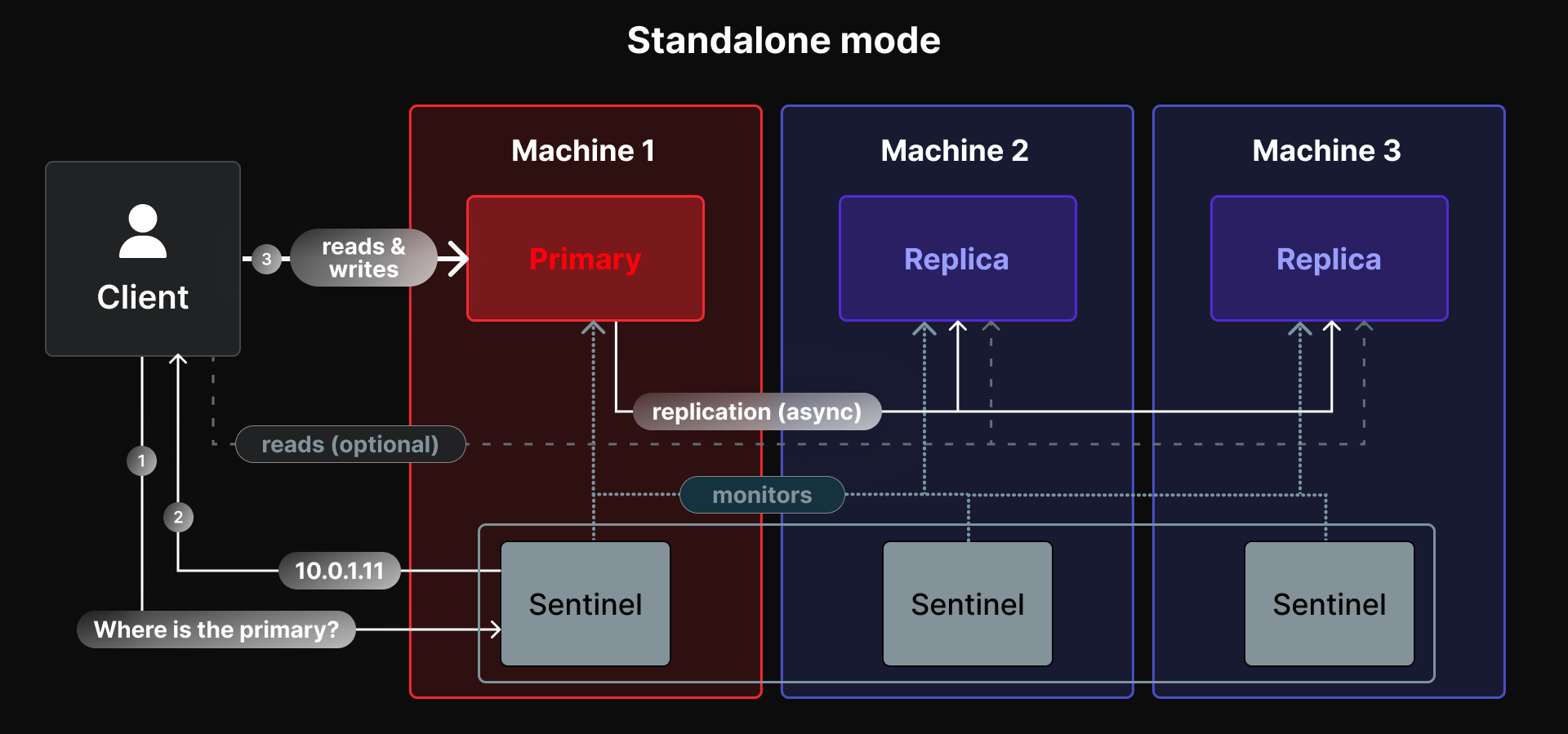
In standalone mode, one server, the primary, holds the entire dataset and handles all writes. Replicas keep a copy of the data: the primary streams every change to them, and they can serve read requests. Sentinels, small separate processes, watch the primary and promote one of the replicas when it fails. Designing a Production-Ready Memurai Deployment walks through this setup step by step, from a single node to a primary with two replicas and three Sentinels.
From the application's point of view, a standalone deployment behaves like one big server. Every command works on every key, transactions and Lua scripts can touch any keys, and any client library can connect. For failover, the client connects to the Sentinels and asks them for the current primary, which most client libraries support.
Reading from replicas
Replicas can take over part of the read load, which helps read-heavy applications. Replication is asynchronous, though: the primary confirms a write to the client before the replicas have received it. A read from a replica can therefore return slightly outdated data, usually a few milliseconds behind, but more during network problems or under heavy load.
Many applications don't mind, for example when reading cached values. Where it matters, read from the primary. When a write must reach the replicas before the application continues, the WAIT command blocks until a given number of replicas have acknowledged it.
Where standalone mode reaches its limits
A standalone deployment can grow in two ways: a bigger machine (more memory, faster CPU), and more replicas for reads. Two limits remain:
- Memory. The whole dataset, plus the headroom the server needs for client buffers, replication, and background saves, has to fit into the memory of one machine.
- Writes. All writes go through the single primary, which executes commands one at a time on its main thread. Replicas don't help, because they only copy the writes.
These limits are higher than many people expect. A single primary can often handle hundreds of thousands of operations per second, and modern servers have plenty of memory. For a large share of applications, standalone mode is all they will ever need.
Cluster mode
How it works
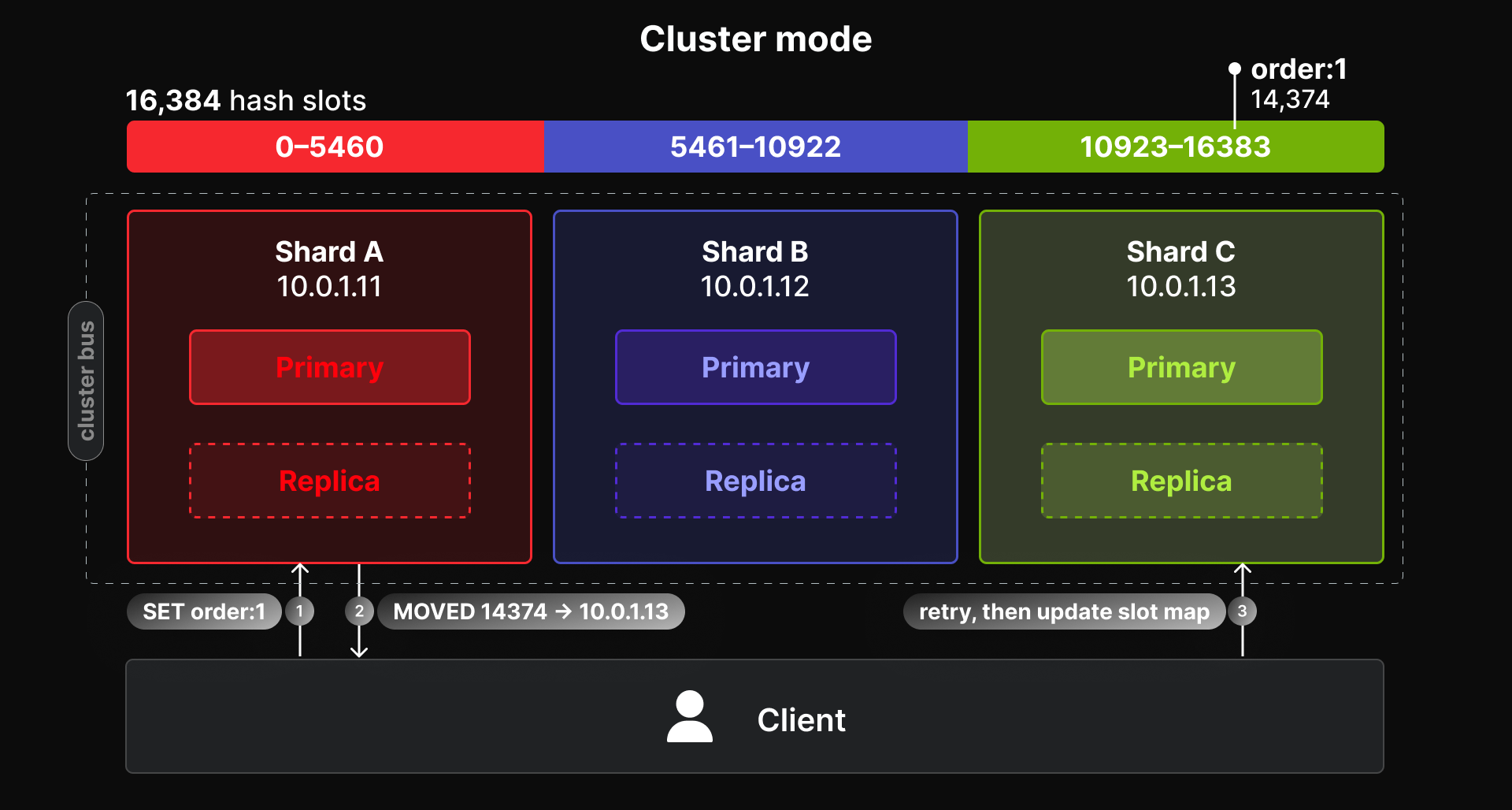
Cluster mode spreads the dataset across several primaries. The keyspace is divided into 16384 hash slots. The slot of a key is calculated from its name (a CRC16 checksum of the key, modulo 16384), and every slot is assigned to one primary. Each primary therefore holds only part of the data and handles only the writes for its slots. Adding primaries adds both memory and write capacity.
You can see the slot of any key with CLUSTER KEYSLOT:
> CLUSTER KEYSLOT user:42
(integer) 15880
> CLUSTER KEYSLOT order:1
(integer) 14374
Each primary has its own replicas. The nodes constantly exchange information over a dedicated connection, the cluster bus, which uses the client port + 10000 by default. When a primary stops responding, the other primaries agree that it has failed, and one of its replicas takes over. No Sentinels are needed: failure detection and failover are built into the cluster. Because the agreement requires a majority of the primaries, a cluster needs at least three of them.
How clients find the data
A client that supports cluster mode keeps a map of which node holds which slots, and sends each command directly to the right node. When the map is outdated, for example after a failover or after slots were moved, the node replies with a redirection instead of executing the command:
> SET order:1 value
(error) MOVED 14374 10.0.1.13:6379
A cluster-aware client follows the redirection and refreshes its map. A client without cluster support simply reports it as an error. That's why the client configuration matters as much as the server configuration: in cluster mode, the client must have cluster support enabled. With redis-cli, the -c option enables it.
When part of the cluster is down
If a primary and all of its replicas are unavailable, nobody holds the slots of that primary anymore. By default (cluster-require-full-coverage yes), the whole cluster then stops serving requests, even for the slots of the healthy primaries:
> GET item:2
(error) CLUSTERDOWN The cluster is down
This is the safe default: the application either gets complete data or a clear error. If serving the available part of the data is more useful for your application than refusing everything, set cluster-require-full-coverage no on all nodes. The healthy primaries then keep serving their slots, while requests for the missing slots fail. With enough replicas spread across machines, this situation should be rare either way.
What cluster mode changes for the application
The extra capacity of a cluster comes with constraints, because a single command can only be executed by one node. Most of these constraints are invisible for simple workloads, but some applications rely on features that work differently in a cluster.
Only one database
A standalone server has 16 numbered databases by default, which some applications use to separate data (SELECT 1). A cluster has only database 0:
> SELECT 1
(error) ERR SELECT is not allowed in cluster mode
Key prefixes, such as orders: and sessions:, are the usual replacement, and they also work in standalone mode.
Multi-key operations need keys in the same slot
Commands that work with several keys at once, such as MSET, MGET, SUNION, SINTERSTORE, or RENAME, can only be executed if all the keys are in the same slot. Otherwise, the node rejects them:
> MSET a 1 b 2
(error) CROSSSLOT Keys in request don't hash to the same slot
The same rule applies to transactions (MULTI/EXEC), Lua scripts, and functions: all the keys they access must be in one slot.
Hash tags let you control which keys share a slot. If a key name contains a part in curly braces, only that part is used to calculate the slot:
> CLUSTER KEYSLOT {user:42}:profile
(integer) 15880
> CLUSTER KEYSLOT {user:42}:sessions
(integer) 15880
> MSET {user:42}:profile p {user:42}:sessions s
OK
Group keys that are used together under a common tag, typically the ID of the entity they belong to. Avoid putting too much under one tag, though: all keys with the same tag live on the same primary, so a single tag shared by a large part of the data recreates the single-primary bottleneck the cluster was supposed to remove.
Commands that look at the whole keyspace
Some commands only see the data of the node that executes them:
KEYS,SCAN, andRANDOMKEYreturn keys from one node only.DBSIZEcounts the keys of one node.FLUSHALLandFLUSHDBdelete the data of one node only.
Administrative scripts and tools that use these commands have to run them on every primary. redis-cli --cluster call <host:port> <command> does that for you, for example redis-cli --cluster call 10.0.1.11:6379 DBSIZE.
Pub/sub
Classic pub/sub (PUBLISH, SUBSCRIBE) works in a cluster, but every message is broadcast to all nodes, so that subscribers connected to any node receive it. With many nodes and many messages, this creates a lot of traffic on the cluster bus. Sharded pub/sub (SPUBLISH, SSUBSCRIBE, available since Redis 7) assigns each channel to a slot like a key, and messages stay within the shard that owns it. For pub/sub-heavy applications, it scales much better.
Client libraries
The application needs a client library that supports cluster mode, with that support enabled. Most popular libraries have it, but there can be differences in the details: how pipelines and batches are split across nodes, whether multi-key commands across slots are rejected or split by the client, and how quickly the client reacts to topology changes. It's worth testing the application against a real cluster before going to production. For testing, all cluster nodes can run on a single machine.
Summary for the application
| Standalone | Cluster | |
|---|---|---|
| Databases | 16 (by default) | Only database 0 |
| Multi-key commands, transactions, scripts | Any keys | Keys in the same slot (use hash tags) |
KEYS, SCAN, DBSIZE, FLUSHALL | Whole dataset | One node at a time |
| Pub/sub | Classic | Classic (broadcast to all nodes), or sharded |
| Clients | Any client, Sentinel support for failover | Cluster-aware clients |
What cluster mode changes for operations
More nodes
A highly available standalone deployment needs three machines: a primary, two replicas, and three Sentinels, which are lightweight enough to run next to the data nodes. The minimum recommended cluster has three primaries with one replica each, so six nodes. They can share three machines, as long as no primary runs on the same machine as its own replica. Otherwise, losing that machine takes the primary and its replica down together, and with them a part of the slots.
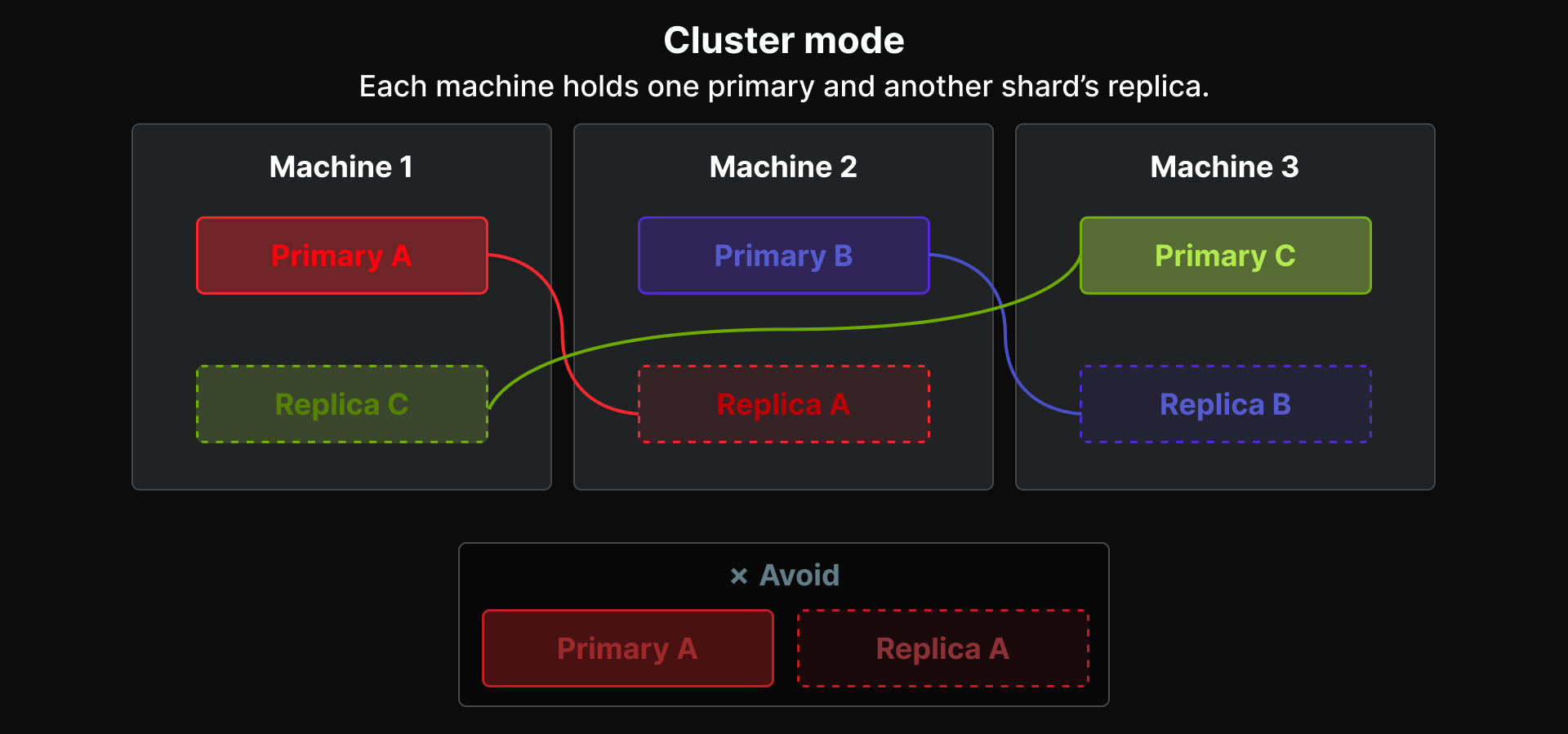
Every additional node is another process to configure, patch, and monitor, and every node needs its own port and its own cluster configuration file.
Scaling
A standalone deployment scales vertically: a bigger machine for more memory, and more replicas for more reads. A cluster scales horizontally, while it keeps running:
redis-cli --cluster add-nodeadds a new node to the cluster, either as a primary or as a replica.redis-cli --cluster reshardmoves a number of slots, together with their keys, to another primary.redis-cli --cluster rebalancespreads the slots evenly across the primaries.
Moving slots takes time and generates load, especially for large keys, so it's best done outside peak hours. During the move, clients occasionally receive ASK redirections, which cluster-aware clients handle on their own.
Backups
In a standalone deployment, one RDB file contains the whole dataset. In a cluster, each primary writes its own RDB file with its part of the data, so a complete backup consists of one file per primary, taken at about the same time. Restoring means restoring all of them into a cluster with the same slot layout. redis-cli --cluster backup can collect the RDB files from all primaries.
Monitoring
The health of a cluster is more than the health of each node. CLUSTER INFO reports the overall state (cluster_state:ok or fail) and whether all slots are covered, and CLUSTER NODES lists the role and state of every node. Both are worth adding to the monitoring next to the usual per-node metrics.
[Memurai] Running a cluster on Windows
On Windows, every cluster node is a separate Memurai instance, typically running as a Windows service with its own configuration file, port, data directory, and service name:
memurai.exe --service-install --service-name memurai-7000 D:\Memurai\7000\memurai.conf
memurai.exe --service-start --service-name memurai-7000
Each configuration file enables cluster mode and points to a cluster configuration file that's unique to the node:
port 7000
cluster-enabled yes
cluster-config-file nodes-7000.conf
cluster-node-timeout 15000
dir D:/Memurai/7000
The firewall has to allow both the client port and the cluster bus port (here, 17000) between the nodes. Once all nodes run, memurai-cli.exe --cluster create creates the cluster in the same way as redis-cli:
memurai-cli.exe --cluster create 10.0.1.11:7000 10.0.1.12:7000 10.0.1.13:7000 `
    10.0.1.11:7001 10.0.1.12:7001 10.0.1.13:7001 --cluster-replicas 1
After creating the cluster, check with CLUSTER NODES that no primary shares a machine with its own replica, and adjust the layout if it does.
For more details, please refer to Memurai documentation.
How to choose
A few questions usually settle the decision:
- Does the dataset fit into one machine? Count the dataset with its expected growth over the next one or two years, plus headroom for the server's other memory needs. If it fits comfortably, standalone mode is possible.
- Can one primary handle the peak write load? Measure or estimate the writes per second at peak. Remember that replicas can take over reads, but not writes.
- Does the application rely on standalone-only features? Several databases, multi-key commands across unrelated keys, or scripts that access arbitrary keys all need changes before the application can run on a cluster.
- Do your client libraries support cluster mode well enough for your use, including pipelines and failover handling?
- Can you operate six or more nodes? A cluster needs more servers, more configuration, and more monitoring.
| Choose standalone when… | Choose cluster when… |
|---|---|
| The dataset fits into one machine, with room to grow | The dataset doesn't fit, or will soon outgrow one machine |
| One primary handles the write load | The write load needs more than one primary |
| The application uses several databases or multi-key operations on unrelated keys | The application can keep related keys together with hash tags |
| You want the simplest setup to run | You can operate a larger number of nodes |
When none of the requirements calls for a cluster, start with standalone mode. It's simpler to run, compatible with every client and command, and a single primary goes a long way. Prepare the application for a cluster anyway, so that switching later is a configuration change rather than a project.
Moving from standalone to cluster
Prepare the application early
The move goes smoothly when the application already respects the cluster's rules while running standalone:
- Keep all data in database 0, and separate it with key prefixes instead of
SELECT. - Use hash tags for keys that are used together in multi-key commands, transactions, or scripts. In standalone mode, the braces are just part of the key name, so they cost nothing.
- Use a client library that supports cluster mode, so that switching is a matter of configuration.
- Run the integration tests against a cluster from time to time, for example a small cluster on a single test machine. It catches
CROSSSLOTerrors long before production does.
Move the data
Once the cluster is running, the data has to get into it. There are a few ways to do that, depending on the kind of data:
-
Caches can simply start empty in the cluster and fill up again, as long as the backing systems can handle the extra load while the cache warms up.
-
redis-cli --cluster importcopies the keys of a standalone server into the cluster, sending each key to the primary that owns its slot:redis-cli --cluster import 10.0.1.11:6379 --cluster-from 10.0.2.20:6379 --cluster-copyWith
--cluster-copy, the keys stay on the standalone server, and with--cluster-replace, existing keys in the cluster are overwritten. Writes that reach the standalone server after a key has been copied aren't transferred, so stop writes to the old server during the import, or plan a short maintenance window. -
Application-level migration avoids the maintenance window: the application writes to both the old and the new deployment for a while, and a background job copies the existing data. It's more work, but the switch can happen without downtime.
Switch the clients
When the data is in place, switch the application's configuration to the cluster, with cluster support enabled in the client. Watch the error rates for CROSSSLOT and MOVED errors, which point to code paths that don't respect the cluster rules or to clients without cluster support. Keep the old standalone deployment around until the application has run on the cluster for a while, so that you can switch back if needed.
Moving back from a cluster to a standalone deployment is possible in the same way, but it's rarely needed: once the application respects the cluster's rules, it runs on both.
Summary
- Standalone mode keeps the whole dataset on one primary, with replicas for reads and Sentinels for failover. It's the simplest to run, supports every command on every key, and is enough for most applications.
- Cluster mode spreads the data over several primaries using hash slots, which adds memory and write capacity and builds failover into the cluster. In exchange, the application is limited to database 0, multi-key operations need keys in the same slot, and clients must support cluster mode.
- Choose based on the dataset size, the write load, and the application's use of standalone-only features. When nothing requires a cluster, start standalone.
- Prepare for a cluster early: database 0, hash tags for keys used together, and a cluster-capable client. Then moving to a cluster later is a manageable step instead of a rewrite.
Get Started with Memurai
Memurai brings Redis-compatible performance to Windows, with the same standalone, replication, Sentinel, and cluster modes described in this article, running as native Windows services. Download Memurai for free for development and testing, and contact us when you're ready to go to production.
Redis® is a registered trademark of Redis Ltd. Any rights therein are reserved to Redis Ltd. Memurai is a separate product developed by Janea Systems and is compatible with the Redis® API, but is not a Redis Ltd. product.