


Streamline Redis-Compatible Workloads on Windows: A Migration Guide for .NET Teams
Technical articles and news about Memurai.
When Your Team's "Temporary" Redis Setup Becomes Permanent
Redis® surpassed 10 billion Docker pulls in November 2025, averaging more than 2.25 million pulls per day, making it one of the most widely adopted in-memory data stores worldwide.
Many .NET teams don't plan to run Redis on Docker or Windows Subsystem for Linux (WSL) in the long term. It often starts as a quick fix to keep a sprint moving, test an idea, or check performance, with someone saying, "We'll clean this up later."
This temporary setup often moves into production, requiring Windows admins to learn Linux, developers to add debugging layers, and slowing down onboarding.
The Hidden Cost for Windows-First Teams
How Windows teams run Redis workloads has evolved significantly. Developers initially relied on MSOpenTech’s discontinued port of the Redis Open Source® project. When this concluded, they switched to Docker and WSL.
Today, 17% of developers use WSL professionally. Many Windows-first teams run Linux environments on Windows, but maintaining this complexity just to use Redis for caching may not be justified.
The issue is not Redis performance but managing Docker, WSL, Linux images, volumes, and networking alongside Windows Server. Windows admins and .NET developers often learn Linux basics just to keep Redis running, which slows response times and complicates onboarding.
Research shows that when developers switch tasks, it can take them up to 23 minutes to regain productivity. Furthermore, they can lose 20-80% of their efficiency due to frequent task switching. For the average .NET developer, each additional layer adds more surfaces to secure, audit, and document. A native Windows deployment simplifies management by using a single OS, security model, and monitoring system that the team already knows.
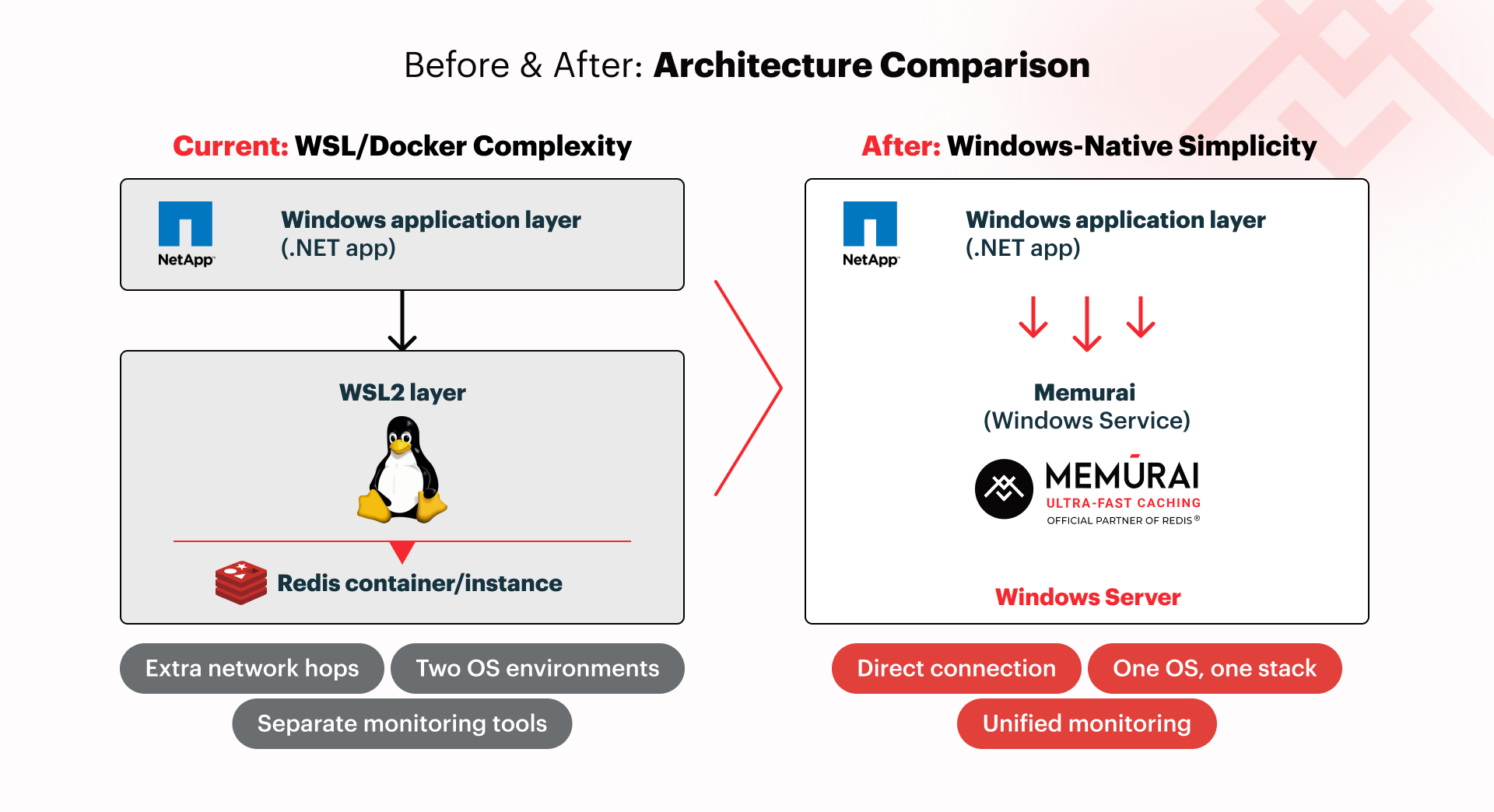
What "Windows-Native Redis‑Compatible" Really Means for Your Team
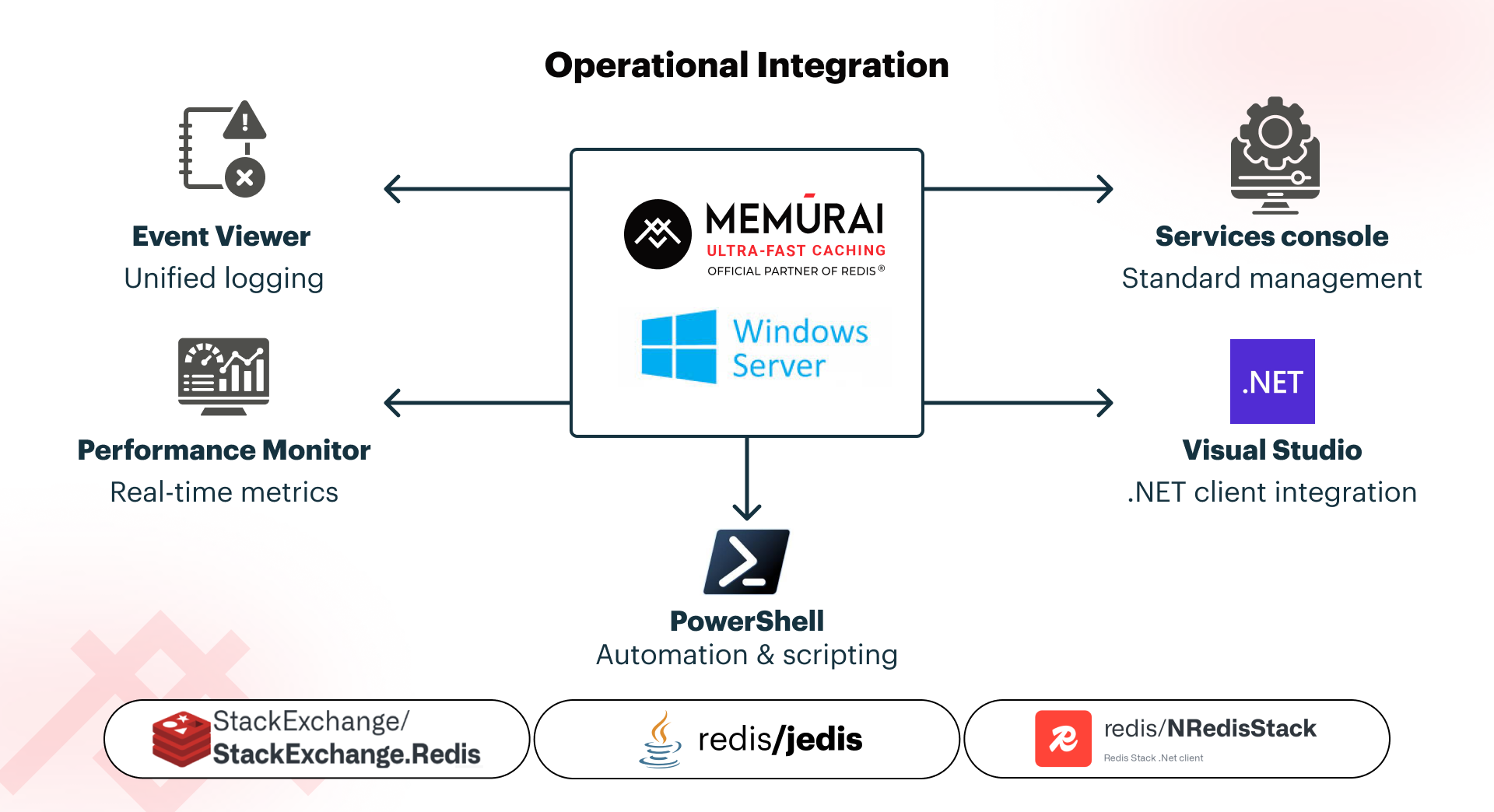
Memurai provides a Redis-compatible alternative without WSL or Docker. It uses the same Redis protocol and core data structures, allowing developers to keep using existing Redis clients and libraries, such as those used by Stack Exchange.Redis, Jedis, and NRedisStack without changes.
Memurai integrates with Windows and .NET tools, including Services, Event Viewer, Performance Monitor, and PowerShell. You can access logs and metrics with other Windows workloads without using SSH or Docker. Developers only need to adjust server setup, not their code.
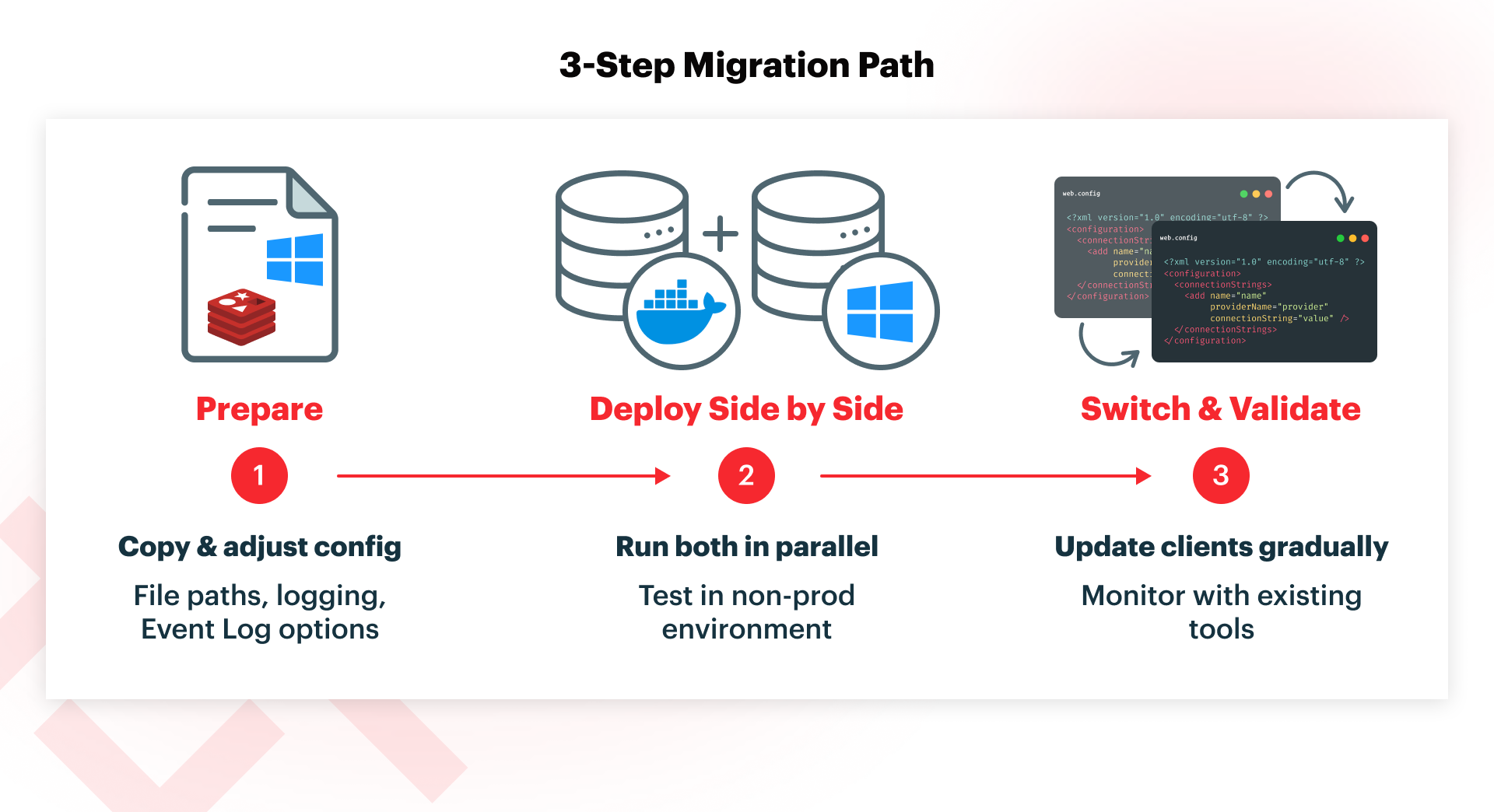
Migration Plan: From WSL/Docker to Native Windows in Three Team‑Friendly Steps
Step 1: Prepare and Align Configuration
Start with the configuration your team already knows. Export your current Redis config from WSL or Docker and copy it into a Memurai config file. Change only what you need by updating file paths to Windows format, selecting logging destinations, and configuring any Event Log options you want. Keep ports, memory limits, and eviction policy unchanged at first, so the behavior matches your current setup. This helps avoid surprises and builds confidence for both developers and operations. Detailed configuration guidance is in the Memurai config documentation.
Step 2: Stand Up Memurai Side by Side
Next, download and install Memurai (free for development and testing) on your Windows Server, then run it as a Windows Service. Start in a non-production environment or choose a single, low-risk workload to test safely. If you need persistence, [restore a snapshot (RDB/AOF)](https://redis.io/tutorials/operate/redis-at-scale/persistence-and-durability/ from your current instance, so the data looks familiar for testing. Running Redis on WSL or Docker, and the new native Windows server side by side, lets your team compare how they work without rushing the switch.
Step 3: Switch Clients and Verify as a Team
When ready, update the connection strings in a single application tier or service to point to Memurai as your Redis‑compatible endpoint on Windows Server. The format is the same as standard Redis. Have your development and operations teams monitor together using the tools you already use. Monitor timeouts, connection errors, and haphazard cache patterns using Application Insights, Performance Monitor, or Event Viewer. If everything works, gradually roll out the change to more services. This step-by-step process lets your team validate each stage and roll back quickly if needed.
Start Simplifying Your Team's .NET Stack Today.
For Windows-native, .NET-focused teams, switching from WSL or Docker to a native Windows, Redis‑compatible alternative simplifies operations. You keep Redis-compatible behavior while removing the extra Linux admin work that has built up over time.
To get started, download Memurai (free for development and testing) and use the quick start guide to migrate to a single service or environment with your team's trusted configuration. See how it feels when everyone can manage the caching layer without extra hassle.
Redis® is a registered trademark of Redis Ltd. Any rights therein are reserved to Redis Ltd. Memurai is a separate product developed by Janea Systems and is compatible with the Redis® API but is not a Redis Ltd. product.