


Redis Session Caching on Windows: From Concept to Code
Technical articles and news about Memurai.
Introduction
Redis® is a popular choice for distributed session management in ASP.NET Core, but many setup guides and tutorials still assume Linux, Docker, or WSL from the start.
This article helps close that platform gap by explaining when distributed sessions make sense and by walking through a straightforward implementation, using Memurai, that is both native to Windows environments and Redis-compatible.
Why Distributed Sessions Matter
ASP.NET Core’s default session support is straightforward when the application runs on a single web server or application instance. The session-related issues start when you deploy multiple instances, for example, behind a load balancer. In this case, each application instance maintains its own local memory, so session state is no longer shared automatically among instances.
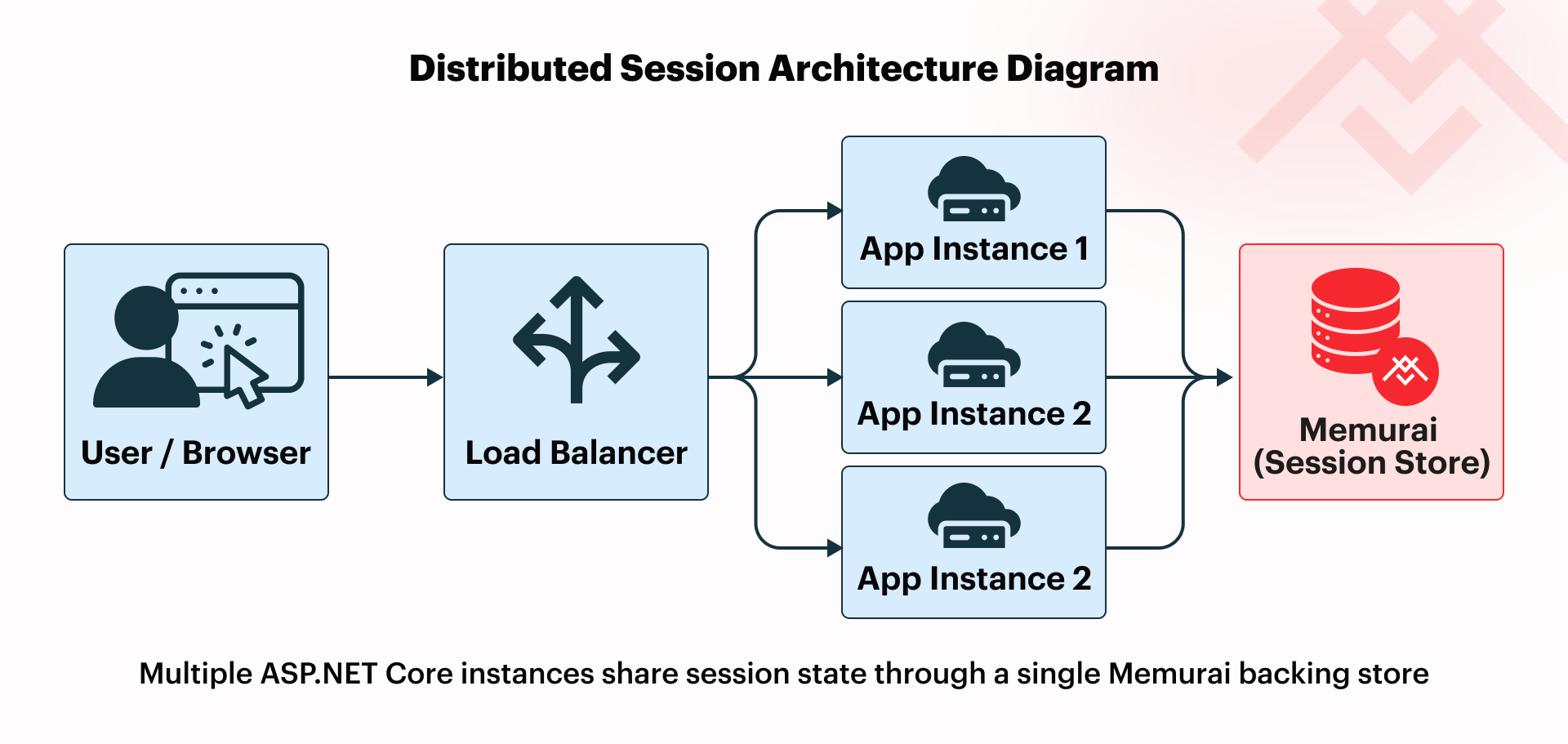
Sticky sessions can help mitigate this situation by routing a user to the same server with each subsequent request, but that’s often not the cleanest long-term design.
A distributed session store addresses this issue by moving session data into a shared backing service. Each of the multiple application instances then leverages this backing service to maintain session state, resulting in consistent session behavior across instances.
As helpful as distributed sessions are, not every application needs to use them. If the application runs on a single instance, there is no cross-instance session-sharing problem to solve, and ASP.NET Core’s default session support may be enough for single-instance applications that are simpler or lower-traffic.
For session data itself, payloads should stay small and practical. Favor small pieces of per-user state that the application needs across requests, such as a user ID, account ID, a wizard step, or user settings. Session state is a poor fit for large serialized objects or values that can be recomputed cheaply when needed.
Why Redis for Sessions
Redis is often chosen for distributed session storage for a few practical reasons:
- Fast reads and writes: Redis is designed for in-memory access, which is why it is commonly associated with sub-millisecond reads/writes.
- Built-in expiration through TTL: Session entries can expire automatically without separate cleanup logic in the application.
- Straightforward .NET integration: ASP.NET Core can use Redis through the
Microsoft.Extensions.Caching.StackExchangeRedisNuGet package, which keeps the setup familiar for .NET developers. - Shared access across instances: Multiple application instances can use the same backing store instead of relying on isolated local memory.
For ASP.NET Core session storage, Redis stays mostly behind the scenes. The session entry is stored under a single cache key, with the payload serialized for storage, while the application code still works through the familiar HttpContext.Session convention. In practice, that means developers do not need to manage Redis sets, lists, or other data structures to follow this implementation.
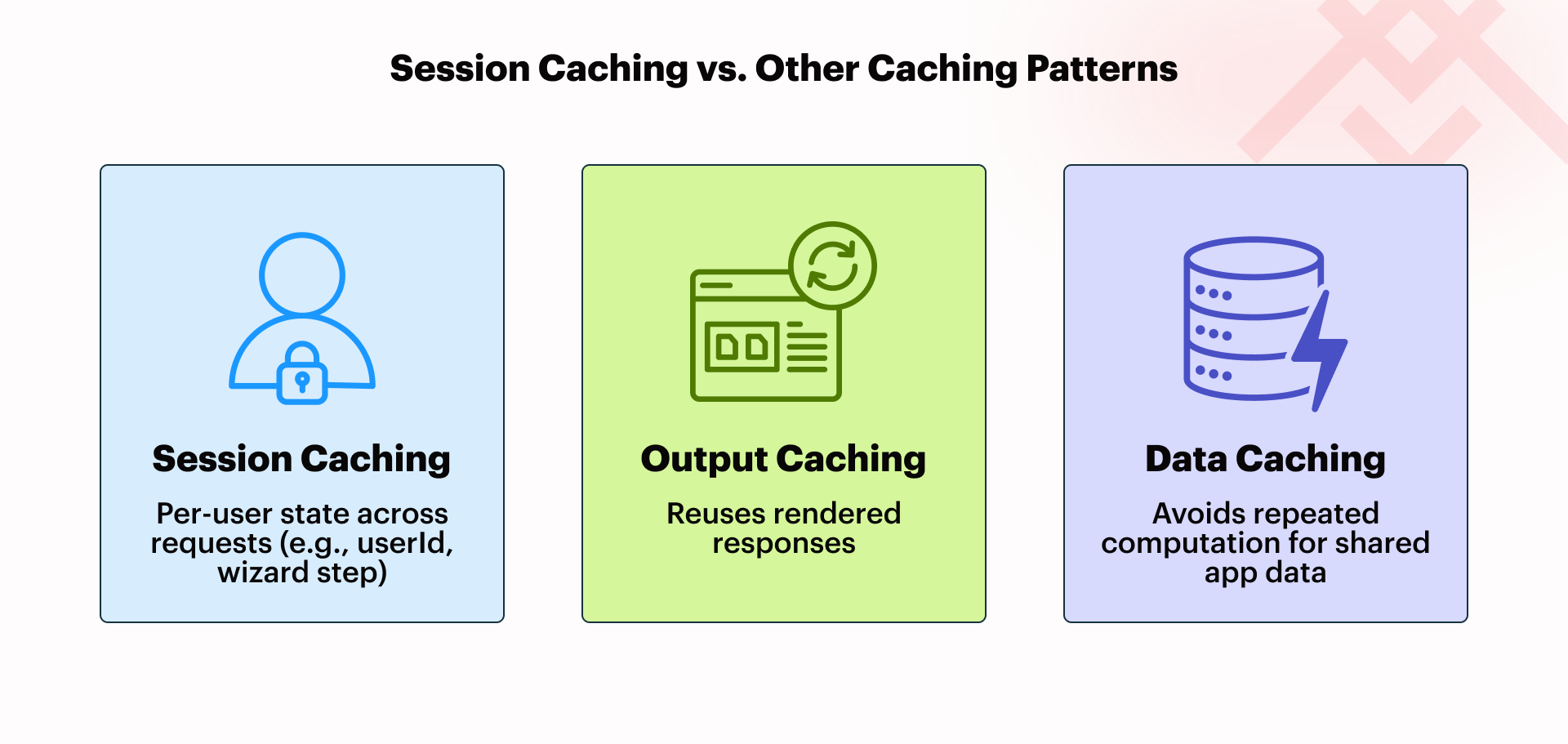
It also helps to distinguish session caching from other caching patterns. Session caching preserves small pieces of user state across requests, while output caching reuses rendered responses, and data caching avoids repeated work for shared application data.
Running Redis Workloads on Windows
In a Windows environment, Redis-style deployment usually comes down to three choices: WSL2, Docker, or a Windows-native Redis-compatible server. WSL2 works well for local development, and Docker is a viable option for teams that already build, deploy, and monitor containerized services. But for teams that want a service model aligned with standard Windows operations, a native Windows deployment is likely the cleaner fit.
This is where Memurai comes in. Memurai is a Redis-compatible, Windows-native server that installs as a Windows Service and integrates with the Windows Event Log for more familiar monitoring and troubleshooting.
Because Memurai is Redis-compatible, Windows teams do not need to learn a separate programming model just to use Redis-style session storage. Additionally, the deployment experience is aligned with Windows instead of layered on top of it — there is also no need for WSL or Docker.
Tutorial: ASP.NET Core Session Setup
At this point, let’s build a small demo ASP.NET Core Web API, based on .NET 8+, that implements Redis-compatible session state using Memurai.
Make sure you have Memurai installed and running as a service on your local development workstation.
Go ahead and create a new ASP.NET Core Web API project that uses controllers. Make sure to add the Microsoft.Extensions.Caching.StackExchangeRedis NuGet package to the project. The StackExchange.Redis package is not required unless you want direct IConnectionMultiplexer access for lower-level Redis operations not discussed in this tutorial.
1: Verify that Memurai is running
Let’s make sure Memurai has been installed successfully and that the service is running. Open a command prompt and issue the following command:
memurai-cli.exe ping
A healthy Memurai instance should respond with:
PONG
Note: If you already have redis-cli installed, it can be used here as well since Memurai is compatible with the Redis protocol.
2: Configure session state and Redis-compatible distributed cache
Replace your Program.cs contents with the code below. The primary areas of interest are:
AddStackExchangeRedisCache()registers Memurai as the application’s distributed cache implementation.AddSession()enables session state. ASP.NET Core will then use the application’s distributed cache as the backing store forHttpContext.Session.
var builder = WebApplication.CreateBuilder(args);

// Configure Redis-compatible distributed cache storage.
// The InstanceName prefix is important because it determines
// how session keys are prefixed in the backing store.
// Connect to the Redis-compatible service running locally on the default port 6379.
builder.Services.AddStackExchangeRedisCache(options =>
{
    options.Configuration = "127.0.0.1:6379";
    options.InstanceName = "session:";
});

// Configure ASP.NET Core session behavior.
// IdleTimeout controls session expiration.
// HttpOnly helps prevent client-side script access to the cookie.
// SameAsRequest is convenient for local HTTP development;
// use Always in production behind HTTPS.
builder.Services.AddSession(options =>
{
    options.IdleTimeout = TimeSpan.FromMinutes(20);
    options.Cookie.HttpOnly = true;
    options.Cookie.SecurePolicy = CookieSecurePolicy.SameAsRequest;
});

builder.Services.AddControllers();
var app = builder.Build();
app.UseSession();
app.MapControllers();
app.Run();
3: Work with Session Data
With that infrastructure in place, working with our session data using Memurai as the backing store is straightforward. Below is a minimal controller example called SessionDemoController. Go ahead and add a new file to your controllers folder called SessionDemoController.cs and replace its contents with the code below.
The controller offers two basic actions: one to set a session value and one to retrieve a session value. Once the Redis-compatible backing store is registered in Program.cs, the controller code remains essentially vanilla ASP.NET Core session code. The Redis and Memurai details stay in the application configuration rather than leaking into the controller logic.
using Microsoft.AspNetCore.Mvc;

[ApiController]
[Route("session-demo")]

public class SessionDemoController : ControllerBase
{
    [HttpPost("session-value")]
    public async Task<IActionResult> SetSessionValue(string sessionKey, string sessionValue)
    {
        HttpContext.Session.SetString(sessionKey, sessionValue);

        // In async controller flows, explicitly committing the session
        // can prevent silent persistence issues in fire-and-forget patterns.
        await HttpContext.Session.CommitAsync();

        return Ok($"Session demo value for {sessionKey} stored.");
    }

    [HttpGet("session-value")]
    public IActionResult GetSessionValue(string sessionKey)
    {
        // Read the value back from session state, e.g., userId.
        var sessionValue = HttpContext.Session.GetString(sessionKey);

        return Ok(sessionValue ?? $"No session value found for key {sessionKey}.");
    }
}
The following curl commands show one straightforward way to set and then retrieve a session value from the demo API:
curl -k -c cookies.txt -X POST "https://localhost:7094/session-demo/session-value?sessionKey=accountId&sessionValue=A991"

curl -k -b cookies.txt "https://localhost:7094/session-demo/session-value?sessionKey=accountId"
4: Verify session data in Memurai
After setting a session value through the demo API, we can verify that ASP.NET Core is writing session data to Memurai by listing cache keys with the session: prefix. Use SCAN 0 MATCH session:* from the memurai-cli to list the cache key(s) that represents the API’s session state. Then use TTL <key> to confirm that the entry has an expiration.
Recall that the cache stores application session state as one serialized value under a single key, so this step verifies that an application’s session state exists in Memurai rather than exposing each application session value directly.
It is strongly recommended to use SCAN for key inspection, rather than KEYS. Avoid using KEYS in production because it is blocking.
Common Pitfalls
Even though the Memurai setup process covered in this article is straightforward, a few common but pesky mistakes still show up from time to time. Most are easy to fix once you know where to look and are presented below.
- Remember to call
app.UseSession()beforeapp.MapControllers(). If the middleware order of execution is wrong, session access may appear inconsistent or fail outright. - Do not let session payloads grow too large. Keep them well under 4 KB and focused on lightweight state, not large serialized objects.
CookieSecurePolicy.Alwaysis correct for production HTTPS, but it can break local development if you are still testing over plain HTTP.- In async controller paths, failing to call
CommitAsync()can lead to session updates that appear to succeed without error but are not written to the backing store before the request ends.
Get Started with Memurai
To try this straightforward approach to implementing distributed sessions on your own, you can get started with Memurai Developer for free in development and testing environments. If you want to evaluate the same Windows-native Redis-compatible model in your production environment, Memurai Enterprise is available as a 90-day trial. Feel free to contact us if you would like to speak to one of our experts.
Redis® is a registered trademark of Redis Ltd. Any rights therein are reserved to Redis Ltd. Memurai is a separate product developed by Janea Systems and is compatible with the Redis® API, but is not a Redis Ltd. product.