


Redis Sorted Sets for Leaderboards and Rankings in .NET on Windows
Technical articles and news about Memurai.
Introduction
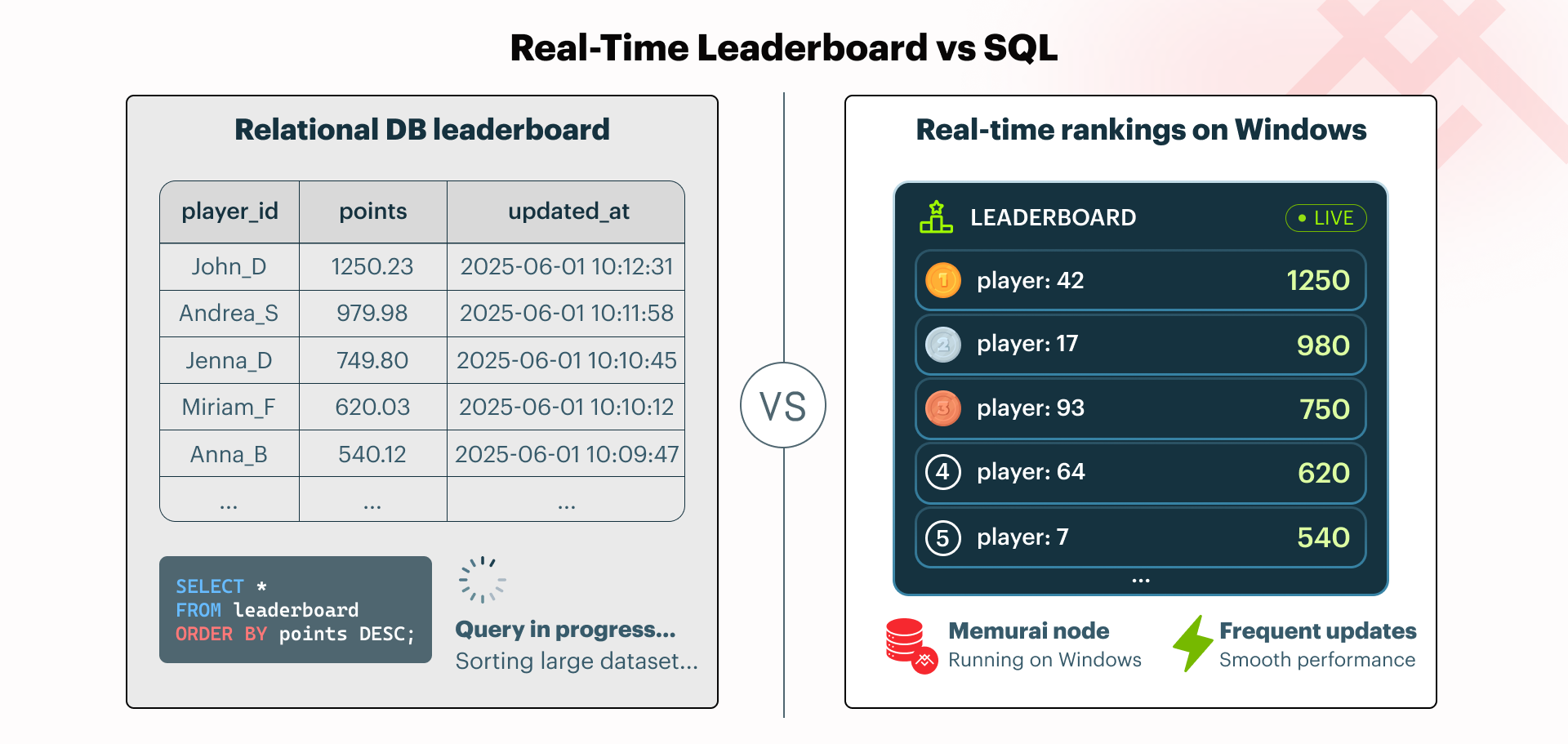
Leaderboards look deceptively simple until scores are changing constantly and the application still has to display the current rankings quickly. Leaderboards appear in many contexts, including game rankings, sales dashboards, activity feeds, and customer standings. A relational database can back any of these, but at scale it means repeated writes followed by ORDER BY queries over a growing table.
That pattern works for small datasets but doesn't scale as the leaderboard grows and updates become more frequent. The database has to maintain or compute order repeatedly, and each such operation competes with other aspects of the application's workload. Redis sorted sets are designed to address this issue. A sorted set stores unique members with numeric scores and keeps the collection ordered as scores change. That means the application can update a score, read the top entries, or check a specific member's rank without building custom ranking logic in SQL.
This article shows how to build a basic leaderboard in C#/.NET using Redis sorted sets, StackExchange.Redis, and Memurai running as a native Windows Service.
What Redis Sorted Sets Do
A Redis® sorted set is a collection of unique string members, each associated with a floating-point score. Redis keeps the members ordered by score. If a member is added again with a new score, Redis updates the existing member rather than creating a duplicate.
For leaderboard-style workloads, that gives us a natural data model:
- The key identifies the leaderboard, such as
leaderboard:game1. - The member identifies the player, such as
player:42. - The score represents the ranking value, such as points, revenue, or activity count.
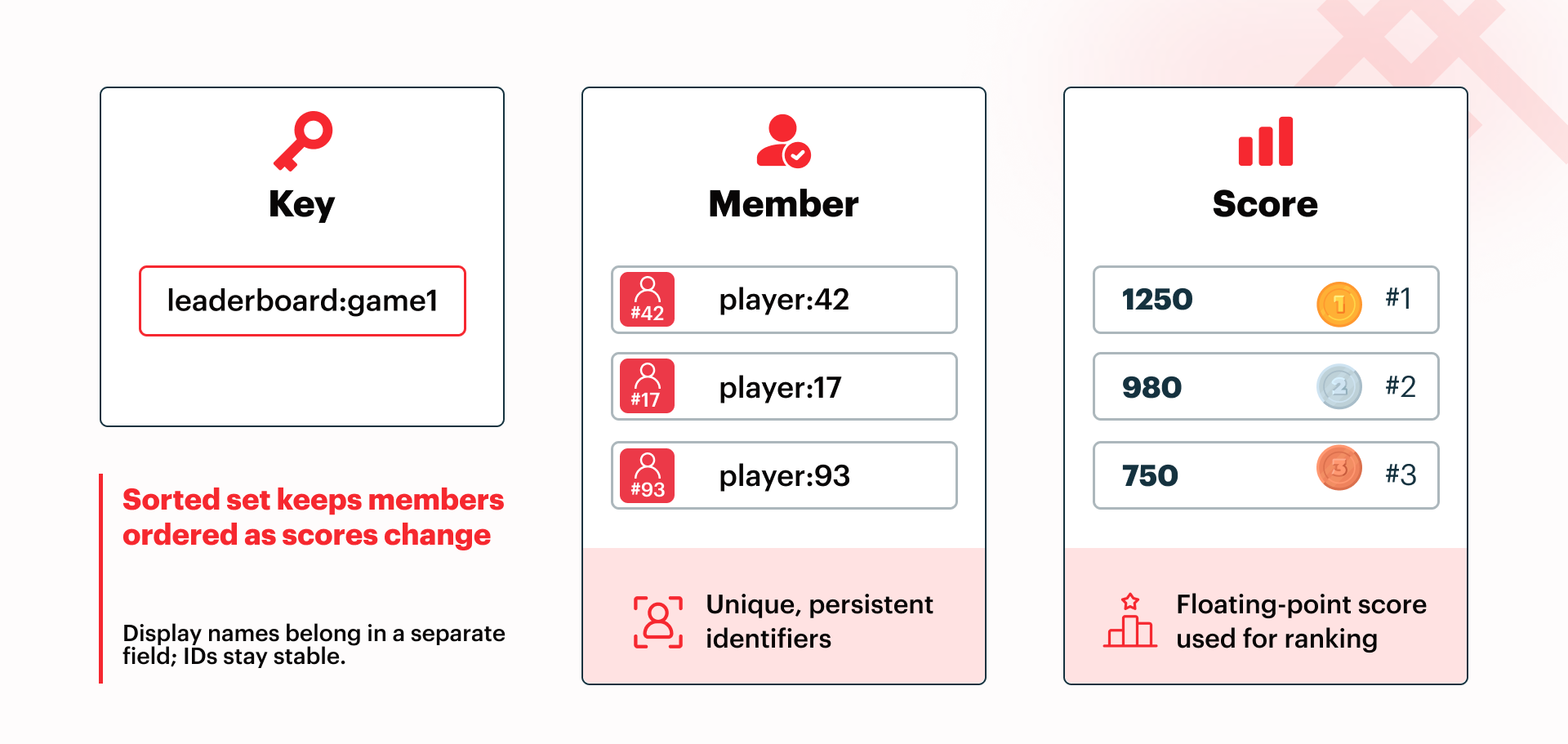
Redis maintains the sorted order internally. In Big O notation, Redis sorted-set writes such as ZADD run in O(log N), while range reads such as ZRANGE run in O(log N + M), where N is the number of members in the sorted set and M is the number of entries returned. The Redis documentation covers these and other Redis commands in detail.
Building the Leaderboard
The examples below use StackExchange.Redis directly. Memurai provides the Redis-compatible server on Windows, while StackExchange.Redis provides the .NET client API.
First, let's use the .NET CLI to create a new .NET console project and also add the Redis client package:
dotnet new console -n RedisLeaderboardDemo
cd RedisLeaderboardDemo
dotnet add package StackExchange.Redis
A ConnectionMultiplexer instance is designed to be long-lived and shared. The examples below create one instance for clarity, but production code should reuse a shared multiplexer instance instead of opening a new Redis connection for each leaderboard operation.
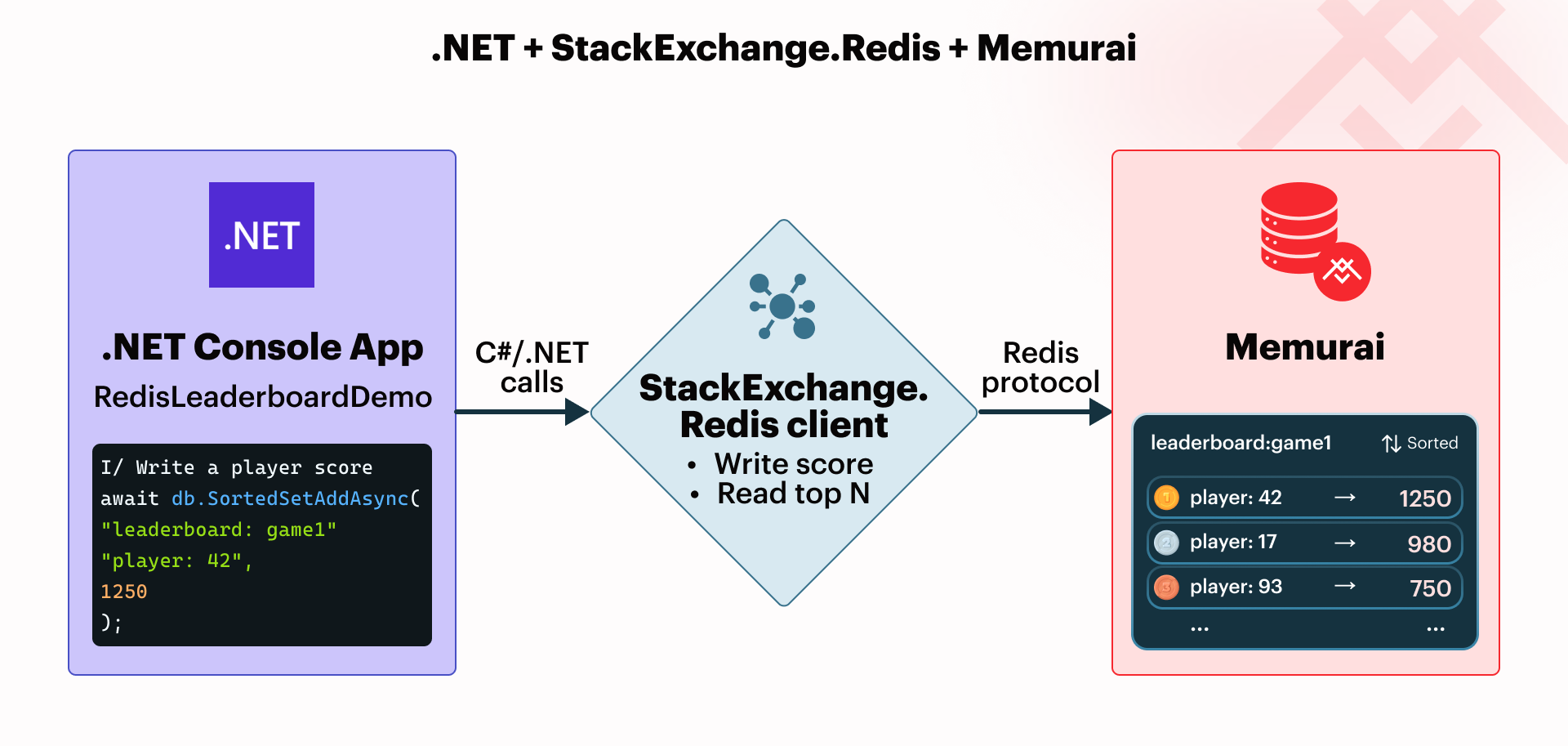
The key name leaderboard:game1 is used repeatedly in the C# code and in the command-line verification later in this article.
The examples connect to Memurai on the local machine using 127.0.0.1:6379, the default Redis port.
Adding or Updating a Player Score
Adding a score to a leaderboard uses the SortedSetAddAsync method. If the player is not already a leaderboard member, Redis adds that new player. If the member already exists, Redis updates its score.
using StackExchange.Redis;

await using ConnectionMultiplexer redis =
    await ConnectionMultiplexer.ConnectAsync("127.0.0.1:6379");

IDatabase db = redis.GetDatabase();

const string leaderboardKey = "leaderboard:game1";
const string player = "player:42";
const double score = 1250;

bool added = await db.SortedSetAddAsync(leaderboardKey, player, score);

Console.WriteLine(added
    ? "Player was added to the leaderboard."
    : "Player already existed; score was updated.");
The Boolean return value from the SortedSetAddAsync call tells us whether Redis added a new member. If the member already existed, the method returns false. In leaderboard terms, that usually means you are updating an existing player rather than inserting a new one.
It is strongly recommended to use persistent identifiers for both the leaderboard key and the sorted set members. The key leaderboard:game1 identifies the leaderboard itself, while member values such as player:42 identify individual players.
Display names are a poor choice for sorted set members because they are not guaranteed to be unique. Redis requires each member in a sorted set to be unique, so writing a second player with the same display name updates the existing member rather than creating a separate entry. Display names can also change; if the application uses the new display name as the member value, Redis treats it as a new entry rather than an update to the original player.
The remaining examples assume the same redis.GetDatabase() and ConnectionMultiplexer.ConnectAsync() calls as above.
Reading the Top N Players
To read the top N entries from a leaderboard, let's use the SortedSetRangeByRankWithScoresAsync method. First, so we get some informative results, go ahead and add 10 or more entries to the leaderboard using the prior source code example. The following example displays the top 10 entries. If there are fewer than 10 entries, then all will be displayed.
const string leaderboardKey = "leaderboard:game1";

SortedSetEntry[] topPlayers = await db.SortedSetRangeByRankWithScoresAsync(
    leaderboardKey, start: 0, stop: 9, order: Order.Descending);

foreach (SortedSetEntry entry in topPlayers)
    Console.WriteLine($"{entry.Element}: {entry.Score}");
The start and stop arguments for the desired range use zero-based indexes. start: 0 means the first ranked entry, and stop: 9 means the tenth ranked entry. Specifying Order.Descending in the order argument returns the top 10 players from highest score to lowest score. The returned values are SortedSetEntry objects, which include both the player and the score. That makes this method useful for rendering leaderboard views where the UI needs to show each player and their current score.
We can also verify the leaderboard directly using the memurai-cli.exe. The following command reads the top 10 players in descending score order and includes each score in the output:
memurai-cli.exe ZRANGE leaderboard:game1 0 9 REV WITHSCORES
Possible output, depending on leaderboard data:
1) player:42
2) 1250
3) player:17
4) 1185
5) player:103
6) 990
7) player:2
8) 989
9) player:777
10) 901
Notice that the command uses the same key leaderboard:game1 as the .NET code. REV reverses the range so the highest scores appear first, and WITHSCORES includes the score for each player. The CLI displays members and scores as alternating array items, so each player is followed by that player's score.
Getting a Specific Player's Rank
A leaderboard's requirements often extend beyond adding, updating, and displaying members. Whether in the top 10 or not, a player may want to determine their current ranking. Let's use the SortedSetRankAsync method to retrieve a specific player's rank.
const string leaderboardKey = "leaderboard:game1";
const string player = "player:42";

long? rank = await db.SortedSetRankAsync(
    leaderboardKey, player, Order.Descending);

if (rank is null)
    Console.WriteLine("Player is not on the leaderboard.");
else
{
    long displayRank = rank.Value + 1;
    Console.WriteLine($"{player} is ranked #{displayRank}.");
}
When using descending order, rank 0 is first place, rank 1 is second place, and so on. The Order.Descending argument matters because leaderboard rankings usually treat the highest score as the best position. If the member is not present in the sorted set and therefore is not ranked, SortedSetRankAsync returns null.
Removing a Player
Removing a player from the leaderboard uses the SortedSetRemoveAsync method. This removes the member from the sorted set. It is not a soft delete or status change; that player is no longer part of the leaderboard until it is added again.
const string leaderboardKey = "leaderboard:game1";
const string player = "player:42";

bool removed = await db.SortedSetRemoveAsync(leaderboardKey, player);

Console.WriteLine(removed
    ? "Player was removed from the leaderboard."
    : "Player was not found on the leaderboard.");
This is useful when a player leaves a game, a sales representative changes teams, or an application needs to remove invalid or test data from a ranking.
Handling Ties
When two players have the same score, Redis uses the member value as the tie-breaker. In descending leaderboard queries, tied members within the sorted set are returned in reverse lexicographical order by member value. This is another reminder to use persistent identifiers such as player:42 rather than mutable display names. If the application needs a different tie-breaking rule, such as earlier score wins, encode that rule in the sorted set design rather than relying on display names or Redis default ordering.
Persistence on Windows
Sorted sets are stored in memory, so persistence matters for leaderboards that must survive a restart. To persist leaderboard data, one common way is to enable append-only file (AOF) persistence in the memurai.conf configuration file so Memurai can recover the sorted set after the service restarts.
When Memurai is installed as a Windows Service, the memurai.conf file is typically located under C:\Program Files, though the exact location can vary depending on how Memurai was installed. After changing persistence settings, restart the Memurai service so the updated configuration is loaded.
Getting Started with Memurai
This article showed how to build a basic leaderboard in .NET using Redis sorted sets and Memurai as a Redis-compatible native Windows Service. By doing so, it removes the need for additional layers such as Linux, containers, or WSL.
Memurai Developer is free for development and testing, making it straightforward to continue learning about leaderboards and other concepts from this article on a local or staging machine. Memurai Developer has three important restrictions before you scale up: a maximum uptime of 10 days before an automatic shutdown, a maximum of 10 unique connected IP addresses, and a RAM cap of 50% of available system memory. If you're ready to move beyond Memurai Developer, register on the Memurai portal for a free 90-day Memurai Enterprise trial and run everything in this article without the listed restrictions.
Redis is a registered trademark of Redis Ltd. Any rights therein are reserved to Redis Ltd. Any use by Memurai is for referential purposes only and does not indicate any sponsorship, endorsement, or affiliation between Redis and Memurai.